
afa
RDM cmdlet manage private key object
Hi,
Could you provide the key name to set on a linux session in order to set a PrivateKey credential? Could you give us an exemple?
The following keys does not seems to be the right key
(Get-rdmsession -name XXX).PrivateKeyConnectionID or ((Get-rdmsession -name XXX).Credentials).PrivateKeyData
Thanks for you answer,
Regards
Impossible to create a new-rdmsession type SSHShell in a specifique group
Hello,
Thanks for your answer
Silly question, how to ensure the group is not already defined in the SSHShell template?
I fetch my templates with get-rdmtemplate
Thanks a lot
Impossible to create a new-rdmsession type SSHShell in a specifique group
Hello,
Create a new putty session works fine and the session is created on 'my_group'
New-RDMSession -name test -group 'my_group' -type putty -host 1.1.1.1 -templateid 'putty template ID' -SetSession
Create a new SSHSHELL session works but create the session in the wrong group
New-RDMSession -name test -group 'my_group' -type SSHShell -host 1.1.1.1 -templateid 'SSHShell template ID' -SetSession
Do I miss something? Can someone help me?
Thanks,
Creer une session linux utilisant une clée SSH, as code
Bonjour,
Y a-t-il une possibilité de créer une session linux (objet putty, SSHShell ou autre) utilisant une clé SSH(objet
privatekey ou autre), as code ? J’ai posé la question concernant l’objet privatekey et la réponse est non « https://forum.devolutions.net/topics/31000/rdm-cmdlet-manage-private-key-object »
Néanmoins, je loupe certainement quelque chose. Peut être est ce possible de créer une session putty, SSHShell ou autre et de lui "attacher" une private key à la création de l'objet (as code évidement, à la main, c'est facile). Mais après plusieurs tests, je ne vois pas comment faire cela en powershell?
Merci beaucoup pour votre retour.
interface RDM <> hashicorp-vault manage SSH key
The interface between RDM and hashicorp-vault is working fine for a user/pwd authentication on a linux machine but does not work for a SSH key authentication.
Successfull exemple with user/pwd auth :
1 - Create a key/value entry in my hashicorp-vault serveur such as {"my_account": "my_password"}
2 - Create an hashicorp-vault objet in RDM with the host pointing on my hashicorp-vault serveur
3 - Create an SSH-SHELL session in RDM. I configure this session to point to the vault object (hashicorp-vault type) created on step 2, Then, I browse the hashicorp-vault tree to choise the {"my_account": "my_password"} key-value
4 -Open the SSH-SHELL session in RDM. If the user my_account existe on the linux, it s working fine
Does not work exemple with ssh key auth :
1 - Create a key/value entry in my hashicorp-vault serveur such as {"my_account": "-----BEGIN PRIVATE KEY-----\n my_key \n-----END PRIVATE KEY----"}
2- Follow the same steps 2&3 as above, except on step 4 (copy the pub key in the right place).
Impossible to open a session using an SSH Key located on hashicorp-vault
RDM cmdlet manage private key object
Hello,
3 years later, Is it now possible to create a PrivateKeySession with powershell cmdlet?
Thanks
remote winrm connection to RDM failed without any reason
Hello,
The powershell version is 4.0 on the RDM serveur.
Regards,
remote winrm connection to RDM failed without any reason
Is there any other API to manage RDM session from remote? REST?
remote winrm connection to RDM failed without any reason
Update-RDMUI return "Login failed for user 'NT AUTHORITY\\ANONYMOUS LOGON" but I am connected with an administrator user.
The code hereafter:


remote winrm connection to RDM failed without any reason
Thanks for your return.
Yes, I am connected with the same account on both situations.
Get-RDMCurrentDataSource is working fine, on both situations. It fetch the same ID. Get-RDMDataSource looks to be the only cmdlet that is working fine.
Hereafter, a screenshot, with the two tests. First test, powerhsell, second test ansible.
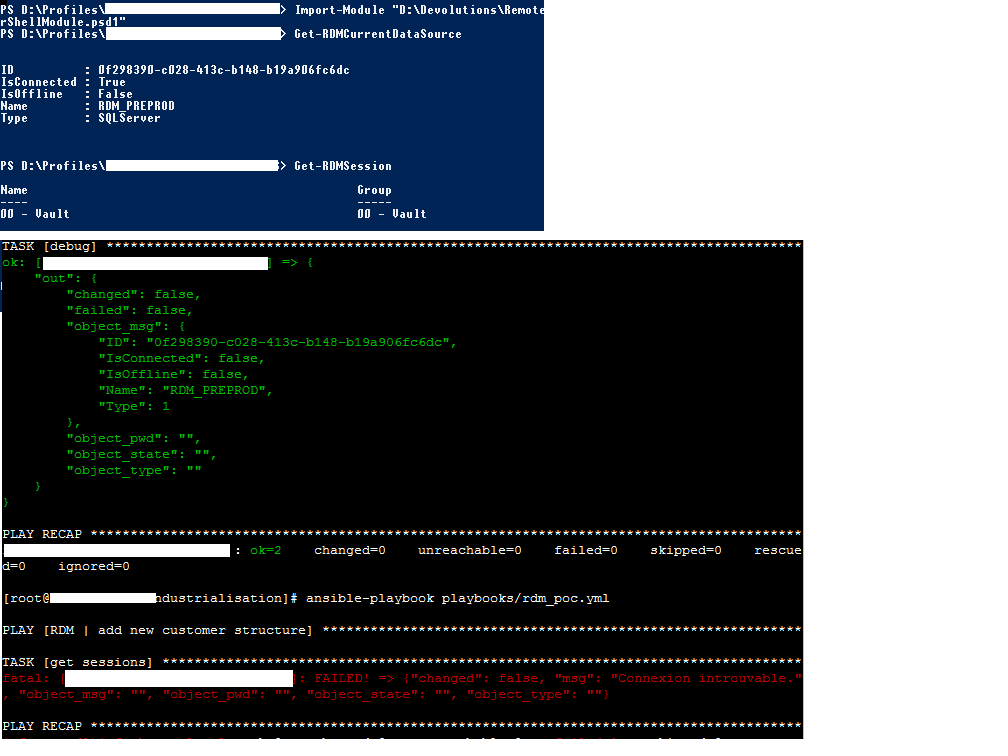
remote winrm connection to RDM failed without any reason
Hello,
I am using RDM v2020.3.16.0.
I want to manage an RDM session remotely, from a remote server. This server is an ansible server that is using winrm to achieve automated tasks on RDM
step-1: I am logged on the RDM server with an admin account and execute a powershell "Get-RDMSsessions". => Successful, I fetch all the
sessions.
step 2- I execute a PowerShell winrm request from my ansible toward the RDM server. I am using the same admin account as above. Connection to the server is successful (I can achieve a get-item as a test) but "Get-RDMSessions" return "Connexion introuvable" (french logs)
It does not seem to be a permission issue as test-1 is successful.
What could I do to manage an RDM session from remote?
Thanks for your answer
RDM cmdlet manage private key object
Hi,
One of my colleague retrieve a cmdlet that was working some month ago (hereafter). Actually, PrivateKeyData argument is not yet available, I get safePrivateKeyData (that is encrypted) instead.
Do I miss something? How is it possible to get back PrivateKeyData argument?
PS C:\> ((Get-RDMSession | Where-Object {$_.ID -eq '35a1421a-2b0d-4b4f-81c3-1c2cddf801c2'}).Credentials).PrivateKeyData
-----BEGIN PRIVATE KEY-----
MIIEvwIBADANBgkqhkiG9w0BAQEFAASCBKkwggSlAgEAAoIBAQDGvWdmBbbGvnA1
.....
Ew4Pe7l5XsMJrp83xEwrQOTbhQ==
-----END PRIVATE KEY-----
RDM cmdlet manage private key object
Hello,
I am using RDM v13.6
I can’t find how to manage "private key" field from "private key" credential object with PowerShell cmdlet? I would like to create a new “private key” object or ready a key on an existing object. I succeed on retrieving user/login credential but it’s not my use case.
Any Help is appreciated
Thanks