remote winrm connection to RDM failed without any reason

Hello,
I am using RDM v2020.3.16.0.
I want to manage an RDM session remotely, from a remote server. This server is an ansible server that is using winrm to achieve automated tasks on RDM
step-1: I am logged on the RDM server with an admin account and execute a powershell "Get-RDMSsessions". => Successful, I fetch all the
sessions.
step 2- I execute a PowerShell winrm request from my ansible toward the RDM server. I am using the same admin account as above. Connection to the server is successful (I can achieve a get-item as a test) but "Get-RDMSessions" return "Connexion introuvable" (french logs)
It does not seem to be a permission issue as test-1 is successful.
What could I do to manage an RDM session from remote?
Thanks for your answer
All Comments (10)
Hello,
Thank you for contacting us on that matter!
Since your post relates to PowerShell, I will move it to the PowerShell section of our forum and let one of our experts reply from there.
Best regards,
James Lafleur
Hello,
Are you connected with the same user account in both situation?
Do you get the same result when you try the following cmdlet?
Get-RDMCurrentDataSource
Best regards,
Érica Poirier
Thanks for your return.
Yes, I am connected with the same account on both situations.
Get-RDMCurrentDataSource is working fine, on both situations. It fetch the same ID. Get-RDMDataSource looks to be the only cmdlet that is working fine.
Hereafter, a screenshot, with the two tests. First test, powerhsell, second test ansible.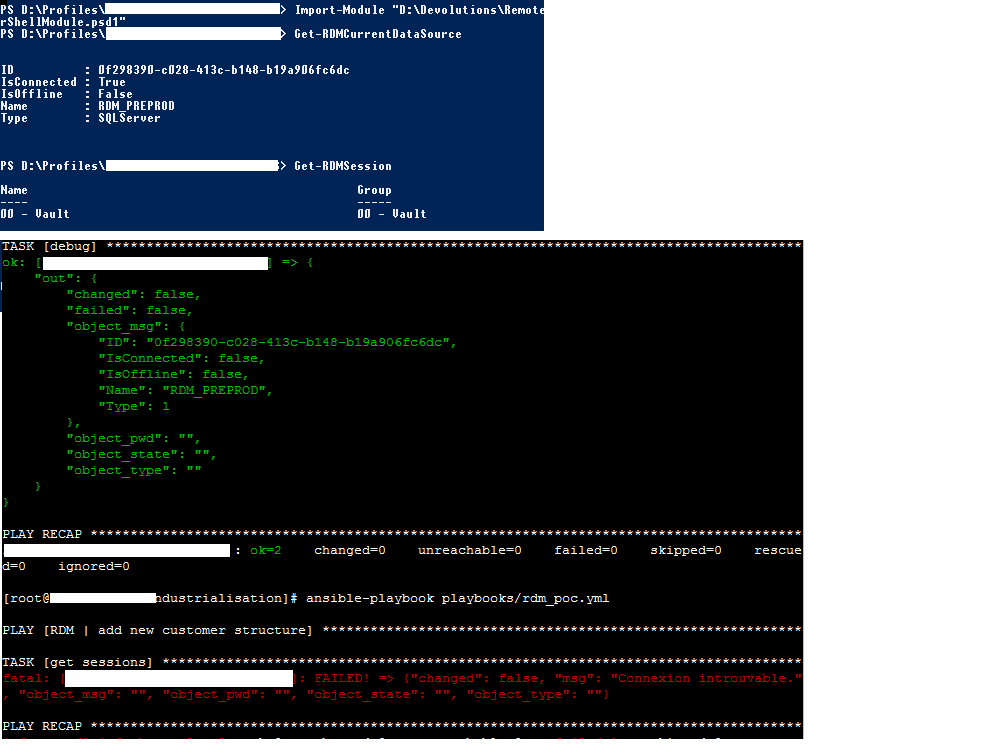
RDM_poc.png
Hello,
Thank you for your feedback.
Is using the Update-RDMUI cmdlet before Get-RDMSession helps to solve the issue?
Is it possible to have a look on your script you use from the Ansible server? You can send it in a private message.
Best regards,
Érica Poirier
Update-RDMUI return "Login failed for user 'NT AUTHORITY\\ANONYMOUS LOGON" but I am connected with an administrator user.
The code hereafter:

Is there any other API to manage RDM session from remote? REST?
Hello,
What PowerShell version are you using on the Ansible server?
Sadly, only the PowerShell module exist with SQL data source. There is no REST available with RDM.
With a Devolutions Server (DVLS) data source, we are working on a PowerShell module to interact with the DVLS API. Please note that this is a work in progress and we will constantly add API calls in the module. See this GitHub deposit for more information about it.
https://github.com/Devolutions/devolutions-server
Best regards,
Érica Poirier
Hello,
The powershell version is 4.0 on the RDM serveur.
Regards,
Bonjour,
Je me permets de rebondir sur le sujet.
Je pense que le problème provient du fait que le fait d'initier une connexion à distance (winrm) et executer le script ne fonctionne pas car les élément de configuration de connexion se trouve dans le fichier cfg qui est déporté sur un serveur de profil.
Quelles sont les commandes pour initier une connexion sur la base de donnée sans se baser sur le fichier remontedesktopmanager.cfg ?
exemple de retour également à distance en winrm : 
J' ai essayé un Set-RDMCurrentDataSource -id 'xxxxxxxxxx ' mais cela ne fonctionne toujours pas
Merci pour votre retour
Hello,
@michel01 thank you for your reply. If you don't mind, I will reply in English for other customers.
In fact, RDM always refers to the RemoteDesktopManager.cfg file and because the RDM PowerShell module is embedded and closely tied to RDM, there is no method to connect on a data source without using the cfg file.
I would recommend you to try with RDM installed on the remote machine and configure the exact same data source in the user context which will run the script.
Let me know if that helps to solve your issue.
@afa Is it possible to upgrade your PowerShell to version 5?
Best regards,
Érica Poirier