
marco05
PS script to read password viewed by users
Hello Maurice, thank you for your suggestion.
I tried to extract the data with the query you suggested but I found some differences from those in your post, the MessageType code for the displayed passwords are 4 and 43 and not 5.
It's right ?
what is the difference between code 4 and code 44?
Regards
Marco
PS script to read password viewed by users
very happy to hear this.
Thank you very much
View password in context menu
Hello, not exactly, I have a role that enables some users to view passwords.
Every evening on server runs a task that extracts from activity logs accounts with displayed password and the report is sends to the manager.
it happens that in the report some are user accounts, others are machine accounts, the manager wants only user accoutn to be displayed.
Since it is not possible for me to directly convert the machine accounts into user accounts in the report, I was wondering if there is a configuration for which it is possible to disable the password display when a host is selected.
Otherwise I could read the report with a powershell script and convert the machine accounts into user accounts, but what is the property of the object that lets me know if it is a machine account?
Regards
View password in context menu
Hello, is it possible disable in context menu "View Password", "Copy Password", etc on Host entry and leave only on Credential entry ?
for example remove this :
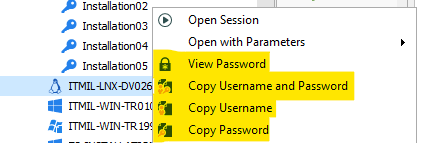
and leave this :
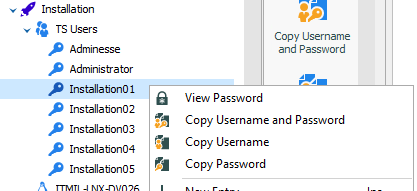
thanks
Login in to RDM with powershell
Hello, thanks for informations.
For now I have set the export of log files following the indicated online help page.
Regards
Marco
Login in to RDM with powershell
Hello Erica, RDM version is enterprise 2019.2.19.0. and datasource is a SQL Server with Integrated Security (Active Directory).
The need is to allow users who visit customers to start tasks remotely.
The idea is to run simple PowerShell scripts from a web page, users must authenticate to verify that they have permissions to access RDM and what objects they can see.
For example if they have rights, they can request the display of a server password, it is essential that the event is tracked in RDM with the name of the user who requested the display of the password
I can collect user and password with Get-Credential, and I can have the RDM user with Get-RDMUser. But how I can match user and password and login in to RDM?
About Activity Logs can I export filtered events with powershell ?
Regards
Login in to RDM with powershell
Hi, I have to run a powershell script where users have to log in to RDM and based on the membership of a security group the script executes tasks.
How can I check the credentials and make them appear in the RDM logs?
After update to 2019.1.34.0 users can't access
Hi, after update to version 2019.1.34.0 users can' access, error is : DOMAIN\Users has not be granted access rights to vault 'defailt'
We use integrated security (Active directory).
Users can access to Data Sources only if are administrator
Thanks
Using a password without having 'View Password' rights
Hello Maurice, yes it is because of security in RMD, and it's working right.
We have many customers each with their own domain.
Each server has linked administrative credentials with which to connect.
My powershell script connects to the client's server with credentials and changes other users' passwords.
The script is launched by users who do not have permission to view administrative passwords.
I would like to solve the problem by modifying the RDM configuration or eventually finding ways to run the script with an administrative user.
Best Regards
Using a password without having 'View Password' rights
Hi, I've a security group with View Password Disallowed.
I wrote a script to set a daily password on Windows Server Account.
This script use an admin password to connect to target server and set the daily password .
The problem arises when a user of the group without permission to view the password launches the script receives the error access denied.
There is a way to use the password or to run the script with an admin account ?
Thanks
SSH Terminal strange behavior
Hi Hubert, thanks for the quick answer. With Legacy terminal it works.
We wait for new release.
Marco
SSH Terminal strange behavior
Hi,
we are experiencing a problem with the SSH terminal. If I leaving SSH Session and then come back, terminal doesn't works anymore.
For example if I'm working in a SSH terminal and leave it with ALT-TAB and then I came back into SSH console, keyboard doesn' works.
I only can close down windows with X.
I tried to change all settings under Terminal and keyboard tabs without success.
I run Enterprise Edition 2019.1.25 64 bit with Windows 10 Enterprise.
Best regards
Web Authentication
Hello,
Lastpass is not a official company software, I use it only for my personal sites.
Best Regards
Web Authentication
Thanks Etienne, it's a java application, exactly the web frontend of the symantec antivirus console.
I tried id JTextField_522501108Input in username field and SEPMPasswordField_257256838 in password field without success.
And I tried chrome extention but it doesn't recognize the site.
I would not use Typing Macro becouse password is clear.
Web Authentication
Hi all, we need to pass username and password to a web for generated by java application.
Discover button doesn't works.
I tried using inspect from Google Chrome without success.
How can I send credentials through Control ID ?
Attached images about Chrome inspection on username field and password field.
Best regards
Marco
SSH Terminal
Hi, I need to increase the value of 'Max scrollback lines' in all SSH sessions.
Which is the parameter to use with a Custom Powershell command ?
Thanks
Batch edit
Great !! It works
Thanks
Batch edit
In terminal Tab I need to modify Initial keypad mode from Default to normal
Batch edit
Hello, since I converted my putty sessions into ssh I can no longer use 'Edit Entries (Session Type Settings) in batch edit

this is the error

Thanks
Macro on multiple enties
Hello Erica, thank you.
My sessions were imported from putty so I didn't have in the menu 'execute script in terminal'.
I've converted all entries from putty to ssh shell and this works for me now.
I still have two questions :
Can I generate a random password from powershell ?
Can I execute 'Execute Script in Terminal' in powershell with parametres ?
Kind regards
Macro on multiple enties
Hi, we run RDM version Enterprise 14.1.3.0 and I need to change password on remote linux machine.
I thought doing it with a macro, there is a way for run a macro on multiple entries ?
How I can run a SSH macro with host's username and password as parameter ?
Thanks