After update to 2019.1.34.0 users can't access

Disabled
Hi, after update to version 2019.1.34.0 users can' access, error is : DOMAIN\Users has not be granted access rights to vault 'defailt'
We use integrated security (Active directory).
Users can access to Data Sources only if are administrator
Thanks
All Comments (18)
Same here.
we have the same issue!
please provide a quick solution! ;)
Disabled
Same problem here, hoping to have a quick fix ;)
Hello everyone,
Sorry to hear about the issue and thank you for reporting it.
After performing many test with Remote Desktop Manager and SQL Server I was able to reproduce the issue.
If I roll back my RDM to 2019.1.30.0 I was able to connect again on the data source as a user.
In the mean time we solve the issue, could you please roll back RDM to the previous version and tell us if it's working. The download link is https://cdn.devolutions.net/download/Setup.RemoteDesktopManager.2019.1.30.0.exe
Best regards,
David Grandolfo
Hi David,
you mean: unistall 2019.1.34.0 and then install 2019.1.30.0?
Best regards,
Clemens
Hi,
As a temporary workaround the time we find/fixe the issue, yes. Uninstall RDM 2019.1.34.0 and install 2019.1.30.0.
Best regards,
David Grandolfo
Hi,
it works! :)
Thank you!
Best regards,
Clemens
Disabled
worked for me too, I thought I messed up with my SQL server.
Please pull the updated from the auto update checker to avoid other people updating their client
Hi Mephisto,
Thanks for the information, we have roll back our version to .30 yesterday. We found the issue and are currently working on it.
Regards,
David Grandolfo
is it possible to control the update settings through e.g. a group policy, with database settings or anything else?
Thanks!
Hello,
The automatic update can be disabled with GPO, further information can be found at https://help.remotedesktopmanager.com/how_to_modify_the_group_policy.htm
That being said, I also recommend using Version Management which controls which version of RDM can connect to the data source. This feature can be found under System Settings > Applications > Version Management. As reference, you can find details at https://help.remotedesktopmanager.com/datasourcesettings_versionmanagement.htm
Best regards,
David Grandolfo
We also experienced this bug. The rollback to .30 fixed the issue of "DOMAIN\User has not been granted access rights to vault 'default'".
However, now *some* our non-admin users see a different issue when selecting an item in the tree: "You don't have enough rights to perform this action!" Possibly this is related, so I flag it here.
-Matthew
Hello,
The error "You don't have enough rights to perform this action!" is related to the option Execute implemented since RDM 2019.X.
Could you edit the properties of the Root folder and confirm that your users have enough privileges at the Connect (Execute) permission?
Best regards,
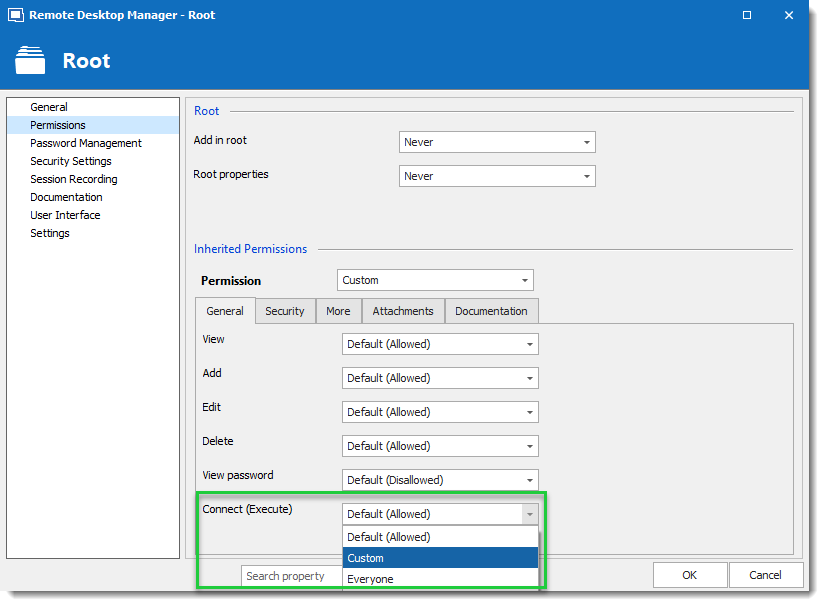
David Grandolfo
Connect_execute.png
Hi David,
That was totally the issue. Thank you!
-Matthew
Hi David,
you wrote 'Thanks for the information, we have roll back our version to .30 yesterday. We found the issue and are currently working on it.'
Is the issue resolved in the latest version (.38)? I can't find it specifically in the release notes nor in this post...
Bas
Hi,
Correct since RDM 2019.1.35.0 the issue has been fixed. You can download the latest at https://remotedesktopmanager.com/Home/Download
Best regards,
David Grandolfo
Disabled
We still experience this problem in RDM version 2019.1.36.0. Is there some action we need to perform to fix it?
@l,
Seems that you have also opened a ticket with our support team. The ticket number is DEVO-5081.
We've sent you an email via our ticketing system. Have you received it?
Best regards,
Jeff Dagenais