
Constantin
Powershell Script Makro to be Executed on Remote Host with Credentials from Remote host
Hi there,
i've a simple Powershell Script that needs to be executed on the Remote Host, not locally.
But i do not get it to work, since it's never using the correct Credentials for that Session. It seems not respecting the inheritance from the Credentials on the host?

I already tried with the "Use Credentials from Session, but that does not work either".

When i have a host with hardcoded credentials, it seems working. But not when we use the "Credential override for user specific settings on the upper folder"

Anyone out there with the same issue or an idea how to solve this?
Passwordstate and Custom fields
That would be awesome!
Custom Editor like VSCode on FileEdit in SCP Connection
Hi there,
in an scp connection/session i would like to EDIT Files. To do so, I click Edit on the file, but then notepad opens.
It would be awesome if there could be an "Open With" Setting, to specify a custom Editor like Visual Studio Code or any other.

Kind regards,
Constantin
Atlassian Integration
Currently I dont see the option, so i guess it is not resolved. But maybe @James does know something :-)
After Login Command sudo from Credential
Hi there,
i've the same question - I want a simple "sudo -s" command after login to a ssh session and then I want the password which is specified for the host to be entered.
At the moment I've done sth like:

But how do I get the password from the host? Is there a variable which can be used or sth. like that?
Or what is the best way to handle this atm?
Kind regards,
Constantin
Powershell - Embedded Script [Encoding Problem with Umlauts]
Hi Erica,
thanks for the update :-)
Kind regards,
Constantin
Powershell - Embedded Script [Encoding Problem with Umlauts]
A temporary workaround is to store the powershell script not within RDM directly and link it in the filesystem. But thats not really desired because then we have a dependency more, to reach a smb share :-)
Powershell - Embedded Script [Encoding Problem with Umlauts]
Hi there,
it seems that when running with powershell embedded scripts the file is getting saved in utf8 format.
This causes issues with for example often in germany used umlauts characters.
As example to reproduce:

whoami
Write-Host "This is a Test wit ae: ä and oe: ö or ss: ß"
Execute this script:

As you can see the umlauts are not correct:
This is a Test wit ae: ä and oe: ö or ss: ßChecking the file in the TMP Directory we see that it is saved in UTF8:

If I execute this in a separate powershell session i have the same behaviour, so it's not directly related to RemoteDesktopManager - its a Powershell Problem.
If I convert the file with notepad++ to utf-8 with bom and execute it with powershell the output is as wanted.


So my question is: Can we specify the default file encoding for the embedded scripts or is it otherwise possible to change from utf-8 to utf 8 with bom? I've not found sth. in the Settings so far.
Kind regards,
Constantin
Powershell Embedded Skript - does not work [RDM 2020.2.20.0 64-bit]
Hi Richard,
i could solve the issue by configuring the uac a bit different. In detail setting the value EnableLUA under "Computer\HKEY_LOCAL_MACHINE\SOFTWARE\Microsoft\Windows\CurrentVersion\Policies\System" from 1 to 0. (To Complete disable the uac)
After that the Run-As works in RDM as designed :-) [Same behaviour in the portable version]
Thanks for your help,
Kind regards,
Constantin
Powershell Embedded Skript - does not work [RDM 2020.2.20.0 64-bit]
Hi Richard,
i can replicate that if I try to get there with usual runas commands. So it seems to be a kind of UAC issue I guess, even if it's disabled on that machine.

>runas /user:domain\admin powershell
cd C:\Users\user\AppData\Local\Temp\RDM

I will check that this week. But from another perspective its maybe not the best way to store the files in the users temp directory, because that requires in every way that the runas user has lokal admin permissions to access the file in the other's users directory.
Kind regards,
Constantin
Powershell Embedded Skript - does not work [RDM 2020.2.20.0 64-bit]
Hi there,
i'm trying to execute an embedded skript under a different user out of RDM.
But it seems that the script could not be written to the temp folder. Testet this on 2 different clients with the same version. I've got on both the following (cut) error message:
ausführbaren Programms erkannt. Überprüfen Sie die Schreibweise des Namens, oder ob der Pfad korrekt ist (sofern enthalten), und wiederholen Sie den Vorgang.
In Zeile:4 Zeichen:3
+ & "C:\Users\user\AppData\Local\Temp\RDM\a74b570f-7873-43c6-80a8-a7d8 ...
+   ~~~~~~~~~~~~~~~~~~~~~~~~~~~~~~~~~~~~~~~~~~~~~~~~~~~~~~~~~~~~~~~~~~~
    + CategoryInfo          : ObjectNotFound: (C:\Users\user\...7d89848900d.ps1:String) [], CommandNotFoundException
    + FullyQualifiedErrorId : CommandNotFoundException

PS C:\Program Files (x86)\Devolutions\Remote Desktop Manager>
Translated it means sth. that the file could not be detected as executable program.

If I look to the Folder I see that for every run it creates the script there, so that could not ne problem:

Do you have an idea whats the problem here ?
The User which should run the script has aswell permissions to this temporary folder of the user in which the temp scripts getting created.
Kind regards,
Constantin
Environment:
Caption                                   : Microsoft Windows 10 Pro
Version                                   : 10.0.19041
BootDevice                                : \Device\HarddiskVolume2
BuildNumber                               : 19041
BuildType                                 : Multiprocessor Free
CodeSet                                   : 1252
CountryCode                               : 49


PS N:\> $PSVersionTable

Name                           Value
----                           -----
PSVersion                      5.1.19041.546
PSEdition                      Desktop
PSCompatibleVersions           {1.0, 2.0, 3.0, 4.0...}
BuildVersion                   10.0.19041.546
CLRVersion                     4.0.30319.42000
WSManStackVersion              3.0
PSRemotingProtocolVersion      2.3
SerializationVersion 1.1.0.1Atlassian Integration
Hi James,
cool thanks for the update!
Kind regards,
Constantin
Atlassian Integration
Hi James,
thanks for the hint - but that works only for confluence cloud right ?
We have confluence server (self-managed on premise) and therefore a local login.
But we can aswell specify oauth access tokens localy, so I guess this would be another type of implementation....

Kind regards,
Constantin
Atlassian Integration
Hi there,
when specifying an url in the -> Properties -> User interface -> Documentation/Confluence Part, I got the confluence tab, but unauthenticated .
Is it possible to specify there the credentials like in a usual Web Browser/https entry ? To directly authenticate to the confluence page ?
Kind regards,
Constantin
Show System Status in Device Dashboard from external Monitoring system like PRTG
While with Check_MK it would be possible to integrate in several ways:
With an url of the service overview of one host: https://checkmkcheck_mk/view.py?deployment_last_contact_from=&deployment_last_contact_until=&deployment_last_download_from=&deployment_last_download_until=&deployment_last_registered_from=&deployment_last_registered_until=&filled_in=filter&host=HOSTNAME&host_last_check_from=&host_last_check_until=&host_last_state_change_from=&host_last_state_change_until=&selection=b735fecc-4cbe-40ec-86b8-b4329d46069d&svc_last_check_from=&svc_last_check_until=&svc_last_state_change_from=&svc_last_state_change_until=&view_name=host

The same data could also be fetched as json with &output_format=json
 [
  "OK",
  "Filesystem C:/",
  "themes/modern-dark/images/icon_menu Buch themes/modern-dark/images/icon_pnp outof_serviceperiod",
  "OK - 64.54% used (25.46 of 39.45 GB), trend: +16.67 MB / 24 hours",
  "2019-10-19 17:32:10",
  "2020-07-30 23:47:54",
  "64.54%"
 ],
 [
  "OK",
  "Filesystem E:/",
  "themes/modern-dark/images/icon_menu Buch themes/modern-dark/images/icon_pnp outof_serviceperiod",
  "OK - 70.38% used (70.5 of 100.17 GB), trend: 0 B / 24 hours",
  "2019-10-19 17:32:10",
  "2020-07-30 23:47:54",
  "70.38%"
 ],
 [
  "OK",
  "HTTPS SSL-Zertifikat-443",
  "themes/modern-dark/images/icon_menu Buch outof_serviceperiod",
  "OK - Certificate 'Unknown CN' will expire on Fri Mar 18 10:28:28 2022 +0000.",
  "2020-07-15 05:12:45",
  "2020-07-30 23:47:27",
  ""
 ],
Is it possible to add an tab in the overview with an url ? I've looked into the settings but didnt found sth. though.

Kind regards,
Constantin
Install DVLS-Prerequisites.ps1 does not work
After modifying the script and adding following content, it works. But this is not user friendly... ;-)
$wc = New-Object System.Net.WebClient
$WebProxy = New-Object System.Net.WebProxy("http://proxy.server:8080",$true)
$Wc.Proxy=$webproxy
$wc.DownloadFile($url, $output)
Install DVLS-Prerequisites.ps1 does not work
Hi there,
I'm trying to install PasswordServer on an clean Windows Server 2016 machine but getting an error while installing the requirements.
That machine has no direct internet connection. Is there an offline package available, or what can I do?
(I already tried with setting an proxy connection in IE and also setting this via net sh cmd, but this does not help.)
When running the powershell script for installing the basics I get an error:
PS D:\Programs\Devolutions\Remote Desktop Manager\Scripts> .\DVLS-Prerequisites.ps1
Exception calling "DownloadFile" with "2" argument(s): "Unable to connect to the remote server"
At D:\Programs\Devolutions\Remote Desktop Manager\Scripts\DVLS-Prerequisites.ps1:451 char:1
+ $wc.DownloadFile($url, $output)
+ ~~~~~~~~~~~~~~~~~~~~~~~~~~~~~~~
+ CategoryInfo : NotSpecified: (:) [], MethodInvocationException
+ FullyQualifiedErrorId : WebException
Time taken: 21 second(s)
WARNING: The configuration 'DevToolsConfiguration' is loading one or more built-in resources without explicitly
importing associated modules. Add Import-DscResource –ModuleName 'PSDesiredStateConfiguration' to your configuration to
avoid this message.
Directory: D:\Programs\Devolutions\Remote Desktop Manager\Scripts\_configurations\push\DevToolsConfiguration
Mode LastWriteTime Length Name
---- ------------- ------ ----
-a---- 12.09.2018 16:20 2440 localhost.mof
Thanks in advance,
Constantin
Show System Status in Device Dashboard from external Monitoring system like PRTG
In the Dashboard of an Device / Object it would be awesome to show the live status of the system provided from an monitoring system like PRTG.
So an administrator gets a direct view of the system status without the need to have a separate look at the monitoring system, when administration servers.

In special PRTG provides an huge api with connections to sensor data, aswell as graphs - which could be embedded in Remote Desktop Manager. It's documented here:
https://www.paessler.com/manuals/prtg/application_programming_interface_api_definition
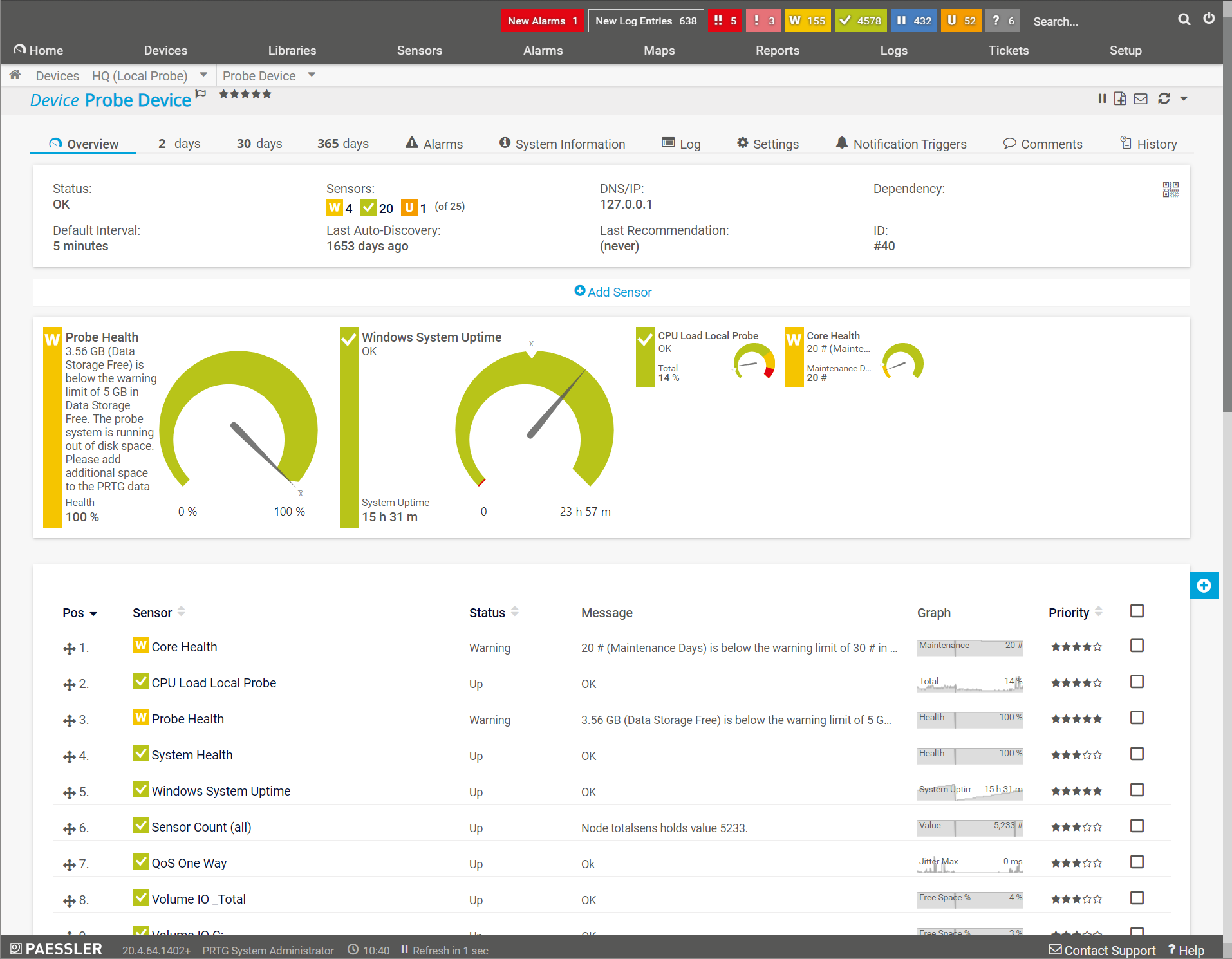
Maybe this is also possible with an already included function? If not, it would be awesome to have some guys of you thought about it ;-)
Kind regards,
Constantin
Add Mateso Passwordsafe as Password Storage
Hi there,
we are currently looking to buy and implement the Remote Desktop Manager and have aswell Mateso Passwordsafe in usage. Because of we are very satisfied with this software this we do not plan to change the software for password handling.
So a integration via the API would be very nice.
Thanks in advance,
Constantin