
clarke
LastPass authentication not working
Replacing the DLL fixed the issue for me. Thank you for the quick response.
LastPass authentication not working
Upgraded RDM to 2024.2.10
Same Error trying to connect to LastPass
The error comes after entering the MFA response
LastPass authentication not working
I'll give that a go, but it seems strange that all instances stopped working at the same time. Could there be an expired token between RDM and LastPass?
LastPass authentication not working
RDM version 2024.1.32
Datasource MS SQL
LastPass authentication not working
We have been using RDM with LastPass authentication for years. This morning, I can login to my LastPass vault in a browser (with MFA), but when I try to connect using RDM, I get this error:
Unable to connect to LastPass. Please make sure your information is valid.
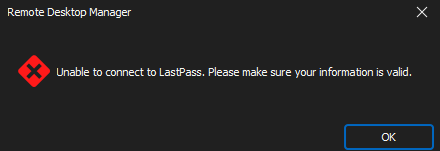
The same thing is happening to all users at my site.
Is anyone else finding this problem?
Unable to connect to LastPass
Incidentally, Bitwarden creds don't work either, so this is affecting all credentials that we use.

No problem logging onto LastPass as the user that I'm using in the RDM credentials.
I tried changing the LastPass user's master password, but the error is the same.
Unable to connect to LastPass
All users today are seeing this error when attempting to connect to existing sessions. The error is also shown when trying to modify an existing credential. I have confirmed that no changes have happened to the RDM clients or data source, or the LastPass account, and that our RDM licence is valid.

Is there an internal certificate or similar that might have expired? That's what this feels like.
Any idea how to troubleshoot?
PuTTY/KiTTY with LastPass - can't load default settings
Hi David,
My dialog looks quite different to yours. The Advanced tab contains encryption and authentication algorithm settings. I found the logging options under a 'Recording' tab.
As I share the RDM configuration with several users, I changed the path to be %userprofile%\documents\logs\$NAME$_$DATE_TEXT_ISO$_$TIME_TEXT_ISO$.LOG to make it user-agnostic.
This works, but I would prefer to use Putty or Kitty. The behaviour I experienced does appear buggy.
Thanks, Clark
PuTTY/KiTTY with LastPass - can't load default settings
Hi David,
I'm using v 13.5.6.0 64-bit.
I just tried SSH Shell and it connects with the LastPass creds, but I can't see where to specify the session logging options, which is what I'm trying to use with PuTTY. I want to be able to specify a location and to use the hostname in an automatically-rotated session log. Can I do that with built-in ssh shell?
Thanks, Clark
PuTTY/KiTTY with LastPass - can't load default settings
I've followed the suggestions that Community members have made with regard to loading a PuTTY or KiTTY profile, but this doesn't work when you're using LastPass for credentials. It always says "Send automatic password" which fails, instead of using the creds from LastPass. I have to use 'Embedded session', which ignores the saved session name, or 'Session' and a unique session name for the LastPass creds to be successfully passed through. I would have thought that I could use 'Session' and choose a saved PuTTY profile. Is this a bug?
File > Options > User Interface > Tree View - makes no difference
Any change I make to these settings makes no difference to the UI. For example, select 'Hide expired entries' / groups, or deselect 'Merge credentials list with sessions', restart RDM, no change