
D_Admin
Splashtop Integration Questions (Request)
Awesome. I also wrote to Splashtop about some improvements they could implement in Splashtop itself and also told them that I'm using RDM to integrate and to look into improving the integration.
Looking forward to results.
Splashtop Integration Questions (Request)
Hello,
so, since Wayk Bastion was cancelled, I have chosen Splashtop as an alternative, since RDM has an add-in for it.
Additionally to the previous request (which isn't possible), I have two other questions:
Why do I have to put in the MAC-Address? I have to log into each client, cmd, ipconfig /all, copy paste... ugh. WHY?
Also, would it be possible to implement some kind of login/password injection for us that are using windows credentials for remote login? (you know, the blue window that pops up, if there are no credentials saved in the Splashtop)
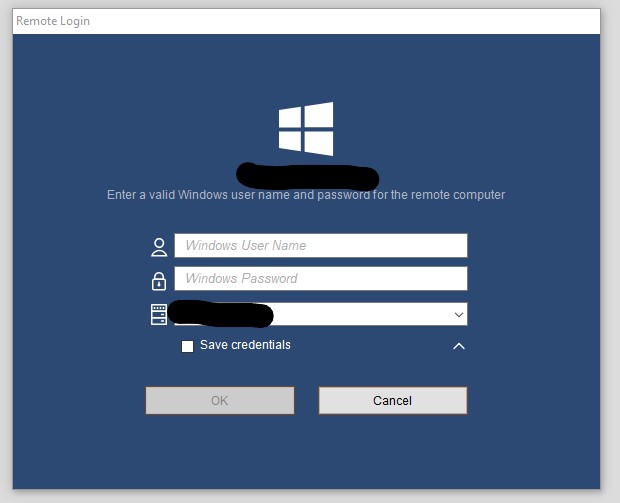
It would be very helpful if Splashtop add-in would use the credentials stored in the RDM, so that I don't have to save them on each machine I am using Splashtop on (80 clients x 4 management machines... ugh). Pretty please!
Also, additional features like session zoom (I prefer Original Size) in the entry properties?
Splashtop Thumbnail functionality
Too bad, thank you for the info.
Splashtop Thumbnail functionality
Hello,
would it be possible to implement Splashtop RDM-Thumbnail functionality?
KeePass integration TOTP Support
Hi,
I just tried it the first time today, without any kind of manual, so I hope I am doing it right.
I created a new entry in my Credential folders in RDM, mode is direct. Then I selected my database and entered password for it. On entry page, I searched and selected the entry, above it says Default, specific UUID. Name shows the name of the entry in the KP.
Additionally, do you have instructions to configure your KeePass database that way?
Right mouse click on the entry, Set up TOTP, paste the secret key from whatever application you are setting the 2FA.
Now you can show the TOTP via same menu and use it to login.
However, it comes down to the requirement of the login site. There are various possibilities, I've seen:
1) login & password on the same page, TOTP on the 2nd
2) all 3 on the same page
3) login and password+totp or totp+password (and this is what my OPNsense firewall requires)
So what I am using in KeePass under Password is "12345678{TOTP}", which basically automatically fills the whole password field with the password and automatically takes whatever is the current TOTP and appends it to the password (of course, I can choose if in the front or back)
KeePass integration TOTP Support
Does the KeePass integration in RDM support usage of TOTP?
For instance, in my KeePassXC, I have a password set up as xxxxxxx{TOTP}
But RDM doesn't read the TOTP, although if I view the password, it shows me xxxxxxxx{TOTP}
But apparently that's it, it doesn't read out the TOTP.
Remote Desktop Manager 2021.1 BETA
Ohhh finally! Variable-issue is fixed! Thank you!!
Remote Desktop Manager 2021.1 BETA
I didn't expect any features. Just fixes. Thank you.
Remote Desktop Manager 2021.1 BETA
I'm sorry, but how can this be an RC if a reported issue of session naming with variables is not fixed? Somewhat important, I would guess variables are used a lot? James told me he'll keep me updated, I just though this will land in .18.
Because this is really a no-go.
Remote Desktop Manager 2021.1 BETA
Anonymity in forums heh (Srdan). Thanks for the update.
Remote Desktop Manager 2021.1 BETA
Awesome... now my RDM is constantly crashing. It seems I closed RDM with wayk bastion data source open, so it's attempting to open it again. It requests the wayk login via a website, then goes into RDM, starts loading, and then it just crashes. Right now, I have no idea how to start RDM on my computer any more - possibly downgrading...
Or maybe how do I force it to open the SQL data source?
I tried a repair, no success.
But first, I'll wait for your reply until latest tomorrow morning (about 12 hours from now). See if you have magic up the sleeve :)
Application: RemoteDesktopManager64.exe
Framework Version: v4.0.30319
Description: The process was terminated due to an unhandled exception.
Exception Info: exception code c0000005, exception address 00007FFAC0B73416
Stack:
Faulting application name: RemoteDesktopManager64.exe, version: 2021.1.11.0, time stamp: 0x6048254e
Faulting module name: ntdll.dll, version: 10.0.19041.844, time stamp: 0x60a6ca36
Exception code: 0xc0000005
Fault offset: 0x0000000000063416
Faulting process id: 0x16f8
Faulting application start time: 0x01d716a9c05d2c3d
Faulting application path: C:\Program Files (x86)\Devolutions\Remote Desktop Manager\RemoteDesktopManager64.exe
Faulting module path: C:\WINDOWS\SYSTEM32\ntdll.dll
Report Id: 56de5dbd-3329-40c6-8bcd-a5014f41a2fd
Faulting package full name:
Faulting package-relative application ID:
EDIT:
I tried something... uninstalled .11. Installed .9. Was able to open RDM, opens into Wayk Bastion source. Switch to SQL. Close. Upgrade to .11. Open RDM, starts with SQL. Switch to Wayk data source. Asks for password on the webpage. Enter it... RDM crashes. Maybe that helps. I'll uninstall .11 again and put back .9.
Oh and btw, it doesn't ask for any database upgrade, as noted in the release notes.
Remote Desktop Manager 2021.1 BETA
Any updates on .10? I have same errors on other computers, so I wanted to make sure I have a fixed version.
Remote Desktop Manager 2021.1 BETA
When is it scheduled for release?
Remote Desktop Manager 2021.1 BETA
Great, thank you!
Remote Desktop Manager 2021.1 BETA
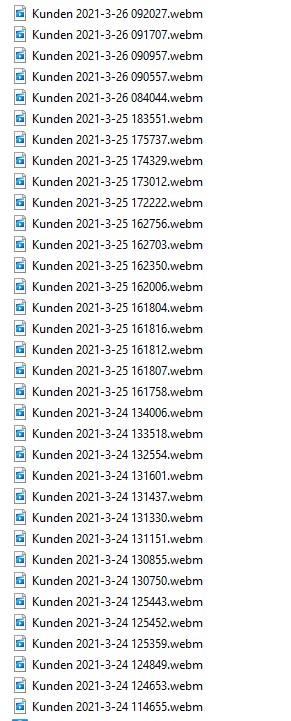
And btw. it's about Wayk Session recording, not what you presented.
If I do what you did, I get the correct variable-readout.
Remote Desktop Manager 2021.1 BETA
Shouldn't $NAME$ variable return the name of the session? Because it doesn't here... it used to, but since 2021.1.*, it returns some funny numbers...
Remote Desktop Manager 2021.1 BETA
Indeed. Repair done. Dashboard is back and no more error with Ctrl+-!
Session-Naming-Issue remains.
Remote Desktop Manager 2021.1 BETA
1) I'm missing the Dashboard since the update to this beta. All computers. Pressing Dashboard on the View Menu does nothing.
2) Since previous beta, .8, variables are broken: I am using $NAME$ $DATE_YEAR$-$DATE_MONTH$-$DATE_DAY$ $TIME_TEXT$ and it doesn't produce what it used to procude. Instead:
#546804 Customer 2021-2-25 135512 I get
522798-2021-03-08T10_31_37-1 (as an example)
3) Ctrl+- produces an error in RDM .9, worked in .8 I believe.
I reported all via Ticket I think, but possibly makes sense to put it here too for others to read.
Recorded session naming
Great!! Thank you!
Data sources flat view possibility
Hello,
right now I find myself often changing between data sources.
I have a simple situation: company SQL database and my home database.
I often work on both sides, and it's pain that I have to switch, very very often.
Maybe someone else would find this useful too?
ALT+Q execute macro
This is always set to On the local computer (and I am using Wayk session, not RDP), I've never changed it. And I checked on the two sessions I was using yesterday, both are set to On the local computer.
And no, in the Options, its also set to On the local computer.
Copy/Paste not working
Oh sorry, I didn't notice it there, how stupid of me! No need for clipboard in this case, of course.
Copy/Paste not working
The problem with text copy/paste has been solved, now it's working.
Will transferring files ever be supported?
ALT+Q execute macro
Aaaargh, this still ain't clean. I just had a session which again did not work. And this time I WAS in the folder. Pressing shortcut, no go, did the menu thing, works.
ALT+Q execute macro
I believe I found the cause.
The macro will not execute if I'm not in the folder of the session (in this case Wayk sessions).
I had the tree jumping turned off, so it appeared as if it was working at times and at times not.
After I turned the option to always select in the tree, macro seems to work flawlessly again.
However, I do have another issue: in the same folder I have another macro, which simply types some text and enter. I have it set to type in the current tab. And it just doesn't work.
Not sure if I should open a new topic about this?