Recorded session naming

Hello,
When recording sessions, I can choose to automatically name them.
So I have it something like "session-name year-month-day time".
But sometimes I have to add a subject, like "session-name year-month-day time "server installation"".
Looking for some suggestions - is there a way to somehow do that?
All Comments (10)
Hello,
If you are in custom file name mode, you can check "always prompt for name". It will fill in what you have entered as the custom file, and you will be able to enter a prefix. Would also being able to enter a suffix work for your scenario?
Regards,
Hubert Mireault
OK, it's an option, however more looking for more automation, let me clarify:
We often have certain installation-batches, like program updates, service releases, windows updates... a single job that is repeated over multiple customers.
So let's say that as of late I was installing service releases from 11. December, I would usually name the file manually like this: #CustomerNumber CustomerName "SessionName" 01
Ending number increasing with each save.
So, I have no problem replacing the last number with date/time, I would like to embed SessionName somehow automatically.
What I was somewhat hoping for is a window that is bound to a custom variable, which is in return entered into the custom naming scheme. I don't know if this makes any sense.
I tested the option you suggested - this is not usable, since I need a specific format, which is currently this:
$NAME$ $DATE_YEAR$-$DATE_MONTH$-$DATE_DAY$ $TIME_TEXT$
And the idea would be to have something like this:
$NAME$ $CUSTOM_VARIABLE$ $DATE_YEAR$-$DATE_MONTH$-$DATE_DAY$ $TIME_TEXT$
And the $CUSTOM_VARIABLE$ could be the pop-up instead of prefix. That would make sure that what I enter is put where I want it, and not beginning or end.
That's interesting. I think we have some building blocks to achieve what you'd like, but they don't fit in quite well just yet.
We have the $PROMPT_VARIABLE$ variable, which is used in conjunction with the Before Open event: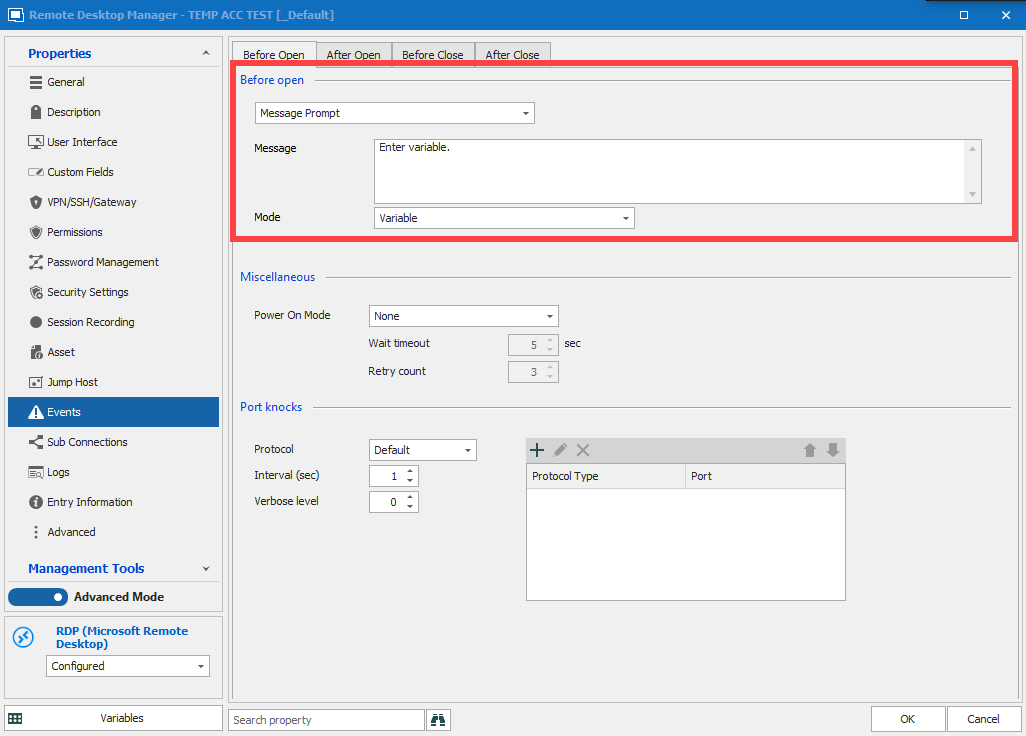
When you open the entry, you will be prompted: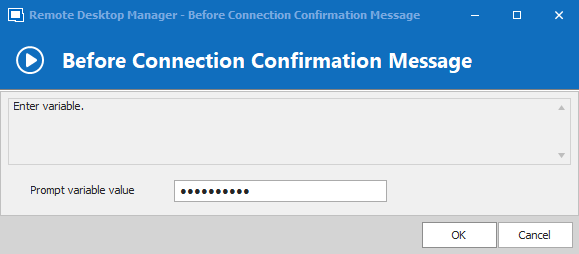
So provided that you configured your recording file with the $PROMPT_VARIABLE$, it will use this value you entered.
There are two issues with this at the moment:
- The variable always seems to resolve to an empty string in this scenario
- You can't actually allow an empty variable in the field, but it would be useful if you don't want anything to be entered.
I feel like this feature could be the solution you need, provided we fix these two issues. Let me know what you think.
Regards,
Hubert Mireault
2020-12-16_8-45-11.png
2020-12-16_8-38-02.png
I tried this. It is actually close to what I need...
It prompts, and I enter something, however nothing appears in the name of the recorded session.
But as you said, it seems to enter a single "space" in the name (I have two spaces instead of one)
This solution would be really great as it is, if 3 things could be done:
- I have recording set to optional, so I get a prompt if to record or not. This variable should appear after I have clicked on yes, if possible.
- A text would appear when I type, instead of dots.
- And yes, duh, would be nice if it resolved ;-)
(and yes, it would also be useful if I could omit the variable, and not have to enter anything)
It might be difficult to change the order of operation but we'll see what we can do.
As for point 2, we did this originally since the variable would be sensitive data (so we made it a password field). Would adding the reveal button (the eye) be a good way to solve this for you?
We'll open a ticket once we're settled on this detail.
Regards,
Hubert Mireault
It might be difficult to change the order of operation but we'll see what we can do.
I understand that, it was merely a question. I just though that would be very useful - at least in my case. However, I could also live with two clicks, denying a recording and also denying the naming prompt.
As for point 2, we did this originally since the variable would be sensitive data (so we made it a password field). Would adding the reveal button (the eye) be a good way to solve this for you?
Honestly, no. That would introduce just more clicking around, which I am trying to avoid. Speed and automation are the key here.
A suggestion here: add another "Mode" or another variable type. I am not sure how this corresponds, but a secondary type of entry might allow for both options?
No problem, we could add an option in the entry when the variable mode is selected to protect the field or not. It would be checked by default (current behavior), and unchecking it would make it a 'normal' text field.
I'll open a ticket with all this information. We'll update this thread once we have made progress on the changes.
Regards,
Hubert Mireault
Sounds good. Thank you.
Hello,
We've fixed the resolving of the Prompt_Variable in the session recording filename. It will be available in version 2021.1.5.0.
You'll also have the possibility the unprotect the text field, as well as enter an empty value.
Regards
Jonathan Del Signore
Great!! Thank you!