
colin
Extensions stopped working with large amount of login since MV3
The problem seems to be solved.
It seems to be working fine the last couple of days
Did you get an updated version? Mine is still having the issue. I appear to still be on 2024.2.7.2 MV3.
Extensions stopped working with large amount of login since MV3
I'm seeing the same issue.
If I open the extension settings then uncheck "Enable Remote Desktop Manager app" it will start working again for a time, then it will start returning the empty list again. It happens every time my vault locks, but the seems like it will randomly happen other times as well.
Password Expiration Notification for MySQL Users
We have an enforced Password Expiration for our MySQL users. Would it be possible to add a notification starting around 14 days that your MySQL Password is about to expire. Currently there is no notification and if the password expires an admin has to change the user's password.
Problem with MySQL Users
Thanks Stéfane. If you can let me know when it makes it into the beta channel I'll give it a test on our non-production database.
Problem with MySQL Users
I've sorted out the flush privilages that was a permissions issue.
Problem with MySQL Users
According to the My SQL Documentation Grant is deprecated after 5.7.6
Use of GRANT to define account SSL characteristics is deprecated as of MySQL 5.7.6. Instead, establish or change SSL characteristics using CREATE USER or ALTER USER. This GRANT capability will be removed in a future MySQL release.
https://dev.mysql.com/doc/refman/5.7/en/grant.html#grant-other-characteristics
Problem with MySQL Users
MySql.Data.MySqlClient.MySqlException (0x80004005): You have an error in your SQL syntax; check the manual that corresponds to your MySQL server version for the right syntax to use near 'REQUIRE SSL' at line 1 ---> MySql.Data.MySqlClient.MySqlException (0x80004005): You have an error in your SQL syntax; check the manual that corresponds to your MySQL server version for the right syntax to use near 'REQUIRE SSL' at line 1
at System.Runtime.ExceptionServices.ExceptionDispatchInfo.Throw()
at MySqlConnector.Core.ResultSet.<ReadResultSetHeaderAsync>d__2.MoveNext() in C:\projects\mysqlconnector\src\MySqlConnector\Core\ResultSet.cs:line 51
at MySql.Data.MySqlClient.MySqlDataReader.ActivateResultSet() in C:\projects\mysqlconnector\src\MySqlConnector\MySql.Data.MySqlClient\MySqlDataReader.cs:line 125
at MySql.Data.MySqlClient.MySqlDataReader.<CreateAsync>d__95.MoveNext() in C:\projects\mysqlconnector\src\MySqlConnector\MySql.Data.MySqlClient\MySqlDataReader.cs:line 405
--- End of stack trace from previous location where exception was thrown ---
at System.Runtime.ExceptionServices.ExceptionDispatchInfo.Throw()
at System.Runtime.CompilerServices.TaskAwaiter.HandleNonSuccessAndDebuggerNotification(Task task)
at MySqlConnector.Core.CommandExecutor.<ExecuteReaderAsync>d__0.MoveNext() in C:\projects\mysqlconnector\src\MySqlConnector\Core\CommandExecutor.cs:line 62
--- End of stack trace from previous location where exception was thrown ---
at System.Runtime.ExceptionServices.ExceptionDispatchInfo.Throw()
at System.Runtime.CompilerServices.TaskAwaiter.HandleNonSuccessAndDebuggerNotification(Task task)
at MySql.Data.MySqlClient.MySqlCommand.<ExecuteNonQueryAsync>d__69.MoveNext() in C:\projects\mysqlconnector\src\MySqlConnector\MySql.Data.MySqlClient\MySqlCommand.cs:line 220
--- End of stack trace from previous location where exception was thrown ---
at System.Runtime.ExceptionServices.ExceptionDispatchInfo.Throw()
at System.Runtime.CompilerServices.TaskAwaiter.HandleNonSuccessAndDebuggerNotification(Task task)
at MySql.Data.MySqlClient.MySqlCommand.ExecuteNonQuery() in C:\projects\mysqlconnector\src\MySqlConnector\MySql.Data.MySqlClient\MySqlCommand.cs:line 67
at Devolutions.RemoteDesktopManager.Business.DataSources.DatabaseConnectionDataSource.ExecuteNonQuery(String sql, IDbTransaction dbTransaction, IDbDataParameter[] parameters, Int32 commandTimeout)
at Devolutions.RemoteDesktopManager.Business.DataSources.DatabaseSecuritySubDataSource.c06e99ae45c28bc443f7493b644c1c38f(String c18a861f9b67a3be20238a264f7a3df12, IDbConnection cc8ffdaea2e23db4129bef3df37e0e2f5, IDbTransaction c5a0ca8eaa594113c2f0b3cfe13dedff9, List`1 cc70d7c4f86cb5303a85c6249dbaa3140)
Problem with MySQL Users
When selecting Require SSL for MySQL Users with a MySQL 8 Database there is an error. It appears because the syntax for setting this after 5.7 has changed.
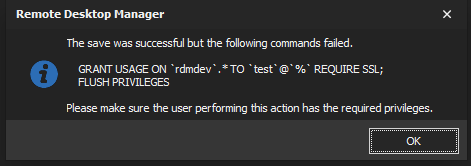
The correct syntax for MySQL 5.7+ is
alter user test require ssl;
End of Life Date?
I know PVM is still considered a supported product, howerver is there an End of Life date for it as it's been pretty well removed from the website? We have an additional team looking for a password vault solution, howerver I don't want to go through the process of setting it up for them if we're going to have to move to DPS or some other solution in the next 12 months.
Custom Installers
Thanks, I just received it.
Multi-subnet SQL Always on Group
Thanks. It wasn't terribly clear that I could modify those existing parameters to create new ones. I've modified the clustering Failover Partner with this value and set it to true. At best I can say it didn't break anything at the moment. We also discovered it may be an issue with our software defined perimeter. I'm running down with that vendor. My utility server inside the perimeter appears to be working well now.
Custom Installers
I created a custom installer request for PVM 9.6.0.0 about an hour and a half ago. Usually these take 30 minutes at most.
Multi-subnet SQL Always on Group
Our RDM SQL Database was recently moved to a Multi-Subnet SQL Always on Group. We're seeing random timeouts when connecting to the database listener. Our DBA team has said that we need to add multisubnetfailover=true to our connection information, howerver I don't see a way to do this. My guess is this is something that needs to be added to the Advanced Settings under the SQL Connection, but I thought I would check to make sure I'm not missing it before opening a feature request.
Clear Stored RDP Gateway Credentials
I figured it out. They're being stored in the Windows Credential Store, not actually within RDM.
Clear Stored RDP Gateway Credentials
I have a user that entered credentials for the wrong account in the RDP Gateway Login prompt. They checked the remember credentials box. They are good credentials, just not allowed to access the gateway. I can't seem to find a way to clear those credentials so they can enter new credentials for the gateway.
Mac Personal Credientails Prompt with List when using PVM.
That is correct.
Mac Personal Credientails Prompt with List when using PVM.
I am using Password Vault Manager for My Personal Credentials in RDM. In the Windows version I have the option to prompt with a list all of my PVM entires when connecting. I would like feature to be available for the Mac version of RDM as well.
Copy Username and Password not working after upgrading to 9.0.x
Well, I'm not sure what fixed it, but I had my Surface re-imaged last week and it's working now. Also appears to be working on my Windows 7 VDI. I'll check around with my team and see if they're having the same experience.
Copy Username and Password not working after upgrading to 9.0.x
That did not correct the issue. Point of clarification, I'm using Password Vault Manager, not Remote Desktop Manager which you showed in your screenshot. That said, I made the settings change in both and tested, the issue appears to exist in both products.
Additional information that you may want. I'm on Windows 10 1703, build 15063.786. However we're seeing the same issue across all of the systems on my team which are a mix of Windows 10 and Window 7.
Copy Username and Password not working after upgrading to 9.0.x
I'm seeing it on the Login (Account) type and Username/Password type.
Copy Username and Password not working after upgrading to 9.0.x
After upgrading to 9.0.0.0 and now 9.0.1.0 the Copy Username and Password button is not working in PVM. This was working previously in 8.x on my system.
The individual Copy Username and Copy Password buttons are working.
SSH Gateway Jump Host - My Personal Credentials
Please add the ability to use My Personal Credentials as a credential option for SSH Gateway. Currently the Options are only Custom and Credential Repository.
Unable to Create Credential Entries in PVM 9.0.0.0
Just found that myself. That fixed it.
Hello,
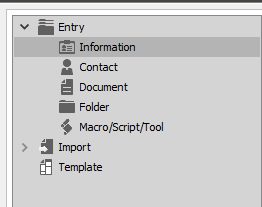
Could you check that you have the "advanced entries" option checked?:
Regards,
Unable to Create Credential Entries in PVM 9.0.0.0
None of the Credential Entry Types show available when trying to create a new Entry.
Use Powershell To Set Custom Roles on View and Edit
I'm trying to figure out how to use the PowerShell Module to set Custom Roles on View and Edit permissions for Individual sessions.
I can set the RoleOverride to Custom using the Set-RDMSessionProperty $RDMID -Path Security -Property RoleOverride -Value Custom
However, I can't seem to find a way to set the actual Permissions for View and Edit to Custom and assign Roles to them.
Anyone have any Ideas? Looking through the documentation I'm not finding anything that seems like it's going to do this, but I'm hoping I'm just missing something.