Problem with MySQL Users

When selecting Require SSL for MySQL Users with a MySQL 8 Database there is an error. It appears because the syntax for setting this after 5.7 has changed.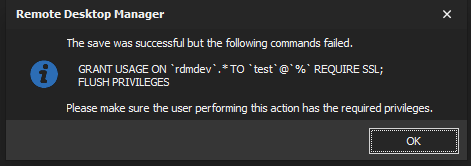
The correct syntax for MySQL 5.7+ is
alter user test require ssl;
rdmerror.png
All Comments (7)
I will look into it. It's most likely that both syntaxes are valid and privileges are missing on the executing user.
- In RDM, go to File > Options > Advanced > "Debug Level" and set the value to 1
- Performing the action again
- Help > Application Logs, there you should see the full error message of why both the statements failed.
Please post both error messages here.
Stéfane Lavergne
MySql.Data.MySqlClient.MySqlException (0x80004005): You have an error in your SQL syntax; check the manual that corresponds to your MySQL server version for the right syntax to use near 'REQUIRE SSL' at line 1 ---> MySql.Data.MySqlClient.MySqlException (0x80004005): You have an error in your SQL syntax; check the manual that corresponds to your MySQL server version for the right syntax to use near 'REQUIRE SSL' at line 1
at System.Runtime.ExceptionServices.ExceptionDispatchInfo.Throw()
at MySqlConnector.Core.ResultSet.<ReadResultSetHeaderAsync>d__2.MoveNext() in C:\projects\mysqlconnector\src\MySqlConnector\Core\ResultSet.cs:line 51
at MySql.Data.MySqlClient.MySqlDataReader.ActivateResultSet() in C:\projects\mysqlconnector\src\MySqlConnector\MySql.Data.MySqlClient\MySqlDataReader.cs:line 125
at MySql.Data.MySqlClient.MySqlDataReader.<CreateAsync>d__95.MoveNext() in C:\projects\mysqlconnector\src\MySqlConnector\MySql.Data.MySqlClient\MySqlDataReader.cs:line 405
--- End of stack trace from previous location where exception was thrown ---
at System.Runtime.ExceptionServices.ExceptionDispatchInfo.Throw()
at System.Runtime.CompilerServices.TaskAwaiter.HandleNonSuccessAndDebuggerNotification(Task task)
at MySqlConnector.Core.CommandExecutor.<ExecuteReaderAsync>d__0.MoveNext() in C:\projects\mysqlconnector\src\MySqlConnector\Core\CommandExecutor.cs:line 62
--- End of stack trace from previous location where exception was thrown ---
at System.Runtime.ExceptionServices.ExceptionDispatchInfo.Throw()
at System.Runtime.CompilerServices.TaskAwaiter.HandleNonSuccessAndDebuggerNotification(Task task)
at MySql.Data.MySqlClient.MySqlCommand.<ExecuteNonQueryAsync>d__69.MoveNext() in C:\projects\mysqlconnector\src\MySqlConnector\MySql.Data.MySqlClient\MySqlCommand.cs:line 220
--- End of stack trace from previous location where exception was thrown ---
at System.Runtime.ExceptionServices.ExceptionDispatchInfo.Throw()
at System.Runtime.CompilerServices.TaskAwaiter.HandleNonSuccessAndDebuggerNotification(Task task)
at MySql.Data.MySqlClient.MySqlCommand.ExecuteNonQuery() in C:\projects\mysqlconnector\src\MySqlConnector\MySql.Data.MySqlClient\MySqlCommand.cs:line 67
at Devolutions.RemoteDesktopManager.Business.DataSources.DatabaseConnectionDataSource.ExecuteNonQuery(String sql, IDbTransaction dbTransaction, IDbDataParameter[] parameters, Int32 commandTimeout)
at Devolutions.RemoteDesktopManager.Business.DataSources.DatabaseSecuritySubDataSource.c06e99ae45c28bc443f7493b644c1c38f(String c18a861f9b67a3be20238a264f7a3df12, IDbConnection cc8ffdaea2e23db4129bef3df37e0e2f5, IDbTransaction c5a0ca8eaa594113c2f0b3cfe13dedff9, List`1 cc70d7c4f86cb5303a85c6249dbaa3140)
According to the My SQL Documentation Grant is deprecated after 5.7.6
Use of GRANT to define account SSL characteristics is deprecated as of MySQL 5.7.6. Instead, establish or change SSL characteristics using CREATE USER or ALTER USER. This GRANT capability will be removed in a future MySQL release.
https://dev.mysql.com/doc/refman/5.7/en/grant.html#grant-other-characteristics
I've sorted out the flush privilages that was a permissions issue.
Hello Colin,
Thank you for the call stack and documentation url. You are correct, they've already completely removed functionality.
I'm the process of fixing this in RDM. Until I can get the fix released, please us MySQL Workbench to execute the command directly instead of RDM.
Sorry for the inconvenience.
Best regards,
Stéfane Lavergne
Thanks Stéfane. If you can let me know when it makes it into the beta channel I'll give it a test on our non-production database.
2020.1.20.0 has been released this morning (no auto-update)
You can download it from here: https://remotedesktopmanager.com/home/downloadenterprise
Stéfane Lavergne