
raymond.jansen
Start WireGuard VPN with WireGuard add-on without UAC prompt
Hi Hubert,
I agree, couldn't find anything else myself with a command line.
There are still options. I could start the VPN from the WireGuard gui. That works fine, no elevation needed.
Another option which works from RDM (sort of) is WireSock VPN client (www.wiresock.net). This is free for personal use, and not too expensive for business use.
You can start this without elevation from RDM by using the custom VPN option, point the client to wiresock-client.exe, and the start command to: run -config [config_full_path_name.conf] -log-level none.
I did say sort of. When you open the VPN, it opens a command prompt, stating that the service has been activated. You can't close it from within RDM (I think), but when you close the command prompt the VPN is disconnected. It's not pretty, but it works.
Finally the last option is to use OpenVPN, which doesn't have this problem at all. The UniFi routers support both VPN's. I just preferred WIreGuard because the connecting process is really quick, and OpenVPN takes some time.
I think, for now, I just use the WireGuard gui. If there aren't too many connections, that might be the most simple option. If there are getting too much connections, I can always switch to OpenVPN.
Thank you!
Kind regards,
Ray
Start WireGuard VPN with WireGuard add-on without UAC prompt
Hi,
I can't get this to work. If I try to run this from a command line in non admin mode, it just says access denied. If I try the same from an elevated command prompt then it works.
Start WireGuard VPN with WireGuard add-on without UAC prompt
Hi,
When I start a WireGuard VPN from the WireGuard add-on, I get a UAC prompt on VPN connect and disconnect.
Our users don't have local admin rights, it would be great if we could do this without UAC prompt/local admin rights needed.
If I start a VPN from the WireGuard client itself, there is no UAC prompt or local admin rights needed.
Kind regards,
Ray
WireGuard add-on, start VPN connection without UAC prompt possible?
Hi Jacob,
I'll do that. It's a bit weird though, because if I start the WireGuard client on my computer, and start the VPN from there, there is no UAC prompt.
It's an issue, because our users don't have local admin rights.
Kind regards,
Ray
WireGuard add-on, start VPN connection without UAC prompt possible?
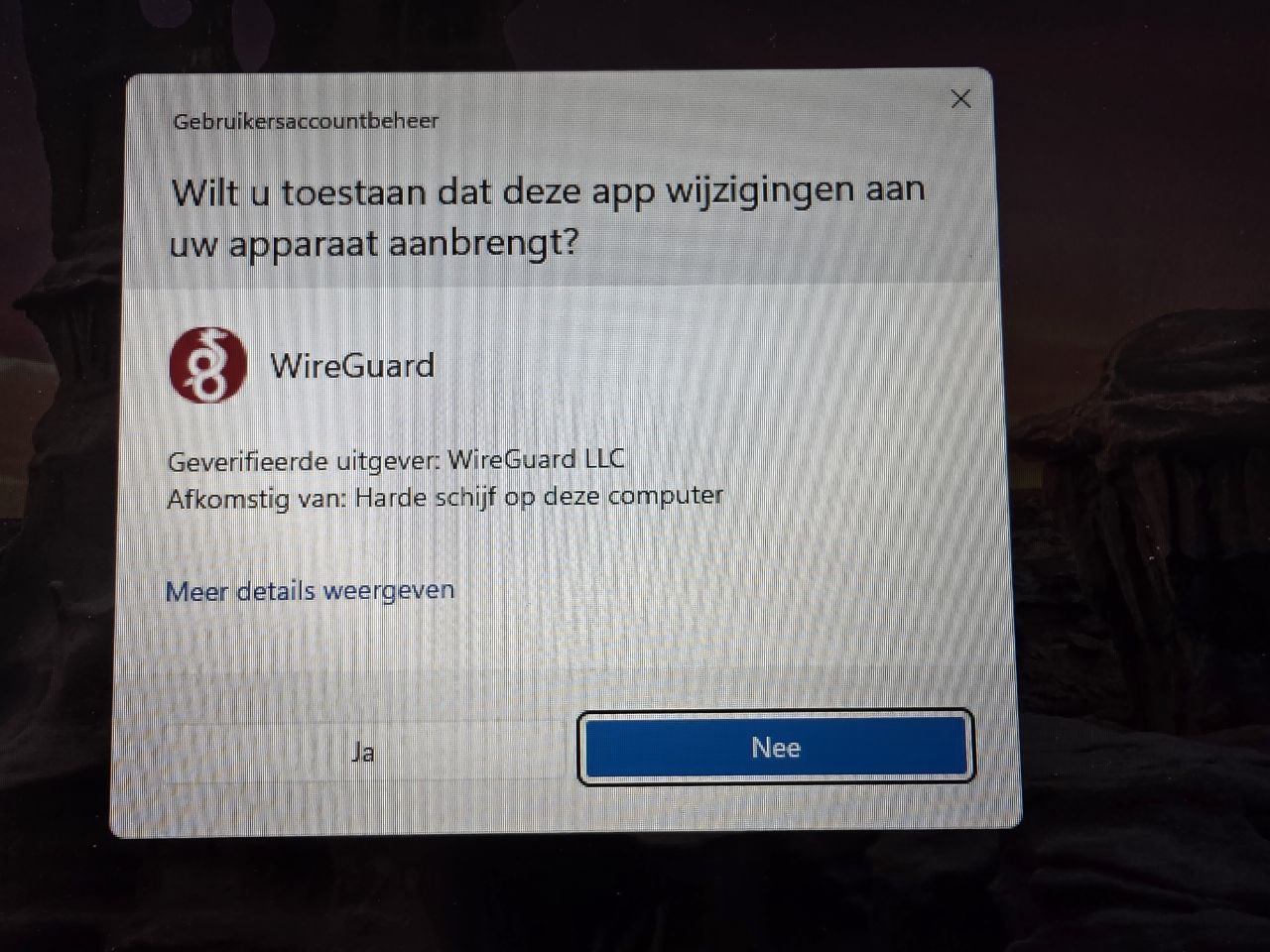
It's in Dutch, but it's just a basic uac prompt.
WireGuard add-on, start VPN connection without UAC prompt possible?
Hi,
I have setup the WireGuard add-on, and it works fine. I did setup WireGuard to use custom configuration mode, as this is more easy to share with a team.
Is it possible to get rid of the UAC prompt on connect/disconnect VPN? If I start the VPN from the WireGuard client itself, it doesn't need UAC.
RDM version: 2024.3.28.0 64-bit, connected to Devolutions Server
Windows 11 24H2
WireGuard: 0.53.
Kind regards,
Ray
DVLS: Error while installing side-by-side gateway
Hi Richard,
Powershell was indeed version 4.0. After update to 5.1 it worked immediately.
Thanks for your help!
Kind regards,
Raymond
DVLS: Error while installing side-by-side gateway
DVLS version: 2022.2.6.0
When I try to install the Devolutions Gateway on the DVLS server itself, side-by-side installation, I get an error (default ports 7171 & 8181):
Starting Devolutions Gateway server installation side-by-side...
Downloading Devolutions Gateway installer 2022.2.2.0 ...
Done!
Configuring the rewrite rules for Devolutions Gateway...
Done!
Installing Devolutions Gateway...
Done!
Configuring Devolutions Gateway service...
Method not found: 'Void System.Management.Automation.Runspaces.InitialSessionState.set_ExecutionPolicy(Microsoft.PowerShell.ExecutionPolicy)'.
Deleting downloaded files...
Done!
Server: Windows 2012R2
dotNET: 4.8
After 'install' the ports are not listening, pressing Edit on Devolutions Gateway gives an error also, so I uninstalled again.
Any idea what's wrong?
Kind regards,
Ray
Automatic login in RDM with Office365 as security provider with Password Server
Hi,
Why was Office 365 authentication removed in the recent versions of RDM?
This was an excellent option! Now it opens a webpage and we have to click the login button everytime.
The old option was excellent. Any change that it can be enabled again?
Kind regards,
Ray
"Is Virtual machine" missing from column chooser in RDM 2021.2.11.0 (beta)
Hi Jafran,
Best fit (all columns) fixed this, thank you!!
"Is Virtual machine" missing from column chooser in RDM 2021.2.11.0 (beta)
Hi Jafran,
When I right click on the columns and choose Column chooser, there it's not in the list anymore:


"Is Virtual machine" missing from column chooser in RDM 2021.2.11.0 (beta)
Thanks Hubert!
"Is Virtual machine" missing from column chooser in RDM 2021.2.11.0 (beta)
Hi,
The field Is virtual machine is missing from the column chooser, which is a bit of a pain.
Could you guys please add this again?
Kind regards,
Raymond
Viscosity plugin, how to?
Hi Hubert,
Yes, I use the same name in the host field as in the connect <host>. It's not really important, because the custom works fine of course.
Viscosity plugin, how to?
Hi,
For Viscosity VPN connections I now use the custom VPN and a command line: connect "server" and disconnect "server".
This works fine.
I've noticed the Viscosity plugin, and when I select this I can enter a host in settings. I've tried both the connection name in Viscosity as the ip address of the host in Viscosity, and both appear to do nothing.
I did check the path settings, and Viscosity says it's ready there.
Anyone an idea of what I'm doing wrong?
DPS error report by mail: SecurityTokenExpiredException
Hi Érika,
The token lifetime was set to 1 day. I'll increase it to 3 days, and check the logs.
DPS error report by mail: SecurityTokenExpiredException
Hi Érica,
We use version 2020.2.7.0.
I sometimes get this message also for myself. I hink this morning I've got about 10-15 emails for different users. But in RDM itself, the situation recovers itself automatically.
The time is synced on my laptop. Clearing the cache did not change anything.
In RDM I did have no problems, only the email notifying of a 'problem' which autocorrected itself is a bit anoying.
For now I have disabled all emails in DPS.
Kind regards,
Raymond
DPS error report by mail: SecurityTokenExpiredException
Hi,
I get a lot of emails daily from DPS containing:
The following error was received by user@domain.com
at 1-7-2020 12:59:27
Error:
SecurityTokenExpiredException - IDX10223: Lifetime validation failed. The token
is expired. ValidTo: '07/01/2020 10:31:41', Current time: '07/01/2020
10:59:27'. at Microsoft.IdentityModel.Tokens.Validators.ValidateLifetime(Nullable`1
notBefore, Nullable`1 expires, SecurityToken securityToken,
TokenValidationParameters validationParameters) at
System.IdentityModel.Tokens.Jwt.JwtSecurityTokenHandler.ValidateLifetime(Nullable`1
notBefore, Nullable`1 expires, JwtSecurityToken jwtToken,
TokenValidationParameters validationParameters) at
System.IdentityModel.Tokens.Jwt.JwtSecurityTokenHandler.ValidateTokenPayload(JwtSecurityToken
jwtToken, TokenValidationParameters validationParameters) at Devolutions.Server.TokenValidationHandler.c731d80e41144a8af371a23b0d39eaa11.MoveNext()
--- Login
Source:
Microsoft.IdentityModel.Tokens
Can I disable these email messages?
Kind regards,
Raymond
Automatic login in RDM with Office365 as security provider with Password Server
Sounds like an excellent solution, thanks!
Wayk Den install on Windows 2019, cannot Start-WaykDen
With the help of Marc-André I did get the website up and running.
But, what's the default login for it?
Kind regards,
Raymond
Wayk Den install on Windows 2019, cannot Start-WaykDen
Hi Marc-André,
I'll send another email in a minute, with some certificate info in it.
Kind regards,
Raymond
Wayk Den install on Windows 2019, cannot Start-WaykDen
Hi Marc-André,
I did use the Import-WaykDenCertificate. It seems to have troubles with my pfx. I will try again with PEM format. After each change I have restarted Den with Restart-WaykDen.
It must be staring me in the face, but I can't find it, the default login for Den.
Sorry for all the stupid questions!
Kind regards,
Raymond
Wayk Den install on Windows 2019, cannot Start-WaykDen
Hi Marc-André,
If I set the url to Set-WaykDenConfig -ListenerUrl 'http://localhost:4000' -ExternalUrl 'http://localhost:4000', I get the login webpage from Den when I go to localhost:4000.
Externally will not work yet it's throwing a certificate error: SSL_ERROR_RX_RECORD_TOO_LONG. I'll try to reload the certificate again.
Do I need to setup ldap/active directory to login to the webinterface?
I'm struggeling a bit to find the correct help. Is there something help page dedicated for Den?
Thanks again,
Raymond
Wayk Den install on Windows 2019, cannot Start-WaykDen
Hi Marc-André,
Indeed, 127.0.0.1 was used as the secondary DNS server. I removed this, rebooted the server, and the service would start.
However, when I go to localhost:4000 it throws a bunch of errors:
Uncaught (in promise): Error: Network Error 3Rfw/t.exports</e.JsonService</t.prototype.getJson/</a.onerror@http://localhost:4000/web/main.a49daa0cafa54590663c.js:1:130576 E@http://localhost:4000/web/polyfills.d0a00739bbfdd1782543.js:1:18568 r/</u</e.prototype.invokeTask@http://localhost:4000/web/polyfills.d0a00739bbfdd1782543.js:1:8183 onInvokeTask@http://localhost:4000/web/main.a49daa0cafa54590663c.js:1:1133322 r/</u</e.prototype.invokeTask@http://localhost:4000/web/polyfills.d0a00739bbfdd1782543.js:1:8104 r/</s</t.prototype.runTask@http://localhost:4000/web/polyfills.d0a00739bbfdd1782543.js:1:3262 r/</f</t.invokeTask@http://localhost:4000/web/polyfills.d0a00739bbfdd1782543.js:1:9315 p@http://localhost:4000/web/polyfills.d0a00739bbfdd1782543.js:1:22293 h@http://localhost:4000/web/polyfills.d0a00739bbfdd1782543.js:1:22527
T@http://localhost:4000/web/polyfills.d0a00739bbfdd1782543.js:1:13706
T@http://localhost:4000/web/polyfills.d0a00739bbfdd1782543.js:1:13244
S/<@http://localhost:4000/web/polyfills.d0a00739bbfdd1782543.js:1:14512
r/</u</e.prototype.invokeTask@http://localhost:4000/web/polyfills.d0a00739bbfdd1782543.js:1:8183
onInvokeTask@http://localhost:4000/web/main.a49daa0cafa54590663c.js:1:1133322
r/</u</e.prototype.invokeTask@http://localhost:4000/web/polyfills.d0a00739bbfdd1782543.js:1:8104
r/</s</t.prototype.runTask@http://localhost:4000/web/polyfills.d0a00739bbfdd1782543.js:1:3262
_@http://localhost:4000/web/polyfills.d0a00739bbfdd1782543.js:1:10499
r/</f</t.invokeTask@http://localhost:4000/web/polyfills.d0a00739bbfdd1782543.js:1:9344
p@http://localhost:4000/web/polyfills.d0a00739bbfdd1782543.js:1:22293
h@http://localhost:4000/web/polyfills.d0a00739bbfdd1782543.js:1:22527
Can't make much of this.
Is there anything that needs to be re-installed, and if yes, how?
Kind regards,
Raymond
Wayk Den install on Windows 2019, cannot Start-WaykDen
Hi Marc-André,
The den-server log:
2020-03-26T09:01:04.581557700+01:00 INFO den_server::router::router - Redis is not configured. Cache in memory will be used.
2020-03-26T09:01:04.598564300+01:00 WARN den_server::router::router - Keen client not configured.
2020-03-26T09:01:04.598564300+01:00 INFO den_server::router::router - Nats is not configured.
2020-03-26T09:01:04.599562300+01:00 INFO den_server::router::router - Starting listeners on ws://0.0.0.0:4491
2020-03-26T09:01:04.600560+01:00 DEBUG reqwest::connect - starting new connection: http://den-lucid:4242/
2020-03-26T09:01:05.799586200+01:00 ERROR den_server - Unable to initialize DenServer: "error sending request for url (http://den-lucid:4242/client): error trying to connect: dns error: No such host is known. (os error 11001)"
Because it showed dns error for den-lucid:4242/client, I've tried adding den-lucid to the hosts file with the local ip address, but that didn't do anything.
When I've tried to get the logs of den-lucid with docker logs den-lucid > den-lucid.txt (is that even usefull?) I've got:
[2020-03-26T08:09:22Z INFO lucid::server::server] Loading repositories
[2020-03-26T08:09:54Z ERROR r2d2] No servers available for the provided ReadPreference.
I also have the output of the Start-Waykden -verbose, but it shows a lot of sensitive info. I have emailed this to wayk@deolutions.net.
Kind regards,
Raymond