Automatic login in RDM with Office365 as security provider with Password Server
Automatic login in RDM with Office365 as security provider with Password Server
0 vote
When I want to login to our Password Server website, I can login with 1 click as the account is known in Windows. (if I use a browser with Windows authentication enabled).
However, when I want to open RDM to the same Password Server, I have to enter the password (and MFA) everytime.
It would be nice if RDM could login to Password Server with O365 automatically.
Kind regards,
Raymond
All Comments (34)
Hello,
I will investigate what could be done but I think that's a cookie problem. RDM use IE ActiveX to login but if I remember correctly it does not share and persist the cookie store. I will let you know if we find something.
Regards
David Hervieux
Hi David,
Thanks!
Warm regards,
Raymond

Disabled
I am also interested in this. O365 single sign on used to work with RDM and DPS, but it seems that it doesn't work in the latest builds.
Hello,
We'll work on adding this as an option in RDM. I can't give you an estimate on when it will be done but I'll let you know once we've made progress on it.
Regards,
Hubert Mireault
Hi,
Any progres/update on this?
Kind regards,
Ray
Hello,
This is still in our todo list, but we've had other priorities for RDM 2020.1. I can't give you an estimate on when we will be able to work on it.
Regards,
Hubert Mireault
Hi,
we also want to have the Single Sign On with our O365 accounts to login to the Weblogin and also with the Remote Desktop Manager.
We need a solution in this month for security audits in March 2020.
Thank you.
Regards
Franco
This works fine with the weblogin, really 1 click and you are in.
For RDM it also works, but you have to enter your password and 2fa again each time you login. The weblogin is easier, but it's definately secure, also in RDM.
So, what's the problem for a audit then?
Ok, and how to configure the SSO for the weblogin?
It should work in RDM and Weblogin that users with 2fa open the RDM or klicks on the link for the weblogin and then it should only asked for the 2fa code and the user should be login without promt the username and password.
Could you please send me how to set up that?
Thanks.
FYI - we have Version 2019.2.12.0
https://helpserver.devolutions.net/kb_azureauthconfig.htm
Please try this guide.
Hello,
Is there any progres on this feature? We are also testing wih O365 and DPS but before we are going to use it we need Single Sign-On in RDM.
Thanks.
Hello,
We have a dev assigned to this, and it is currently planned for RDM 2020.2. The release date for RDM 2020.2 is planned for this summer.
Regards,
Hubert Mireault
I've added a feature to persist the auth-token so that you only need to authenticate if said token has expired, even if you close RDM. Depending on token expiration length, let's assume 24 hours, then you would only need to authenticate on Monday mornings and the token would be good all week as long as you use/start RDM once every 24 hours as the token will be auto refreshed.
It's not perfect but unlike web-based applications things are somewhat different in full blown windows applications and I'm not sure there is much else we can do.
This will be available in the 2020.2 beta that should be released within the next month or so.
Please let me know what you think.
Best regards,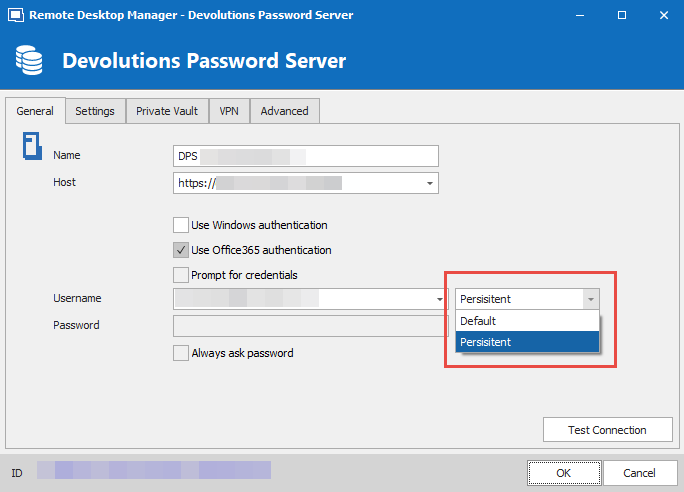
P.S. I've fixed the typo in the real version :-)
Stéfane Lavergne
2020-04-21_15-16-31.png
Sounds like an excellent solution, thanks!
Thanks, that would be very useful to reduce the amount of times you need to login.
There is a possibility to use a session from Windows when the O365 account is added under Email & Accounts. How you can use this session I don't know but it works for our VPN (Cisco AnnyConnect) wich also uses SAML to Azure AD / O365.
Thank you both for the feedback.
We will investigate what it takes to pull the information from the Email & Accounts. Thank you for the information.
Best regards,
Stéfane Lavergne
A quick question, I cannot find this tag in RemoteDesktopManager.cfg. Is it possible to set persistent this way? Or is is possible to set Default to persistent in database?
That part of the .cfg is encrypted so you won't/can't see it.
What are you trying to achieve exactly?
Stéfane Lavergne
I want to manipulate the setting to a lager group of users (instructions with pictures to explain users what to do usually have lower than 93.3% efficiency ;-))
Same as populate UPN in the data source :-)
Are your machines Azure AD joined?
Stéfane Lavergne
Mostly, nowadays (when hybrid join is mandatory)...
Ok so you can "push" settings into the .cfg one of two ways.
But how do you create a data source configuration that will work for everyone?
You could use the $USER_PRINCIPAL_NAME$ variable that will be resolved to something resembling user@domain.com all should be good.
Perfect, one configuration to rule them all. Right?
The thing is I just implemented (still only on my machine) the variable support with the DPS datasource so you would need to wait to us to release a new build.
You could leave the username field empty and let the user enter it when prompted + the password and MFA. This works for some time but once the authentication token expires it will try to renew to token with username "empty" and fail. I've also fixed this locally, again available in the next release.
Do you think the above solutions are acceptable to you?
We have a third solution that would work now also, it's a hack'ish workaround. We can discus further if you're interested...
Stéfane Lavergne
Hi,
the variable sounds sweet, but not resolved if used in Data Source configuration...
Used in Data source configuration (it is a localised MS login window, you can see it tries with variable name, not the value):

But when used in credential entry it works:
I can find it under Entry Global variables:
RDM version: ENTERPRISE 2020.2.16.0
Datasource details:
About the persistent setting, will this setting exported in default.cfg (and will the custom installer grab that setting from data source?). What is Default setting, can we control that Value?
Thank you for working on that, we are trying for some time now to enforce O365 authentication, since we have MFA on accounts...
Best regards,
Rok Berlec
Rok,
You are correct. Currently the variable is not yet being substituted, it will be with the next release RDM.
As for the default.cfg, it is essentially a rename RemoteDesktopManager.cfg (rdm.cfg for short) file that the system will compare and import when if changes (actually prompts the user for what to do but can be controlled via GPO). In other words, default.cfg is used to initialize users rdm.cfg file and in if the file changes, update the rdm.cfg file for each user.
They way you distribute the default.cfg is via the Custom Installer. Create via RDM a Package.rdi file, create a custom installer with it, the .rdi file will create a default.cfg that has the proper data sources configured with the $USER_PRINCIPAL_NAME$ what will be resolved to the current logged on user and all will be good.
There are other ways to distribute the default.cfg but the customer installer is the easiest.
I will let you know when the new build is available.
Best regards,
Stéfane Lavergne
OK, I misunderstood. I was searching for such solution for quite some time (https://forum.devolutions.net/topics/32817/edit-datasource-username-with-powershell) so I guess it is quite OK to wait a bit more. If we could make it work with variable to populate a username and Persistent token, our users will be more than happy ;-)
Have a nice day,
Rok B
The fix is included in v2020.2.17 which was released a few days ago.
https://remotedesktopmanager.com/home/downloadenterprise
Best regards,
Stéfane Lavergne
Are there any plans to add the same feature to RDM for OS X?
Thanks.
Hi Eugene,
This is quite a long thread. What feature are you referring to exactly? The "Persistent" mode on Devolutions Server data sources or the variable resolving in data source configurations? Or both?
Best regards,
Xavier Fortin
Hi Xavier,
I mean "persistent" mode. It is asking very often to log in with office 365 credentials and considering I have MFA from Office 365, I have to enter code every time I log in.
Any workaround to reduce the number of logins would be great. Would be nice to have something like trust this device for N days.
Thanks.
Eugene
Perfect, this is what I wanted to make sure. I will open the ticket on our side and post back here when we have made progress.
Best regards,
Xavier Fortin
Hi Eugene,
The Persistent mode has been added to RDM 2021.1.1.0.
You can download it here.
Best regards,
Xavier Fortin
Hi,
Why was Office 365 authentication removed in the recent versions of RDM?
This was an excellent option! Now it opens a webpage and we have to click the login button everytime.
The old option was excellent. Any change that it can be enabled again?
Kind regards,
Ray
Hello,
In the version 2022.1 of DVLS, we changed the way users are authenticated to use the oAuth standard. So we still stupport Office 365 authentication, but you have to select it in the web browser during the login process. We understand that it is one more click for the user, but those changes were needed from a security point of view. But we keep your request in mind and see if we could remove that extra click with future developments.
Best regards,
François Dubois