
Miesepies
Change credential type with PS
Thx!
I tried my script but it didn't work at first. The difference with your example is that I did a set-rdmsession on the subconnection and not on the parent.
So set-rdmsession should be done on the parent, not subconnection, after changing subconnection properties.
Change credential type with PS
Great!
Did you also mention that the same goes for the batch edit function?
Change credential type with PS
I don't get it. It's not working.
It looks like it's working on sessions, but not sub connections.
I have a host session with 1 subconnection. For both sessions credential type is set to inherited. If I copy the session, the preview shows me different results:
- copy subconnection - no credentialconnectionid
- copy parent (without subconnection) - no credentialconnectionid
- copy parent (with subcon) - credentialconnectionid for the subconnection only
Change credential type with PS
Btw... my code does work...
I just forgot to do a set-rdmsession $subcon afterwards :(
Change credential type with PS
Ah sorry, should have used the search function :blush:
Thx!
Change credential type with PS
Hi,
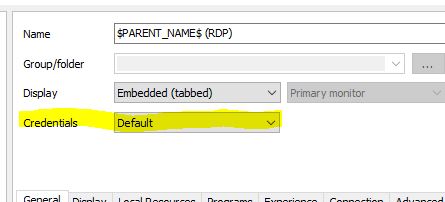
I'm trying to change the credential type a few hundred subconnections. Batch edit unfortunately does not seem to be able to change subconnections so I'm trying to do it using PS. I thought I found out how... but it's not working...
$session = Get-RDMSession -name servername
$subcon = $session.SubConnections | Where-Object {$_.Name -eq '$PARENT_NAME$ (RDP)'}
Set-RDMSessionCredentials -CredentialsType Inherited -PSConnection $subcon
Any ideas??
View not completely restored with custom installer
I think I figured it out...
After the setup RDM tries to install any missing add-ons. Setup of add-on's requires a restart of RDM. If the setup of a add-on happens during first start of RDM, the restart probably breaks the initial setup of the layout of RDM.
If I cancel the add-on setup at first start, the layout is fine.
View not completely restored with custom installer
Well... somehow it looks like the custom installer does changes things in the layout. I built a fresh custom installer based on version 12.5.4.0, but after installing the created setup the Quick Connect bar in the titlebar is missing.
Reset layout returns the Quick Connect bar, but then the treeview is missing. Only solution is to delete the .lyt file.
No updates since 12.5.4.0/12.5.6.0
Ow, I see what you mean. They added the beta change history to the current version release notes.
Template selection popup when default subconnection is selected
It's possible to select the default subconnection to open when doubleclicking on the parent session. However after opening the subconnection, the template selection window is openend too.
[Parent > General > Action > Sub connection to launch + selected subconnection] opens the subconnection AND Template window
[Parent > General > Action > Sub connection to launch + --- Prompt on connection---] opens the subconnection selection window, but not the Template dialog.
(tested on 12.5.6.0 and 12.5.12.0)
No updates since 12.5.4.0/12.5.6.0
I think it depends on how your update setting in RDM is set.
All versions after 12.5.4.0 are beta

Most recently Used panel shows variable, not actual value
That was quick :)
View not completely restored with custom installer
Ok, thanks.
Most recently Used panel shows variable, not actual value
I use variables in subconnections to pass host names from the parent session. If you open such a subconnection, the entry in the MRU panel shows the used variable and does not substitude the variable with the value.

View not completely restored with custom installer
After setting up RDM as I like, I created a custom installer for distribution. While most settings seems to be retained, a docked window does not seem to work.
I have opened the description panel, and docked it below the navigator panel. After installing RDM with the custom installer the descrption panel is not opened.
I used build 12.5.6.0 to setup, custom installer is 12.5.4.0.
Michel
How to set properties in CustomSecurity user
oops.... nevermind. I just found it.
Set-RDMUserSecurity
How to set properties in CustomSecurity user
How can I set additional properties in the CustomSecurity field of a RDMUser object?
This field contains a xml string. Do I have to edit this myself?
What values can be set using CustomSecurity?
<?xml version="1.0"?>
<CustomSecurity>
<CanExport>false</CanExport>
<CanImport>false</CanImport>
<CustomRoles>
<string>aa259670-dae5-42b0-b3cb-4c4edd283ddd</string>
<string>6384f8e4-18fc-4239-8b24-c2e0749f1bb8</string>
</CustomRoles>
<DenyAddInRoot>true</DenyAddInRoot>
<IntegratedSecurity>true</IntegratedSecurity>
</CustomSecurity>
Filter location
Hi Hubert,
yes I can confirm that switching between shared and private but also between shared and favorites changes the location of the search box.
However RDM does not seem to save this location to the config, so after a restart of RDM the search box is in the right place again.
(so I don't know why it did remember the different location the first time)
Filter location
Thanks, resetting the layout fixed the issue.
:)
Filter location
yup!
Filter location
Both settings are set to Navigation pane (top), in RDM and RDMFree :)
Filter location
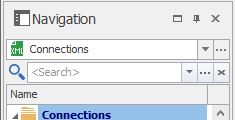
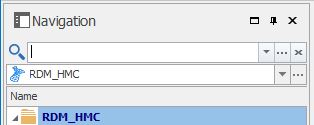
I have configured the filter to be placed on top of the navigator pane. Funny thing is that with RDM Free the filter is placed below the datasource selection box, but for the enterprise version the filter is places above the datasource.
Allthough it's only a minor difference, I prefer the location RDM Free uses, below the datasource box. Can this be changed in the enterprise version aswell?
Free:
Enterprise:
Importing web favorites?
Thanks. I have imported most of my bookmarks allready using powershell, but will try this later.
VMware synchronizer does not create session based on selected template
Great! Thx...
Powershell get-rdmsession cannot find newly created session
Using RDM 12.5.4.0 btw...