Filter location

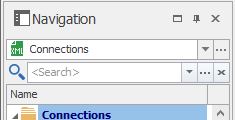
I have configured the filter to be placed on top of the navigator pane. Funny thing is that with RDM Free the filter is placed below the datasource selection box, but for the enterprise version the filter is places above the datasource.
Allthough it's only a minor difference, I prefer the location RDM Free uses, below the datasource box. Can this be changed in the enterprise version aswell?
Free:
Enterprise:
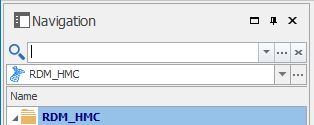
paidfilter.jpg
freefilter.jpg
All Comments (11)
Hi Michel,
please check what you have configured at
Then your UI should look like the RDM Free and mine ;)
Please note that you have to restart RDM to apply the changes!
Regards,
Min
Both settings are set to Navigation pane (top), in RDM and RDMFree :)
very interesting - Enterprise Version = 12.5.6.0 ?
Regards,
Min
yup!
Can you try to reset the window layout? (On the enterprise version)
Regards,
Min
Thanks, resetting the layout fixed the issue.
:)
Perfect!
Thanks for the feedback! :)
Regards,
Min
Thank you Min for helping out.
@Michel: I'm curious, does it mess with the location of the filter box if you change between the private vault and the shared entry list, or are you now unable to get the previous location?
Regards,
Hubert Mireault
Hi Hubert,
yes I can confirm that switching between shared and private but also between shared and favorites changes the location of the search box.
However RDM does not seem to save this location to the config, so after a restart of RDM the search box is in the right place again.
(so I don't know why it did remember the different location the first time)
Sorry for the delay. We'll take a look at this as soon as possible.
Regards,
Hubert Mireault
Hi,
We've made some changes and the filter should always be displayed under the datasource selection. This will be available in the next patch.
Regards,
Samuel Baker