Change credential type with PS

Hi,
I'm trying to change the credential type a few hundred subconnections. Batch edit unfortunately does not seem to be able to change subconnections so I'm trying to do it using PS. I thought I found out how... but it's not working...
$session = Get-RDMSession -name servername
$subcon = $session.SubConnections | Where-Object {$_.Name -eq '$PARENT_NAME$ (RDP)'}
Set-RDMSessionCredentials -CredentialsType Inherited -PSConnection $subcon
Any ideas??
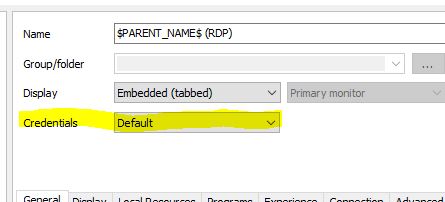
credtype.jpg
All Comments (8)
Hello,
Please consult these posts on our forum for more information on how to change the Credentials parameter in a session.
https://forum.devolutions.net/topic23912-programmatically-assigning-various-credentials-to-entries.aspx
https://forum.devolutions.net/topic18904-how-to-programatically-change-group-fiolder-properties-and-session-properties.aspx#post72155
Best regards,
Érica Poirier
Ah sorry, should have used the search function :blush:
Thx!
Btw... my code does work...
I just forgot to do a set-rdmsession $subcon afterwards :(
I don't get it. It's not working.
It looks like it's working on sessions, but not sub connections.
I have a host session with 1 subconnection. For both sessions credential type is set to inherited. If I copy the session, the preview shows me different results:
- copy subconnection - no credentialconnectionid
- copy parent (without subconnection) - no credentialconnectionid
- copy parent (with subcon) - credentialconnectionid for the subconnection only
Hello,
We have been able to reproduce your issue and a ticket has been submitted to our engineering department.
Best regards,
Érica Poirier
Great!
Did you also mention that the same goes for the batch edit function?
Hello,
Unfortunately, it is not possible to edit the properties on subconnections with the Batch Edit or the Batch Actions features. You must do it with PowerShell.
The newest release of RDM version 12.6.12.0 includes a fix to be able to save the modifications of the properties of a subconnection.
You can download it here https://remotedesktopmanager.com/Home/Download.
Here is an example to change the Credentials property of the first subconnection to set it to the Parent value.$sess = Get-RDMSession -name "ParentEntry"$sess.SubConnections[0].CredentialConnectionID = "E2CC9029-CA3A-4308-BA54-16D5029BC8ED"Set-RDMSession $sess -Refresh
Best regards,
Érica Poirier
Thx!
I tried my script but it didn't work at first. The difference with your example is that I did a set-rdmsession on the subconnection and not on the parent.
So set-rdmsession should be done on the parent, not subconnection, after changing subconnection properties.