
kidimbwi
Create folders from multiple credentials
this is it! Thank you for implementing this, it works as expected.
Create folders from multiple credentials
my pleasure, it really is a helpful feature and it would be great seeing it in RDM. Thank you for considering this feature and acting on it.
Create folders from multiple credentials
MacOS has a very handy feature, when you select many files you get an option - New Folder with Selection. this will create a new folder and move the files you selected into it.
with RDM, we may be handling hundreds of credentials and it would be nice if such a feature were available. a use case would be, a user is subscribed to thirteen streaming platforms and they have saved those credentials into RDM. the user then wants to group them all into one folder called Streaming. currently, they would have to create a folder first then select the credentials and move them into the folder manually.
with the New Folder from Selection feature, they would select the credentials, right click on them and click the New Folder from Selection option from the popup menu. they would edit the folder options(name, icons, etc.) as they wish and save.
this menu option could a time saver for users who handle a lot of credentials within RDM.
Thank you.
Download favicons automatically
excellent, thank you. i really appreciate it.
Download favicons automatically
apologies, i believed that since they were related i did not need to create a new thread for the second one. noted for future requests.
to answer our question, i am saving credentials from an external web browser using the devolutions web login addon.
Download favicons automatically
hello,
would it be possible to download and save the favicons of a site along with its login details when we are saving the details to RDM ? currently we have to go to the details and manually download favicons using the "Assign Favicon" link

speaking of the assign favicon link, can we have an option to assign favicons to multiple entries in RDM ? in this feature, we would select multiple entries from the navigation panel on the left, right click on them and select "Assign Favicons" from the right click menu.
Add dropdown menu to "Destination folder" in the Web Login extension
Thank you for the positive acknowledgement, hope to see this one soon.
Add dropdown menu to "Destination folder" in the Web Login extension
when adding a website to RDM through the Web Login browser extension, i'd like to be able to select a folder from a dropdown menu in the "Destination folder" field. currently we have to type in, by name, an alternative folder to the default "Devolutions Web Login" if you want to save it to a folder you have created for the website.

"Mark all Duplicates" option in "Duplicate Entries" reports dialog
as it is currently a user can only delete one duplicate entry at a time in the Administration>Reports>Duplicate Entries tool. would you consider adding a "Mark all Duplicates" option to the Duplicate Entries window so that a user can quickly select all duplicates and delete them ? a bonus would be to add checkboxes to the left of thr entries so that a user can multi-select entries of interest.
Thank you.
Password Analysis of Imported Passwords
much appreciated. hopefully the team'll be able to pull it off.
Thank you very much.
Set default web browser for web entries
Hello,
The option that Min refers you to is for the Web Browser entry type, not the Login (web) type.
In your case, you would need to update all your Login (Web) entries to indicate the browser that you would like to use. The best way to accomplish this, it's to use PowerShell.
Select your Login (Web) entries and click on Edit -> Edit (Special Actions) -> Custom Powershell Command and run the script below
$connection.DataEntry.WebBrowserApplication = "GoogleChrome"
$RDM.Save();
If you want to use something else than Google Chrome, let me know.
That being said, this will update your existing session. Regarding the new ones that you will create later, to create them with the proper parameter, I would recommend updating your Default Settings Template to make sure that the proper browser is selected at the creation. For more details on this feature, please consult https://help.remotedesktopmanager.com/file_template_defaultsettings.htm
Best regards,
Thank you very much. this is exactly what i wanted and also for showing me a feature of RDM i hadn't explored before. RDM is impressive!
big Thank you as well to @Min for posting the feature request.
Password Analysis of Imported Passwords
i've noticed that RDM cannot analyze passwords that have been imported from Sticky Password using the "Password Analyzer" tool. would you consider adding the ability to do so in future versions of RDM ?
Set default web browser for web entries
Thank you Min for pointing that setting out to me.
unfortunately selecting any thing else other than system default does not seem to work. i still have to select Firefox, Chrome, etc in the web entry properties page. could this be a bug ?
Set default web browser for web entries
i'd like to change the default browser that opens within RDM when i double click on a web entry. i've found that i can change this per entry through the web entry's properties page
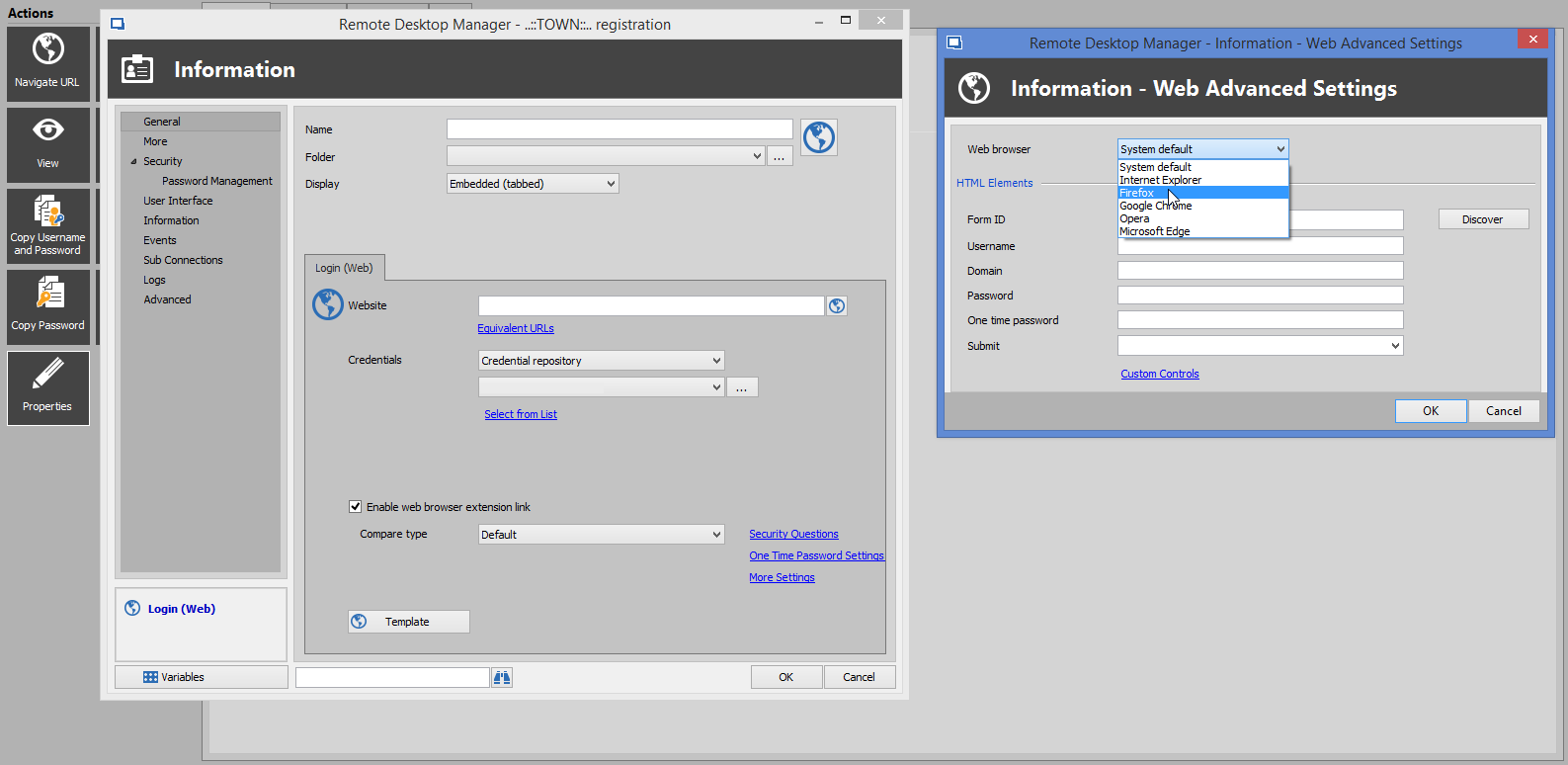
but since i have hundreds of web entries i'd like to apply either Firefox or Chrome as the default browser for all those entries. is there a setting to accomplish this in RDM ?
Error while importing from Sticky Password
Thank you for your response and the explanations. but the second paragraph highlights the issue exactly, ideally, once a connection is established, all three password list credentials would show up in the extension popup and work across all browsers that PVM's extensions are installed in. this is what we see in other tools such as Sticky Password.
i hope that the team will streamline the behaviour so that PVM can reach(and surpass) applications such as Sticky Password especially in the interaction between the main program and its extensions. otherwise i'm really enjoying the power PVM offers vs Sticky Password.
Error while importing from Sticky Password
Hello,
We'll have the change for the import in the next PVM build. I think it's much more usable this way, so I hope it works for you :)
For the other thread this is still on our todo list. When we do it it will probably be a special action rather than a behavior of the "add folder" button.
Regards,
just installed version 9.6 along with the latest extension version(6.0.6.0) and it is good to see all my multiple logins for a site on a single page, Thank you for that.
i have issues in use though, when trying to login to a site with multiple logins, i get the password list dialog with my logins. some issues with this approach:
- it requires a user to click in the dialog to select the login they want to use and so involves an extra step
- if i have three logins(a, b, c) and i select b from the dialog, only login b will be listed by the browser extension for autofilling. when i want to use logins a and c the password list dialog does not appear when visiting the site again and so the browser extension will only list login b.
- it seems that the browser extension for each browser has to have login details filled in from the password list dialog individually. if i select my details for Firefox, its browser extension saves the login but the same extension in Chrome will not have the login and i'll have to select the login from the password list dialog(which appears when i visit the site in Chrome) so that Chrome's browser extension can receive login details from PVM.
a few thoughts:
- is it possible to merge the password entries and password lists ? as it is now we have two entries per site and it looks a bit cluttered.
- could the browser extension be improved so that we do not have to select logins from the password list dialog. the logins will be picked up automatically by the extension once a connection to PVM is successfully established. this would also solve the issue of different browsers and their extensions having to be fed site logins individually.
once again, Thank you for taking my concerns/requests on board.
Error while importing from Sticky Password
Hi,
We added a special action for your last request. You can now select multiple entries right click edit / edit (special actions) / Move selection to new folder in the general tab. You'll then be prompted with a directory list where you can choose any folder or create a new one by clicking the "New Group" button.
Regards,
this is working as expected in version 9.6, Thank you very much for adding this.
Error while importing from Sticky Password
Beautiful! this is a welcome addition to PVM for me. Thank you very very much.
Error while importing from Sticky Password
Hello,
We'll have the change for the import in the next PVM build. I think it's much more usable this way, so I hope it works for you :)
Regards,
sweet! can't wait to test it out. i hope it works for me too :thumb:
on the other request, a special action sounds good also. like this menu item on OSX when multiple items are selected in finder.

Error while importing from Sticky Password
Hello Hubert,
Hello,
I think the way we could do this is regroup the different credential entries under one "password list" entry that matches with the domain. This means it would create a web entry (the Yahoo web entry) and one credential entry containing your three credentials for Yahoo. What do you think?
This would be perfect, it would greatly clean up the list* on the left for people like me that might have multiple accounts per domain(like the Yahoo example). Thank you for picking this up and coming up with an elegant solution.
* speaking of cleaning up the account list on the left sidebar, any progress on this feature ?: https://forum.devolutions.net/topic26825-move-multiple-selected-entries-into-a-new-group.aspx
Error while importing from Sticky Password
latest version 9.5.2.0 has fixed the import issue described in the last few posts, Thank you. however i've noticed another issue with Sticky Password imports(this affects RDM as well). Sticky Password groups logins from the same domain together, so if i have three yahoo logins they will all be grouped under Yahoo like shown in the screenshot below

the problem is with importation into PVM or RDM, only the first account appears in PVM/RDM. the rest appear as username/password combinations with no website attached. so if my three Yahoo accounts in Sticky Password are: User1/password1, User2/password2 and User3/password3 only User1/password1 will appear under Yahoo in PVM/RDM. User2/password2 and User3/password3 will appear on their own in the list unattached to any website(in this case Yahoo).
Error while importing from Sticky Password
Thank you Erica.i appreciate the detailed and timely information. it makes sense now
Error while importing from Sticky Password
Thank you for confirming the difference and for getting back to me so quickly.
if i understand you correctly, RDM supports web browser entries while PVM supports web information entries. could you please detail the difference between web browser entries and web information type entries ? and, if it is not asking too much, could you explain why PVM cannot support web browser entries like RDM does.
Error while importing from Sticky Password
Hello Hubert,
no unfortunately, here is my import window. the host column is empty. i'm using PVM and i see from your screenshot that you are using RDM and so i downloaded RDM to test out Sticky Password imports and it works as it should. this looks like a PVM specific issue

Error while importing from Sticky Password
have installed version 9.5.0.0 and i'm glad to report that the issue is fixed.
however, i do not know whether this is a bug or should be a feature request, the import only imports user names and passwords without their corresponding websites. so if i have imported my devolutions forum details it will only import my devolutions forum username and password without specifying that they are to be used on the devolutions forum. could you please look into this ?