Set default web browser for web entries
i'd like to change the default browser that opens within RDM when i double click on a web entry. i've found that i can change this per entry through the web entry's properties page
but since i have hundreds of web entries i'd like to apply either Firefox or Chrome as the default browser for all those entries. is there a setting to accomplish this in RDM ?
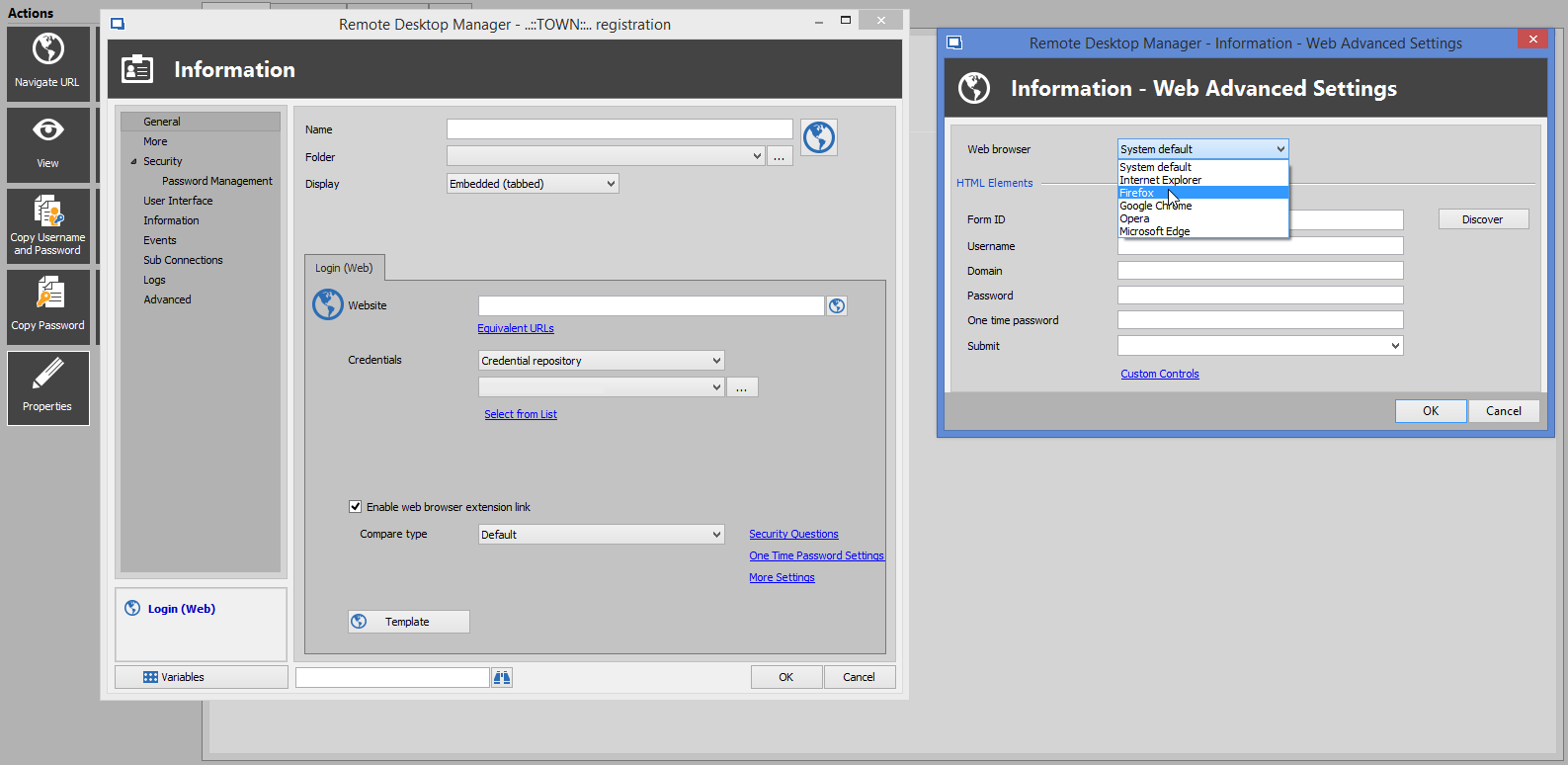
RDM.png
All Comments (8)
Hello,
yes, there is an option - you can find it at File => Options => Types => Web - this setting will be applied to all entries when the Web browser is set to "System default" in the session properties.
Regards,
Min
Thank you Min for pointing that setting out to me.
unfortunately selecting any thing else other than system default does not seem to work. i still have to select Firefox, Chrome, etc in the web entry properties page. could this be a bug ?
Hello,
The option that Min refers you to is for the Web Browser entry type, not the Login (web) type.
In your case, you would need to update all your Login (Web) entries to indicate the browser that you would like to use. The best way to accomplish this, it's to use PowerShell.
Select your Login (Web) entries and click on Edit -> Edit (Special Actions) -> Custom Powershell Command and run the script below
$connection.DataEntry.WebBrowserApplication = "GoogleChrome"
$RDM.Save();
If you want to use something else than Google Chrome, let me know.
That being said, this will update your existing session. Regarding the new ones that you will create later, to create them with the proper parameter, I would recommend updating your Default Settings Template to make sure that the proper browser is selected at the creation. For more details on this feature, please consult https://help.remotedesktopmanager.com/file_template_defaultsettings.htm
Best regards,
Jeff Dagenais

Disabled
Even i am facing the same issue.
Is there any other solution to this.. that could be quick and easy???
Please help.
https://freeaccountsonline.com/nitroflare-premium-account/
@sarajames,
There's no other solution, because even if you change your Login Web entries into Web Browser entries, if you launched them in embedded mode, you still need to select the appropriate browser in the properties of the session. If it's not properly configured, you still need to run a PowerShell script to adjust the existing one and modify the default template for the new ones that you will create.
Best regards,
Jeff Dagenais
@everyone,
I would like to make a precision regarding the option Web (HTTP/HTTPS) located in File -> Options -> Types -> Web.
This option will select the appropriate browser that you have selected in that area when creating a new Web Browser entry.
As example, if Firefox is selected in File -> Options -> Types -> Web, by default, in the dropdown menu of your Web Browser entry, the default web browser would be Firefox.
Best regards,
Jeff Dagenais
Hey Guys,
I've created a feature request - please post your ideas or just that you're also interested to this feature here: Global option for default web browser
Regards,
Min
Thank you very much. this is exactly what i wanted and also for showing me a feature of RDM i hadn't explored before. RDM is impressive!
big Thank you as well to @Min for posting the feature request.