
MBroadfield
Allow credential access from shortcuts
Interesting.
So if the Credential Repository entry is in the same folder as the Original Session, the new shortcut will be able to access the credentials?
That would work.
Thank you!
Allow credential access from shortcuts
Jean-Phillippe.
What I would like is a single folder to host multiple shortcuts, each shortcut inheriting the credentials associated with each respective target.
In other words, I have a session called "Session 1" that is in a folder named "Client A" and has a unique credential set which is assigned at the "Client A" folder level. "Session 1" is configured to inherit the credentials from its parent folder "Client A". I have a second session called "Session 2" that is in a folder named "Client B" and has a unique credential set which is assigned at the "Client B" folder level. "Session 2" is configured to inherit the credentials from its parent folder "Client B".
I would like to create a new folder and call it "Current Projects" and I would like to create a shortcut to "Session 1" which continues to inherit its credentials from the "Client A" folder - not from the "Current Projects" folder. I would then create a shortcut to "Session 2"and place it in the "Current Projects" folder as well, but it would continue to inherit its credentials from the "Client B" folder.
In this way, I would be able to copy shortcuts to my current projects into a folder that would sit at the top of my Tree, each of them inheriting their original credentials.
I hope that explains my request a bit better.
If this is not possible, I can continue to find my desired sessions in their current locations!
Thanks,
Allow credential access from shortcuts
Jean-Phillippe,
Thanks for the reply.
To be clear - I do not want to edit the credentials. I want the credentials associated with the Shortcut Target to be available to me when I use the shortcut, so this may be the missing piece I need.
I'll give it a shot and see if that will work for me.
Allow credential access from shortcuts
All:
I have many clients - and I will work on projects for those clients from time to time, sometimes months or even years between projects for a specific client.
I have a folder set aside for my "current" projects and place shortcuts to the sessions in that folder as those projects kick off and then remove the shortcuts as those projects close. Credentials are not available to those shortcuts. It would be great if they could be, so that I can log in to those sessions from the shortcut and have access to the Credentials when I have need to use them in the session.
Thank you for your consideration!
Would it be possible to add "Copy Password" to available options on "Website" entry?
This is true in the local datasource as well - if I switch to Default Credentials, the action buttons are available - if I use Credential Repository, they are not.
Would it be possible to add "Copy Password" to available options on "Website" entry?
I switched to SQL datasource just to test - and had the same behavior (no copy password option) - note that I am using "Credential Repository" - when I switched the Credential pick list option to "Default" and filled in the information I was able to see the action buttons.
Is that the expected behavior?
Would it be possible to add "Copy Password" to available options on "Website" entry?
Yes, I'm using a local datasource.
So does that mean that because I'm using local I will not have access to "View password"?
Would it be possible to add "Copy Password" to available options on "Website" entry?
I am using the Administrator account. I installed RDM with this account on my local machine - it is the Admin account on the local machine, I have full admin privileges everywhere on this machine.
I uninstalled RDM 2019 Enterprise and reinstalled it, using a new datasource and still don't seem to be able to gain access to the Permissions area - what am I missing?
Would it be possible to add "Copy Password" to available options on "Website" entry?
James,
Thanks for the response.
I'm sure it should be obvious, but I'm not seeing how to change permissions.
When I look at the Root settings - Permissions is not available to me:
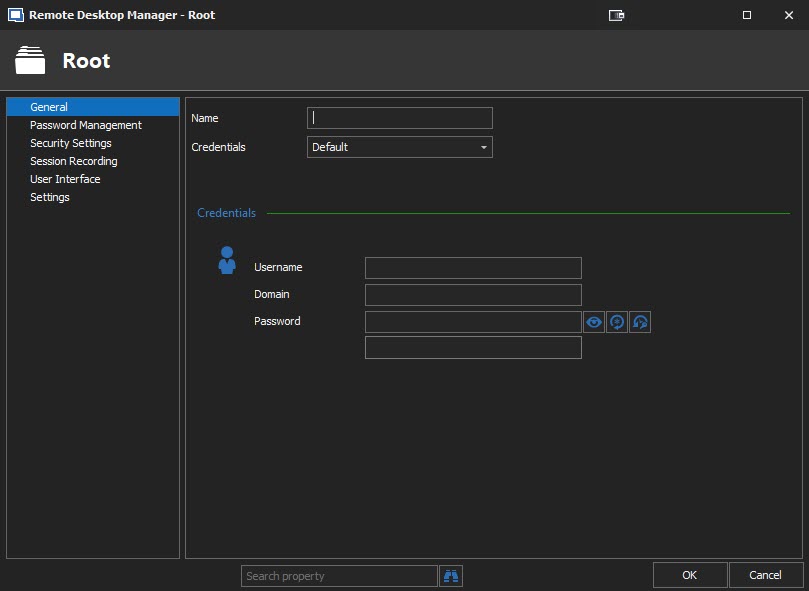
Thanks,
Would it be possible to add "Copy Password" to available options on "Website" entry?
Hubert,
Sorry - I should have included that in my original post. I'm using 2019.1.20.0.
When I create a new Website I have the following action buttons:
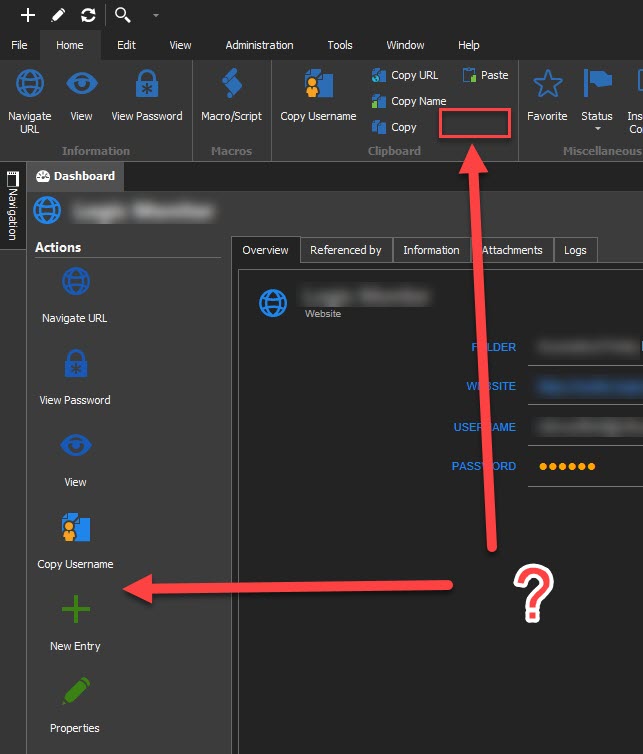
There is a "Copy Username", but no "Copy Password" available to me.
Would it be possible to add "Copy Password" to available options on "Website" entry?
I've been using the Session Type of "Web Browser" for much of my entries, and will probably continue to use it, but if the "Website" entry was able to access the Clipboard in the same manner as the "Web Browser" type (namely access to the Password, though URL would also be useful), I may use it more frequently.
Thank you!
Password History Sort change
I could not find an option to change the Password History Sorting method. If there is a way to do so, please let me know, otherwise, I think it would be preferable to have a Default Sort on the "Modified Date/Time" field as opposed to the "Modified By" field in the Password History Dialog.
Ideally, there should be a way to allow the user to choose their personal preference for sorting.
Thank you!
In Beta release 2019.1.15.0 I cannot access the Tab group pick list on some Entry types
@jswami972,
I updated to 2019.1.17.0 this morning, and the behavior is still present. I’m unable to access the Tab Group pick list on the User Interface tab.
Thanks,
Access to Ticket # through Insert Log Comment or Close Comment?
The Ticket # field is useful - but there are times when I'm in a rush and don't have it available when I open a session, but will in the middle of the session or at the end of a session have the information available.
It would be nice to be able to enter the Ticket # in the Insert Log Comment and in the Close Comment dialogs.
Thanks,
Unable to use Copy User/PW button when Logs Prompted (2019.1.15.0 64-Bit - Local Data Source
Jeff,
Just a point of clarification - When the sessions starts - before connection - I am indeed entering comments. That behavior is both expected and desired. I turned on the option for prompt for opening comments. But it is what happens after connection is already established which I'm reporting.
Here's the scenario: I start the connection, and I'm prompted for comments. I enter my comments and hit enter. The session opens. I work - open SSMS Studio, for example, and go about my business. I need my password, so I click on "Copy Password" and I get the Open Session Comment dialog. I have already entered my opening comments and have no need to enter any further comment and the dialog should not open a second time. If I enter comments on that dialog and hit enter/OK, I click the copy password a second time, I get another dialog, ad infinitum, until I interrupt the cycle as indicated in my opening remarks by using the context menu. Neither username nor password will be copied until the cycle is interrupted. As long as I stay in the process of entering comments and copying from the ribbon, the dialog continues to appear and I enter comments, close the dialog and copy, comment, close, etc. Less than ideal.
As a side note - for me - anyway, I wanted to use the Ticket # field - and it seems like the only place it is available for entry is on the Open Session Comment dialog. I have no other need for the open session comment - so if it were available in the close or insert log comment - that would be nice.
Thanks,
Unable to use Copy User/PW button when Logs Prompted (2019.1.15.0 64-Bit - Local Data Source
Once the Username or Password has been retrieved by other means (context menu, for example) I can use the buttons on the Ribbon without the dialog reappearing.
Unable to use Copy User/PW button when Logs Prompted (2019.1.15.0 64-Bit - Local Data Source
On any Session that has Log Entry "Prompt for comment on open", the Copy Username and Copy Password buttons on the Ribbon (Home/Clipboard) reopen the Comment on Open dialog.
I can work around the issue by finding the Credential Entry and using the Context menu options to copy the information (or by using the Event typing macro to fill in the information when initially connecting, for example), but it is a bit annoying, as if I attempt to retrieve the user name or password while in the session, the dialog will reappear.
Thanks,
Azure Portal Issues in Embedded Display using Chrome
Thanks for the quick response.
Azure Portal Issues in Embedded Display using Chrome
I'm running 2019.1.15.0 64-Bit.
When I go to the Microsoft Azure Portal to manage a client Azure AD and use the Embedded Display option with Chrome, I find that I do not have access to the Manage links under the "Azure Active Directory" (I did not go any further in my testing). When I open the Azure Portal using the External Display option with Chrome, I'm able to access Manage links without issue.
If I switch to Internet Explorer for the browser, the links are available in both Embedded and External Display options.
The workaround is to either open Externally or user Internet Explorer and both are palatable options, so this is not a critical issue for me - I just thought I'd mention it.
Matt
In Beta release 2019.1.15.0 I cannot access the Tab group pick list on some Entry types
I cannot access the Pick List on the Secure Note, Credit Card, Website, Bank Account, Email Account entry types (there may be others - I did not test all entry types). There are some entry types which work as expected (RDP/VNC/ARD) - and some which don't.
I am able to enter a value in the Tab Group field, and that value is then available to be picked on entries that do have access to the Tab Group Pick List, but there are entry types which cannot access the pick list at all.
Thanks,
Matt
RDM 2019.1.8.0 Session Icon Picker
If I can add to the discussion, I cannot load a custom image from disk with the new beta (2019.1.8.0). Load from Disk... does not work properly. There is no error, but the new custom image will not load.
The error that the OP mentioned no longer displays, and a different Icon can be selected now, but behavior that I first noticed in 2019.1.6.0 persists, in that I can select a custom icon as long as it has previously been loaded, however any time I try to load from disk, it appears that I'm able to select the appropriate file, but the icon space in the UI is blank, and the new icon is not available in the Custom Image List.
I have noticed that if I load an image from disk in a previous version, export the data source and import it into the new Beta, the Beta will display the Custom Image properly.
Thanks,
Matt
Embedded Sessions ; more than two
Very nice!
RDM 2019.1.5.0 Beta - Folder Sort Priority won't allow Positive Values
When assigning a sort priority at the folder level, I cannot assign a positive value. In order for the sorting to work I have to assign a negative value to all other folders in the grouping. I'm able to sort at the individual entry level without issue, so I'm not sure what the actual impact is, it may only be with folders.
Thanks,
Matt
Issues with embedded Chrome and Firefox web entries
This has annoyed me for weeks. Thank you!