
kernelsandors
trying to upgrade some RDM enterprise licenses to the newest version and...
Hi Gab, Thank you for the quick reply. Email sent.
Hi Tia,
Thanks again for being loyal and sorry for that situation.
My name is Gabriel And it will be my pleasure to help you for that renewal.
You simply have to send me an email to gcaronlandry@devolutions.net
Please include your company info and how many user you need and I will do your renewal right away.
Best regards
Gab
trying to upgrade some RDM enterprise licenses to the newest version and...
trying to upgrade some RDM enterprise licenses to the newest version and i click on existing customer and then put in one of the current license numbers and get Period to Renew License Expired!
hey i am not trying to renew, i am trying to pay for the new version. I believe i should be able to get a price break as an existing customer instead of paying the newbie price. Customer loyalty and all that;)
Maybe I am doing something wrong? Or is there an easier way.
Maybe a sales person should contact me?
TIA
September Poll: Who’s the Greatest IT Pro You’ve Ever Met?
I am the best i think. Seriously. Sure i don't know the most or even work the hardest, not even on my own team. But i get the job done and that's what counts. Every day. Unless i have the day off. In that case i don't usually answer my phone unless i know you and i think it might be easy.
It's all about the computer kharma fellas. It really is.
RDM 11.6.2.0 navigation pane rt click, edit entry extremely slow
Stefane 11.6.7.0 fixes this issue :)
Thank you very much.
Could you try the v11.6.7.0? It contains many improvements that should resolve your issues, at least I hope.
Note: v11.6.7.0 was rebuilt (this week) with the same version number. If you already have v11.6.7.0 installed either uninstall and reinstall or use the zip file and copy over the existing files.
http://cdn.devolutions.net/download/Setup.RemoteDesktopManager.11.6.7.0.exe
http://cdn.devolutions.net/download/Devolutions.RemoteDesktopManager.Bin.11.6.7.0.zip
Best regards,
RDM 11.6.2.0 navigation pane rt click, edit entry extremely slow
Jean the connections are based on info in the .RDM file stored on my machine. I don't think this is related to a data source. This is not a shared resource.
Hello,
Are you the only one connected to this data source or there's several users?
Does the data source is local or on a network drive?
Best regards,
RDM 11.6.2.0 navigation pane rt click, edit entry extremely slow
11.6.6 is still a 15-30 second delay for the Batch Edit (and I assume other rt click options to appear)
RDM 11.6.2.0 navigation pane rt click, edit entry extremely slow
Stefane, i downloaded the 11.6.6 update, installed it using the modify option in the installer. After the install the about screen still shows version 11.6.2. Tested the speed of the navigation pane, rt click, edit/ batch edit or edit entry, SEEMS faster,
made change, saveed. STILL SEEMS SLOW for save to work. Sorry i dont have benchmarks.
RDM 11.6.2.0 navigation pane rt click, edit entry extremely slow
Thank you Stefane, I replied to you via private message.
We are aware of this issue and are currently working on a solution. We should have something much faster (aiming for sub-second response times) within the next few days.
Is there any way we could get a hand on your data (no credentials). If you could export your data in .csv format including group I would have enough to reproduce the issue. Take a look at the file prior to sending it to make sure it does not contain any confidential information, substitute any text you feel necessary. You can send me the file via private message of the forum or via email (slavergne at devolutions dot net)
Best regards,
RDM 11.6.2.0 navigation pane rt click, edit entry extremely slow
evaluating this version and finding a huge delay for the rt click edit menut to populate in navigation pane and huge delay when anything chosen there and huge delay when closing rt click menu even when not changing anything. When i say huge its maybe 15-30 seconds but our companie's use of this part of the software requires many changes every day and this slows us down too much. it makes the software unusable. The previous version did not have this issue.
I checked forums and did not see other complaints of this. I tried running the software as administrator- no difference.
The data sources we use are quite numerous, about 1300, but i would think this would have no bearing on editing an individual entry.
attached screen shot of navigation pane and a highlighted entry that if rt clicked and edit entry is chosen will be very slow.
getting invalid file format when trying to import .RDG file from Remote Desktop Connection Manager
Hi,
I'm pretty sure that everything is fixed in RDM 11. They changed the format and we did the adjustment.
Regards
Maurice, thank you so much! this did the trick and now i got to upgrade to 11 too. I hope i like it.
Windows Active Directory Integration
Hello,
The topic about MariaDB is old, AFAIK MariaDB never did get that plugin as it was a commercial option. We will update the documentation.
As for your problem, unless you have hundreds of users, you could use SQL Server Express which is free. It's your only option. You will have to manage users permissions individually though, not a concern if the number of users is reasonable.
Best regards,
MAURICE THANK YOU!!
getting invalid file format when trying to import .RDG file from Remote Desktop Connection Manager
Enterprise edition 9.0.3.0 not sure what version of RDCM the file came from but the exports used to import successfully.
Also tried importing CSV file and got invalid CSV file error.
Can't provide file for security reasons but wondering if this has been a general problem and has a general solution.
I did search this website before posting.
Thanks.
Help!! all my sessions got blanked
Right Click just below "Local Data Source" and Select "Column Chooser", find the Name column and drop it back into the view.
that worked!!!!
thank you Stefane. I won't say that was easy because the first times i dragged it nothing happened but i guess it was where i was dragging it.
Excellent response and i am pleased this was actually user error. It's decent software and i didn't want to be disappointed.
Help!! all my sessions got blanked
Could you post a print screen of your main screen? Sometime the columns header in the tree view is empty.
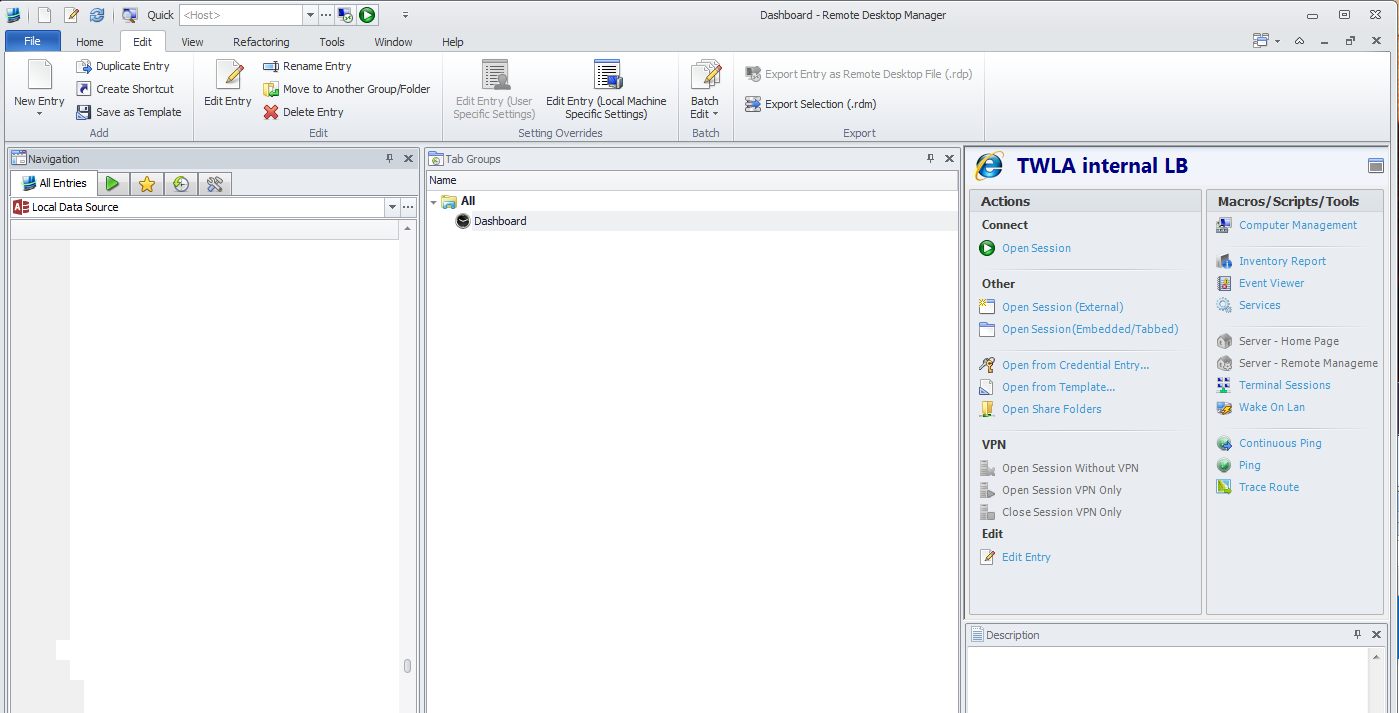
Help!! all my sessions got blanked
Have you tried Window -> Reset Layout?
Did you have offline enabled? If so, go find the file and make a backup of it just in case. Look for offline.db or offline.mcdf in %localappdata%\Devolutions\RemoteDesktopManager\...
yes Reset window layout was the first thing i tried. All that does is refresh the navigation pane and shows only the Local Data Source again.
Help!! all my sessions got blanked
i use this program every day to manage over 300 servers.
Today, too easily i accidentally clicked and dragged all my sessions to the data sessions button and BAM now they are all gone.
I don't know how to restore this except from a VERY old RDM file that is missing changes and would almost be useless.
How does this product allow such destruction by barely doing anything ?
More importantly how do i restore it???
i checked FAQ already. nothing.