Help!! all my sessions got blanked

i use this program every day to manage over 300 servers.
Today, too easily i accidentally clicked and dragged all my sessions to the data sessions button and BAM now they are all gone.
I don't know how to restore this except from a VERY old RDM file that is missing changes and would almost be useless.
How does this product allow such destruction by barely doing anything ?
More importantly how do i restore it???
i checked FAQ already. nothing.
All Comments (9)
Have you tried Window -> Reset Layout?
Did you have offline enabled? If so, go find the file and make a backup of it just in case. Look for offline.db or offline.mcdf in %localappdata%\Devolutions\RemoteDesktopManager\...
Stéfane Lavergne
yes Reset window layout was the first thing i tried. All that does is refresh the navigation pane and shows only the Local Data Source again.
Could you post a print screen of your main screen? Sometime the columns header in the tree view is empty.
David Hervieux
What data source type do you use?
Stéfane Lavergne
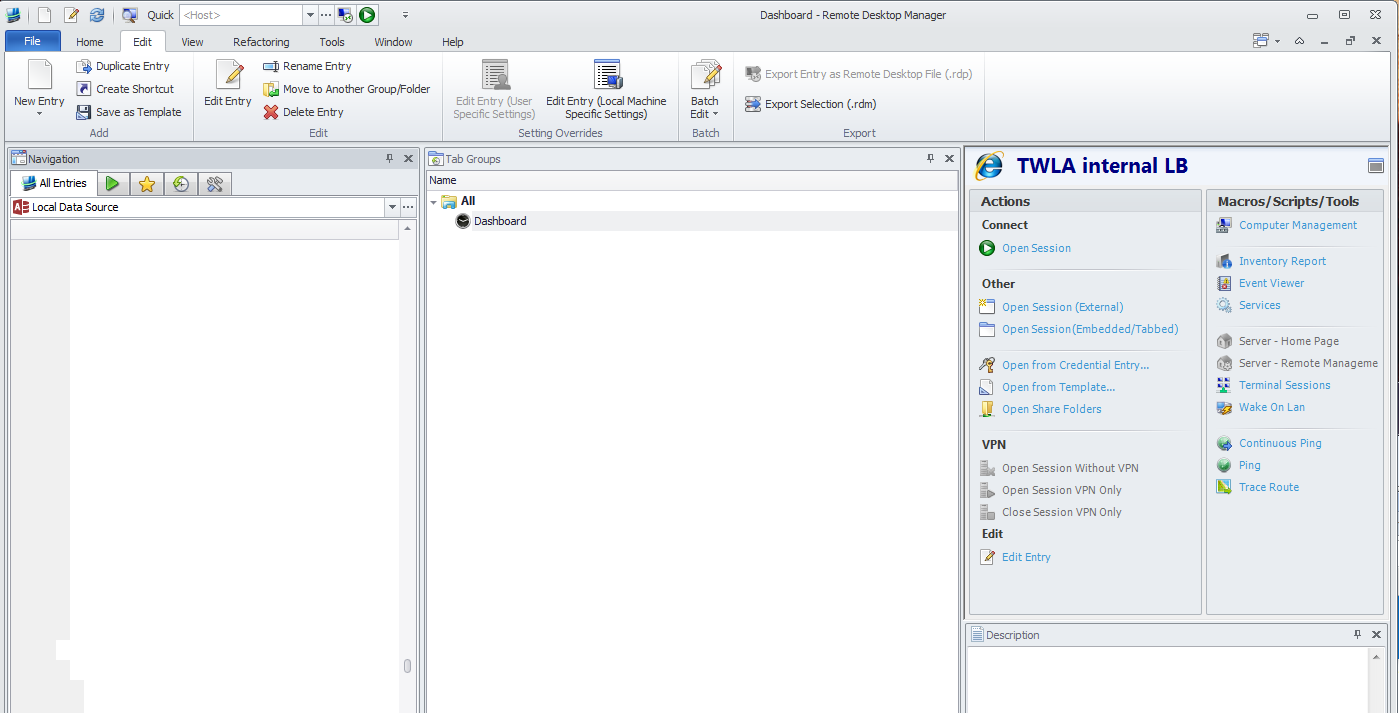
RDM.bmp
Right Click just below "Local Data Source" and Select "Column Chooser", find the Name column and drop it back into the view.
Stéfane Lavergne
that worked!!!!
thank you Stefane. I won't say that was easy because the first times i dragged it nothing happened but i guess it was where i was dragging it.
Excellent response and i am pleased this was actually user error. It's decent software and i didn't want to be disappointed.
I'm happy to hear all is good.
Might be a good time to setup a backup ;-)
Stéfane Lavergne
Hi,
You can reset the tree view columns in the Reset Layout but it's not checked by default.
Regards
David Hervieux