
Peter01
RDM for Mac and pinwheel of death
600 entries, man! I thought my 72 or so was alot haha
Well it's not just me, we use it with team counting 20 people.
I'm trying to deploy RDM as the default for all RDP,SSH en other webgui connections. then the number of entry's is going up fast.
RDM for Mac and pinwheel of death
Great, now I can't sleep ;-)
RDM for Mac and pinwheel of death
Jeff,
we now have 600 entry's, i expect it to grow to about 1000 entry's soon.
We just started using it.
When will the update for the double 2FA popup be released?
Gr,
Peter
RDM for Mac and pinwheel of death
Here also still the same problem.
Are you using 2FA?, it "feels" like the problem is after a small time of inactivity.
gr,
Peter
SSH Jump/Gateway - Feature Request
is this feature already implemented?
This is something we want to use.
thanx
Peter
RDM for Mac and pinwheel of death
Wow thats amazing fast!
thanx
Peter
RDM for Mac and pinwheel of death
Just so I understand. It prompt you twice for the two factor but you're still able to connect, right?
Yes, thats correct.
And when you say it expands all folder, are they still expanded when you start the application?
No, they are back again the way you left it, some expanded some collapsed
RDM for Mac and pinwheel of death
Xavier,
This happens always.
Also when i close RDM, it expands all the folders (where the entry's are located). this takes a lot of time.
gr,
Peter
RDM for Mac and pinwheel of death
I have the same problems, mainly after some inactivity.
We are using Devolution server with Google authenticator for 2fa.
After starting RDM it comes 2 times with a popup box for 2fa.
it feels like a problem with 2fa, don't have proof.
Database error's in the application log.
What to do?
in the RDM application log;
[18-1-2016 11:10:56]ERROR SILENT The peer connection was lost.
[18-1-2016 11:50:01]ERROR SILENT The peer connection was lost.
[18-1-2016 11:51:01]ERROR SILENT The peer connection was lost.
[18-1-2016 12:42:15]ERROR SILENT The peer connection was lost.
[18-1-2016 12:44:43]ERROR SILENT The peer connection was lost.
[18-1-2016 13:35:07]ERROR SILENT The peer connection was lost.
[18-1-2016 13:51:37]INFO Offline file - Database disk image is malformed, trying to delete the file: /Users/petervanderveen/Library/Application Support/com.devolutions.remotedesktopmanager/9742A73F-4D0F-4C88-AF7A-54AA51C12F9D/offline.db
[18-1-2016 13:51:37]INFO ClearCache - Offline file has been deleted, recreating new file
[18-1-2016 13:51:37]INFO Offline file - Database disk image is malformed, trying to delete the file: /Users/petervanderveen/Library/Application Support/com.devolutions.remotedesktopmanager/9742A73F-4D0F-4C88-AF7A-54AA51C12F9D/offline.db
[18-1-2016 13:51:38]INFO ClearCache - Offline file has been deleted, recreating new file
[18-1-2016 13:51:38]INFO Offline file - Database disk image is malformed, trying to delete the file: /Users/petervanderveen/Library/Application Support/com.devolutions.remotedesktopmanager/9742A73F-4D0F-4C88-AF7A-54AA51C12F9D/offline.db
[18-1-2016 13:51:38]INFO ClearCache - Offline file has been deleted, recreating new file
MAC OS-X El Capitan 10.11.2 (15C50) and RDM 3.0.8.0
Embedded RDP session with VPN connection not working
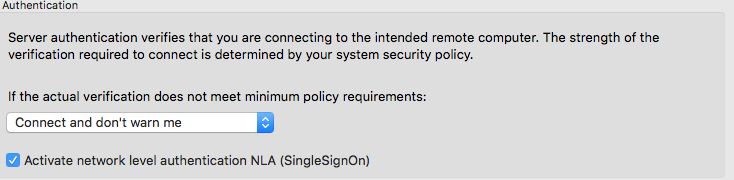
I already found the problem, i had to enable the NLA;
Embedded RDP session with VPN connection not working
Benoit,
Thats correct, started the VPN before starting RDM and first RDM and then the VPN.
both isn't working.
Error:
Failed to connect to host 131084
Gr,
Peter
Embedded RDP session with VPN connection not working
I can't use a embedded RDP (docked or undocked) connection when the using an external (Array Networks) VPN connection.
I can ping the server and also connect to the with the Microsoft RDP client (set session to External).
Other servers with VPN with the same OS work with the embedded client.
Do you know whats wrong?
Gr,
Peter
MAC OS-X El Capitan 10.11.2 (15C50) and RDM 3.0.8.0