SSH Jump/Gateway - Feature Request

I recently started using RDM in place of MobaXterm. One key feature I used in MobaXterm is the SSH Jump Host / Gateway functionality for SSH tunnel connections. I am trying to sort out how to achieve the same connectivity in RDM via the SSH and SSH Host built-in clients (without using Putty if possible).
Can someone provide step-by-step instructions for setting up an SSH connection through a jump host? I checked the documentation and forums and did not come across any clear references. (I tried setting up an SSH tunnel and configuring it as a VPN connection in the SSH Host session but have not managed to get it working, if it's possible.)
RDM Client--->SSH Jump/Gateway--->Internal SSH Server
An example screenshot of the MobaXterm setup:
Thanks!
edited by srich on 7/26/2014
edited by srich on 7/26/2014
edited by srich on 7/27/2014
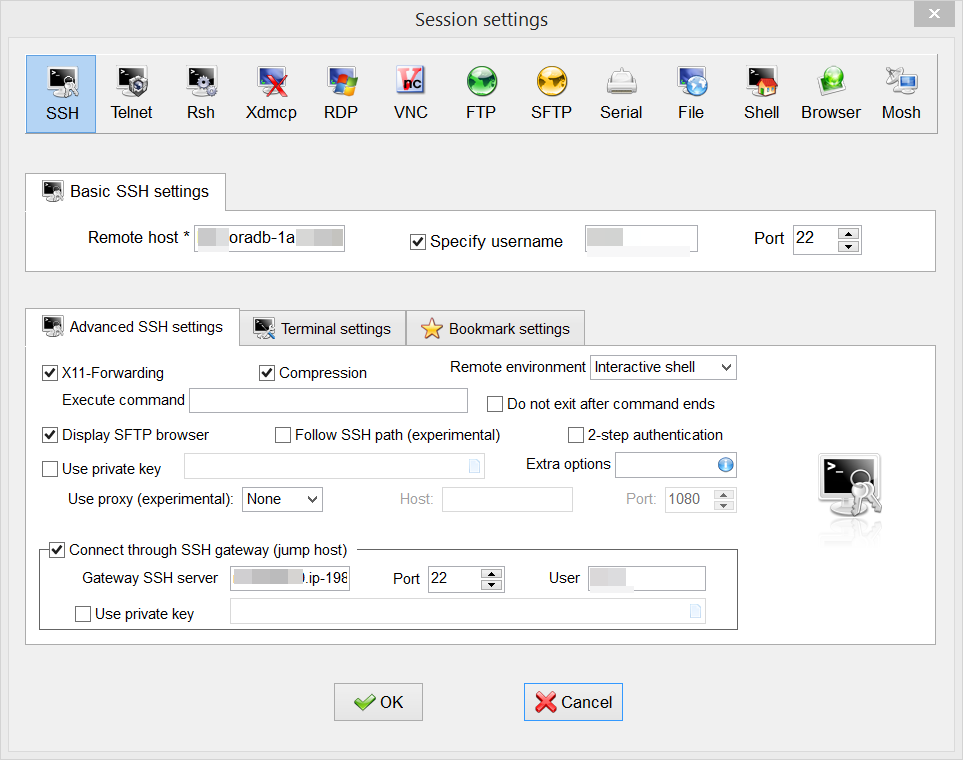
2014-07-26_11-03-20.png
All Comments (14)
Our embedded thirdpart (Rebex) does not support that. You can do that with putty. I think we also have an add-on for MobaXTerm
David Hervieux
Thanks for confirming. It does look like adding SSH tunneling using Rebex is possible with some changes to the RDM code. Can this thread be moved to the Feature Request board, since SSH tunneling is a fairly common use case that would make RDM a more complete solution for the UNIX/Linux crowd?
https://www.rebex.net/sftp.net/features/ssh.aspx#tunneling
Hi,
Maybe we have this feature and I don't even know. I will check with André, he's the one for SSH.
Thank you for the link by the way
David Hervieux
It would be great to add this feature. We would like to see this option as well. Ability to SSH via SSH jump host or gateway.
Any news on this using Rebex guys?
I got it to work through putty but would rather use the built in agent.
Upon using RebEx SSH Shell or RebEx SSH as the connection type for the jump host it fails to connect to the secondary box, if I create an entry with the same settings but with Putty as the target, it works.
Myles
is this feature already implemented?
This is something we want to use.
thanx
Peter
Hi Peter,
I might be wrong but I think that what we have in the SSH Tunnel entry or the Port Forward entry. This is based on Putty so it means that if you know how to do it with Putty we can do it.
Regards
David Hervieux
How do you do this? I want to ssh to one computer, than from that one to another one.
Me - > Tunnel? - > End point
[192.168.1.10] - > [192.168.1.11] - > [192.168.1.12]
Could someone please post a print screen of the settings?
Hello Pelle,
As of now, how do you do your SSH to one computer, than from that computer to another one outside RDM?
With this information, it would be possible for us to guide you properly.
Best regards,
Jeff Dagenais
Hi, as of now I basically caveman and just ssh to one machine, then once connected I ssh to the next. I use putty, haven't tried that much with tunneling, seems to require some server or some sort. Will try in putty stand alone and get back with the results. However I've manage to do it in WinSCP, there I just go to the tunnel setting and enter the middle man as ip, username, password and I got the files in a sec.
Hello Pelle,
Maybe you can try to create you a SSH Tunnel session and use this session in the VPN tab of your SSH Shell session.
Best regards,
Jeff Dagenais
I am trying to get this SSH jump feature to work, and it doesn't, no matter which type of ssh connection I try (Putty, Rebex, etc).
I am trying to connect from external IP address to external IP address in another country (direct connection works just fine if I use putty), then I want to connect to local address from that host (f.ex. 172.21.9.1), and I can do that from shell which I have opened previously, by typing command. However, if I try to put it into jump setup with RDM (latest), it hangs entire RDM and nothing is happening, not even connect to the jump host.
Can anybody point me to a guide step by step how to set it up? I want to connect to that internal host with 1 click, and so far it's not working.
Yes, I bought separate license for Jump functionality, it's there.
Hello,
The documentation can be found on http://help.remotedesktopmanager.com/howto-setupsshtunnel.htm
Its a simple version now, I realized as I was doing it that there are so many scenarios depending on the technology at play that we would need samples for the most popular ones.
Best regards,
Maurice
Can we revisit this? SSH Tunneling isn't really the desired feature here as that mucks with local networking, looking for nested SSH sessions. This can almost be achieved with typing macros, however things get messy when you're already using typing macros to do something on the remote box.
Example:
You have a router on the public Internet which you can SSH to. Also connected to that router (but not accessible via the public Internet where you are) is a switch. The router has an SSH client and from the router you can type "ssh 192.168.0.10" and you will be prompted for a password (it inherits the username you are connecting from, or you can add "ssh -l myusername 192.168.0.10" to override).
So the process would look like this:
SSH Session to Router on Public Internet
Typing Macro to enter the enable password (which due to a bug the $TOOL_PASSWORD$ doesn't work in the macro unless you use a link to a typing macro, posted that in another thread).
At this point you've use up your typing macro because of the enable, so you can't use the typing macro to execute "ssh 192.168.0.10", so somehow that text needs to be executed. Think of a session that executes a previous session first (linked session) to nest the SSH components.