
AJStevens
****** RDM 13 SIGNIFICANT CHANGES ******
Hi David,
I'm noticing a lot of random entries appearing in my Recent tab... I have not initiated any connection (RDP or other) to these machines.
All I can think of is they maybe new computers added on the domain and after the Synchronizer added them, they now count as a recent entry?
This was not the behaviour previously, and I wish it to return to only being recent connections I have made.
However if some want this functionality, can I recommend a new tab in the Navigator "New Entries" ? Lists new entries created either manually or via Synchronizer.
Also still waiting on splitting out the long name field into Name and Location, and be able to remove the empty Repository column, and the unnecessary (but some may like to have it visible) Date column, sorted by most recent date is sufficient for my use.
Thank you
****** RDM 13 SIGNIFICANT CHANGES ******
Hi David,
The 13.5.7.0 Beta update that was released yesterday has the session right-click context menu back in the Recent entry list, thank you, that's much easier now.
For the next minor release, can you adjust the recent entry list (or let me know if it's a setting I can change now), to remove the location of the item from the "Name" column. Entries appear as:
Name (Path\to\Entry)
Really for a "Name" field, it should just be Name, I'm all in favor of a separate column for location that contains that, would also be nice to control what columns are there and in what order as well.
****** RDM 13 SIGNIFICANT CHANGES ******
Thank you, will eagerly await its release.
****** RDM 13 SIGNIFICANT CHANGES ******
Just updated to 15.5.6.0, what happened to Navigation, Recent entries? Right-clicking anything in there ONLY gives "Clear Recent Entries", I'm unable to get the right-click context menu for any of the recent entries to be able to connect to them with a variety of options (admin/console, prompt for credentials, select credentials, etc. etc.)
I tried enabling "Hidden special "Open..." actions in the dashboard : File - Options - User Interface - Dashboard" and restarting RDM in case that was it, but no change, also did Window, Reset Layout as well, hasn't fixed it.
Every few updates something happens to mess about with the interface and put a spanner in the works for my workflow.
Please can you tell me what setting I need to do to get this back, or release a hotfix to fix this please, VERY irritating.
Favourites Panel
Ok, got it, I had to grab it and drag it and get the placements to popup, then managed to get it back to being a left panel.
I expected "Dock" to have done that for me on a right-click.
Also, I found the other threads on moving the icons on the Navigation pane back up to the top and selected that option.
So I'm all sorted now, yippe! Happy with the interface layout again, thank you.
Navigation Panel not re-docking
Ok, got it, I had to grab it and drag it and get the placements to popup, then managed to get it back to being a left panel.
I expected "Dock" to have done that for me on a right-click.
Navigation Panel not re-docking
11.9.4.0 installed.
I tried the (new?) "Dock As Tabbed Document" option for Navigation, but now I can't change it back as "Dock" and "Dock As Tabbed Document do the same thing and Dock it as a tab again if I drag it out of being a tab.
I normally have it as just an unpinned side panel, so I click it and it pops out, select what I want and it collapses again, trying to get this back but I can't now.
Bring Back Option to Put Navigation Tabs to Top
Excellent, thank you.
Any way to put the buttons for Private Vault, Opened Sessions, etc back up on the top?
Fantastic, thank you!
Favourites Panel
11.9.4.0 installed, no change.
I tried the (new?) "Dock As Tabbed Document" option for Navigation, but now I can't change it back as "Dock" and "Dock As Tabbed Document do the same thing and Dock it as a tab again if I drag it out of being a tab.
Ok, I've closed and reopened Remote Desktop Manager... hoping to sort out the Navigation docking problem... nope, still the same.
However, some good news... this option in settings now appears to do something, I tried this when I originally had the problem, but it made no difference, I hadn't checked the setting for the previous betas though, so possibly one of them fixed this option, but I didn't check it was off, it maybe off on my desktop installation.
Now, if I can just get my Navigation pane back to normal... everything will be good.
Favourites Panel
I normally don't have the Navigation pane pinned, had to do that for the screenshots.
I'm on 11.9.2.0 now and still the same problem. Additionally, the buttons/icons for "All Entries/Opened Sessions/Favourites/Most Recently Used/Tools" on the Navigation pane are now on the bottom of the pane instead of the top.
I didn't ask for that, how can I move them back to the top again please?
Favourites Panel
Yes, version on the laptop is 11.7.6.0
Favourites Panel
Ah, I spoke too soon, I got confused.
On my desktop it's fine, but on the laptop it isn't.
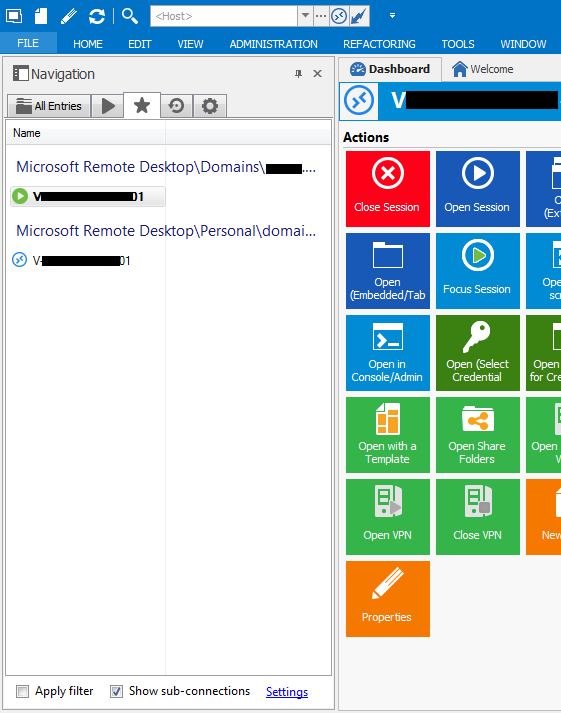
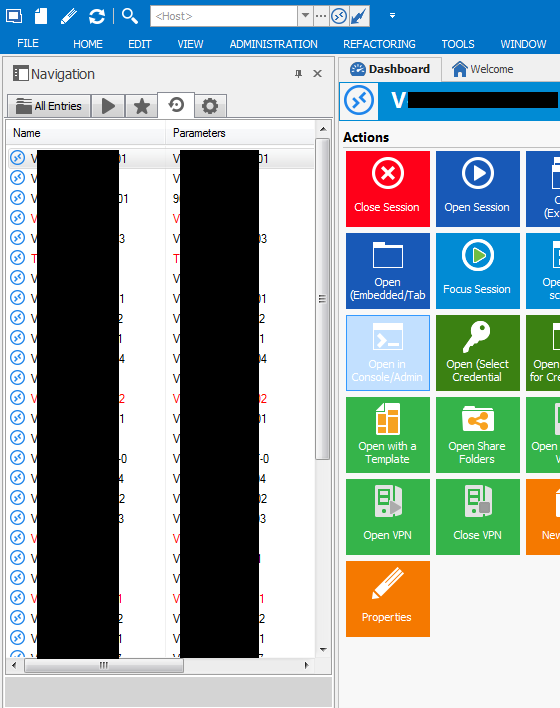
I've selected "List", but it appears as below. Laptop resolution is 1366 x 768.
Favorites tab in "List" mode:
Recently Used tab:
Favourites Panel
Hi Hubert,
I updated to 11.7.6.0 this morning and it's appearing as per your earlier screenshot now.
Favourites Panel
Hmm... whatever I try it doesn't look quite right, what you have pictured is what I would like by my "List View" has the Tree location above each item and the Font size is a bit on the large side compared to "Open Sessions" and "Most Recently Used" tabs.
Favourites Panel
I'm guessing this got added recently?
I don't have that many favourites, I'd like to switch it back to a list view without the folders/sub-folders structure, I tried turning off "Show groups in the favourites list" and restarting the program but it didn't appear to change anything, using 11.7.3.0
On logoff of session, flashes back to Dashboard even after going to a different session
Ok, yeah downloaded and installed the beta (was trying to find someway of doing it within the program), that's fixed it.
Was hoping for a new prod release, but at least it's fixed now, slight reduction in fowl language and frustration in IT now.
On logoff of session, flashes back to Dashboard even after going to a different session
Good, glad I'm not the only one and work has already started on this.
It is extremely annoying, I spend all day connecting between servers and logging off and switching back to another existing connection, just as I'm back to that, the log off complete in the other tab and I'm thrown to the Dashboard tab.
Please release a fix for this as soon as possible.
multiple users for one connection
Thanks Maurice, didn't see that option there, works a treat.
RDM is great and much better than visionapp, it could do with a setup wizard for new users with some of these common questions though as a bit in the deep end to start with, but worked out the default template settings I needed, inheriting credentials, adding them, and syncing from AD (sadly not in that order, thank heavens for Bulk update), it now does everything visionapp did for me and more, love the plugins such as KeePass as well.
multiple users for one connection
Hi, I'm using the HOST method with alternative credentials you've described above as a workaround.
I found RDM would not allow me to connect with another set of credentials... I actually need to be logged in to the same server twice as different credentials simultaneously, it would just shift focus to my current connection to that server.
Is there a better way or can RDM be patched to permit multiple connections to the same server using the right-click "Open with Parameters" option as I originally expected to be able to do?