
Wesley
Cannot search username anymore
Strange for me and my colleagues multiple search options are not active anymore.
After clicking the username field it works again
Thanks :)
Cannot search username anymore
Goodmorning,
Before the last update we could search for username on the search field.
When we try it now we dont get a result.
RDM crash on Server 2016
Even now it crashed again.
I just copied something in Notepad++ on my laptop and RDM crashed again.
The copy part was outside RDM and it stil crashed!
RDM crash on Server 2016
Im working this morning and it crashed 4 times now.
With every crash there isnt a Credential Manager pop up.
The only thing i and others here notice is that when you use copy paste in the session or copy username password, rdm wil crash sometimes.
There arent any other popups that comes when opening a session.
RDM crash on Server 2016
Good morning,
We are working on a Citrix server based on Server 2016 and RDM is crashing randomly.
Can you please help us on fixing this issue?
Searched the forum and found the following:
- Run SFC: no problems found
- Run .Net repair tool: only found reregister installer service (didnt do this)
- Tried x64 and x86 exe and both got same issue
Here are 2 logs i found:
RDM log:
-------------------------
<?xml version="1.0" standalone="yes"?>
<Data_x0020_Export>
<Table1>
<Date>2020-01-11T10:07:07+01:00</Date>
<Version>2019.2.24.0 - 64-bit</Version>
<Type>2</Type>
<Message>System.IO.IOException: Incorrect function.
at System.IO.__Error.WinIOError(Int32 errorCode, String maybeFullPath)
at System.IO.FileStream.BeginWriteCore(Byte[] bytes, Int32 offset, Int32 numBytes, AsyncCallback userCallback, Object stateObject)
at System.IO.FileStream.FlushWrite(Boolean calledFromFinalizer)
at System.IO.FileStream.Dispose(Boolean disposing)
at System.IO.FileStream.Finalize()</Message>
</Table1>
</Data_x0020_Export>
-------------------------
Windows Event log:
-------------------------
Faulting application name: RemoteDesktopManager64.exe, version: 2019.2.24.0, time stamp: 0x5e151602
Faulting module name: ntdll.dll, version: 10.0.14393.3241, time stamp: 0x5d786bef
Exception code: 0xc0000374
Fault offset: 0x00000000000f7a33
Faulting process id: 0x66d4
Faulting application start time: 0x01d5c9eb32d36db7
Faulting application path: C:\Program Files (x86)\Devolutions\Remote Desktop Manager\RemoteDesktopManager64.exe
Faulting module path: C:\windows\SYSTEM32\ntdll.dll
Report Id: b1897a24-b032-423a-810c-dc6c211f8462
Faulting package full name:
Faulting package-relative application ID:
-------------------------
Can't open "server" while in offline mode.
This support is in 1 word: PERFECT!
I can confirm its also working on our end.
Thanks again! ;)
Can't open "server" while in offline mode.
Perfect and thanks for the quick support / release!
Can't open "server" while in offline mode.
Thanks again!
You got any idea when this will be released?
We use the program allot in offline mode and can only connect outside the office by vpn.
Can't open "server" while in offline mode.
Thanks for your reply.
The problem is the "allow offline" this is stated by default.
Where can i change the default option for this instead of using batch edit?
Can't open "server" while in offline mode.
I get the following error when i try to open a server (rdp) in offline mode.
Can't open "server" while in offline mode.
This problem is there after updating to version 13 this morning
How can i fix this?
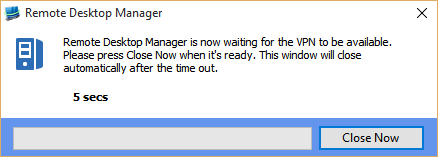
VPN popup
Microsoft VPN (pptp) with external pbk file.
VPN popup
Is there a way how i can disable this message after starting a vpn connection?
I searched but i cannot find it.
Copy paste from local > session / session > local
so, select the entries then, right-click - edit - Batch Edit - Batch Actions, custom powershell command
Enter the following command
$connection.UsesClipboard = $true;
$RDM.Save();You will see a count of sessions that have been changed.
Works perfectly!
Thanks.
VPN options are greyed out in 11.0
Hello,
This should be fixed in the next update.
Regards,
Just installed 11.0.1.0 (with vpn advanced fix) but the problem is still there.
Copy paste from local > session / session > local
Thanks David, this fixed the problem.
VPN options are greyed out in 11.0
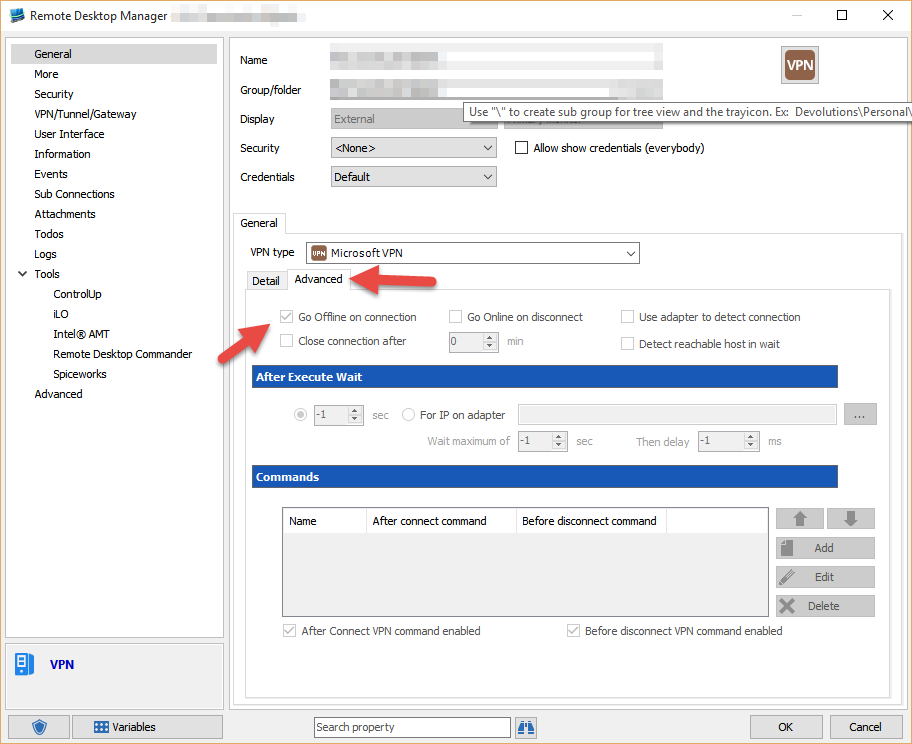
I just add a vpn connection on RDM 11.0
I cant select the advanced options "Go offline on connection"
When my collegae, he still uses v10, edit this it works.
Is this a known bug?
Copy paste from local > session / session > local
Good morning,
With the last update 11.0.0 my copy paste from local to session and the other way does not work always.
On some servers its working and on the some not.
Its working and not working on the following OS:
- Server 2008 R2
- SBS 2008
- Server 2012
Is this a known bug? With version 10 there was no problem to copy / paste.