Copy paste from local > session / session > local

Good morning,
With the last update 11.0.0 my copy paste from local to session and the other way does not work always.
On some servers its working and on the some not.
Its working and not working on the following OS:
- Server 2008 R2
- SBS 2008
- Server 2012
Is this a known bug? With version 10 there was no problem to copy / paste.
All Comments (11)
Hello Wesley,
Could you edit your connection to verify if the clipboard sharing is enabled? We have fixed an issue where it was always enabled even when the value was unchecked.
Regards
David Hervieux
Thanks David, this fixed the problem.
Having this same issue. None of my entry's have that enabled now. Do i need to go to each entry(80+) and enable the clipboard or is there an easier way?
No no, powershell to the rescue
Its even better now since we have the Batch Actions.. http://help.remotedesktopmanager.com/batch_actions.htm
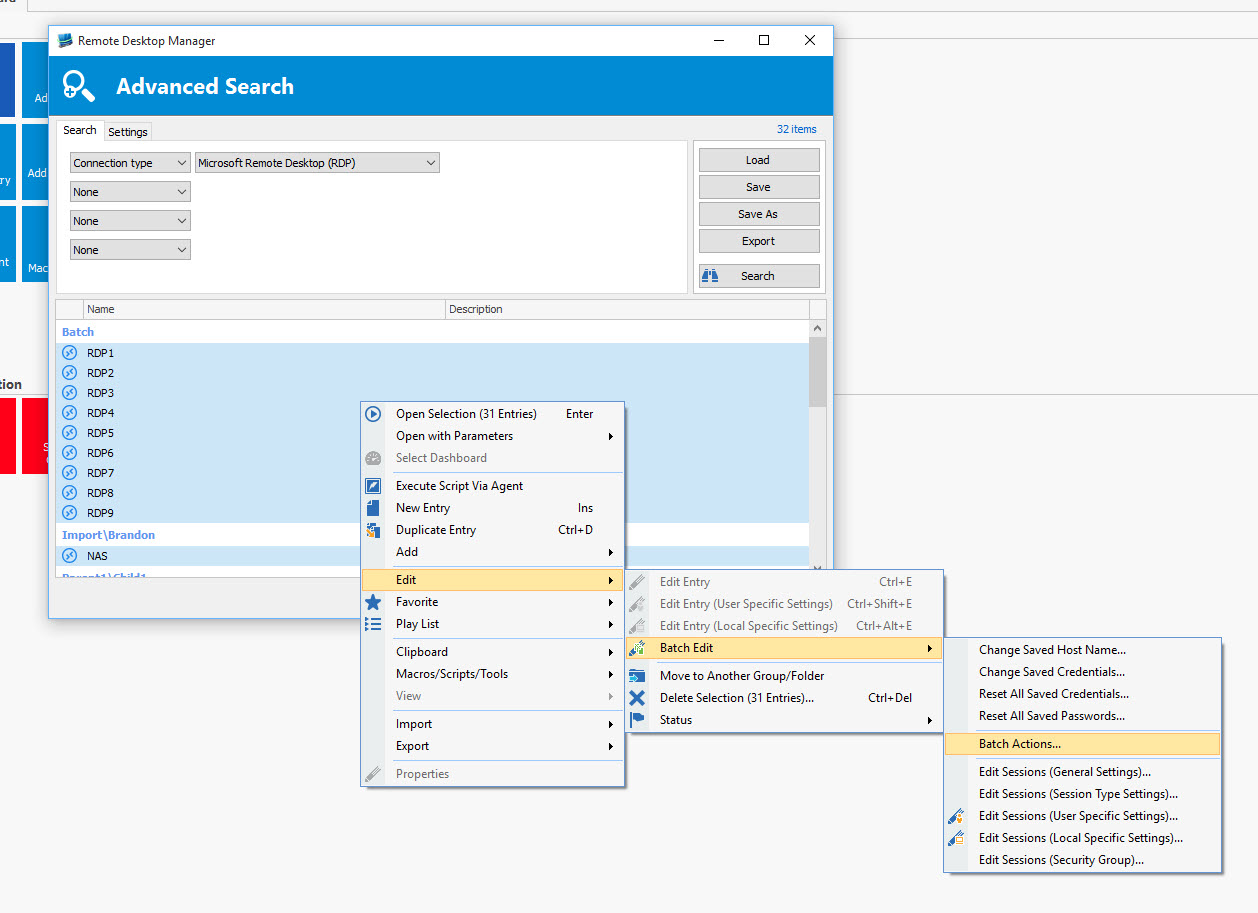
You can either multi select your entries manually, or my favorite, use the Advanced Search to search for connection type = RDP. http://help.remotedesktopmanager.com/advanced_search.htm (after the search press "select in navigation pane")
give me 2 and I'll post the command to run
Maurice
so, select the entries then, right-click - edit - Batch Edit - Batch Actions, custom powershell command
Enter the following command$connection.UsesClipboard = $true;$RDM.Save();
You will see a count of sessions that have been changed.
Maurice
I'm a freeloader and currently using the free version. Don't see that batch edit in the free version...
ouch, let me think...
Best regards,
Maurice
Works perfectly!
Thanks.
Hi guys, i have used the command on the root folder session (700 entries)
$connection.UsesClipboard = $true;
$RDM.Save();
For my surprise I have lost all the sub connections, the ones that were inside of a VMware session.
I have restored my backup and for the moment i am doing it manual.
Any other idea to try not to lose the sub connections?
Hello Paul,
Did you do a View -> Advanced Search to retrieve all your RDP sessions, select all of them and performed an Batch Edit on the sessions to enable the Clipboard?
Best regards,
Jeff Dagenais
2015-10-16_12-59-21.jpg
H Jiean-François Dagenais,
Your advice was totally right.
I have changed all my RDP sessions in minutes without loosing any session.
Thanks.
Regards