
Adriano
RDM not responsive
Hi,
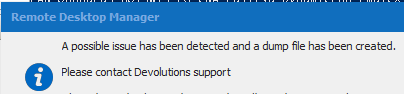
I am happy to report that I was able to work without a freeze for about two weeks and that another one occurred, but was caught by RDM (see screenshot).
The corresponding ThreadDump I have just sent you @Stefanè.
Thanks & best Regards
RDM not responsive
Hi,
unfortunately, there is no end to this, just now with only one RDP tab open, after RDM was open for a few days it happened twice and last time overnight (not responsive).
Hints:
- I was able to get focus this time for password and then TOTP input. Afterwards, the open "Performance Profiling" window (Profiler level 8192) also appeared, but just like RDM, it was not responsive. Entries were also not visible.

@Stéfane:
I have just sent you two MiniDumps.
Best Regards
RDM not responsive
Here also no bginfo.
Regards
Adriano
RDM not responsive
Hi Stéfane,
thanks again for your support.
1. MariaDB (Enterprise)
2. Running on local Windows 10 Pro machine as portable version (in OneDrive folder, should not matter, but mention it anyway)
3. RDP, SSH; which also often remain open
Regards
Adriano
RDM not responsive
Hi Stéfane,
same problem here as well, also with disabled system event handlers. I have just sent you the MiniDump.
Regards
Adriano
RDM not responsive
Hi Stéfane,
thanks for your support!
I just sent you the file after RDM froze again.
Unfortunately I can't find the item "Disable system event handlers" in Options -> Advance. However, I use the 64-bit version, if it should be relevant.
Regards
Adriano
RDM not responsive
Hi,
exactly the same phenomenon here, also for quite some time (estimated: 2-5 months) and only solvable by closing via Task Manager.
@Stéfane:
MiniDump will be created soon, please PN with FileShare URL.
Thanks for support.
Regards
Adriano
Connect through MySQL via SSH-Tunnel
Hi,
with your help and especially Alexandre's, I now have the solution.
If you are interested, I will gladly describe it.
Roughly: You create a session "SSH Tunnel" and a HeidiSQL (or other, e.g. MSSQL) session and combine the whole.
The matter is now resolved, great RDM!
Best Regards
Connect through MySQL via SSH-Tunnel
Hello James,
done.
Thx & Regards
Connect through MySQL via SSH-Tunnel
Hi,
it looks like this. There are CLI parameters, but those for SSH are only available for the GUI.
Apparently HeidiSQL uses an external tool for the SSH connection anyway, like in my screenshot/example on PLINK (plink.exe: a command-line interface to the PuTTY back ends).
Anyway, if I can build a SSH tunnel via RDM before the actual MySQL connection, I can do it with it. Unless I am on the wrong track.
Can you offer me a short remote session or help page regarding the SSH tunnel I needed before ?
Thanks you!
Regards
Connect through MySQL via SSH-Tunnel
Hello David,
the screenshots are from HeidiSQL.
These show in the end the program HeidiSQL, on the one hand the connection to the remote host via SSH and on the other hand the subsequent local (127.0.0.1/3306) connection to the MySQL database.
Let me describe it differently:
In HeidSQL a connection to a MySQL database is created. However, often nothing can be accessed directly to the database, so in HeidiSQL you select the option "MySQL (SSH tunnel)", i.e. HeidiSQL connects via SSH and then to the local MySQL database (127.0.0.1) and the corresponding credentials.
Please contact me if I didn't explain it clearly.
Maybe the option "VPN/SSH/Gateway" is the key, it sounds like it, but my tests were not successful.
For my understanding there should be the options from HeidiSQL "MySQL (SSH tunnel)" in the HeidiSQL session or an alternative via the embedded possibility of RDM "VPN/SSH/Gateway".
Regards
Connect through MySQL via SSH-Tunnel
Oh no, now I am really sad! I have been waiting for this function for a long time. Well, but it's not the end of the world either. The now programmed one is also very useful.
Anyway, I have explained further above, also with answers to David Hervieux questions, what is meant.
Currently I use "HeidiSQL" over RDM for connections via MySQL respectively to MySQL-DB.
Unfortunately I can't connect via MySQL through a SSH tunnel, e.g. via PLINK (see screenshot).
Background: Often it is not allowed to access a MySQL database directly, but only through a SSH tunnel. I.e. you connect to the host through SSH (usually port 22) and then through localhost to the MySQL database.
Just as I described above, including the C# (.NET) library used in the RDM:
https://mysqlconnector.net/tutorials/connect-ssh/
Regards
Connect through MySQL via SSH-Tunnel
Hi,
thank you!, I am waiting for it with great anticipation.
Just now I have installed the current version 2020.3.12.0. I have tried to add a new session, but unfortunately I don't see any possibility to set it up.
Which is the right way ?
Add -> Add Session -> HeidiSQL / SSH Tunnel or something like that ?
Regards
Connect through MySQL via SSH-Tunnel
Hi David,
probably the function has not been implemented yet. I would like to ask you friendly if you still have it on your screen.
Thanks a lot!
Regards
Connect through MySQL via SSH-Tunnel
Good news, thank you!
Regards
Connect through MySQL via SSH-Tunnel
Hi,
is there a chance to know when the feature will be available ?
For security reasons there are probably some people waiting for it.
Regards
Connect through MySQL via SSH-Tunnel
Perfect, thank you very much.
Connect through MySQL via SSH-Tunnel
Hi David,
I think you‘re looking for this:
https://mysqlconnector.net/tutorials/connect-ssh/
BTW: It is an established (and more secure) method to connect via SSH.
Thank you!
Regards
Connect through MySQL via SSH-Tunnel
Hi RDM-Team,
currently I use "HeidiSQL" over RDM for the connection via MySQL. Unfortunately I can't find a possibility to connect via MySQL through a SSH tunnel, e.g. via PLINK (see Screenshot).
Is there a ? Maybe it is a feature request.
Regards
Images:
Select multiple entries in "Opened Sessions"
Thank you, this will be a great help.
Best Regards
Adriano
Use password from specific "Credentials" in "After Login Command"
Hi David, thanks for this solution, this is a good tip. However, it does not a final solution for me, because if a password change is made for root, it has to be changed in several places (here in MACRO).
In the case I have described, the password refers to specific entry (credentials).
For example, we would have clients with different passwords, but the root password is the same (caution: It is not recommended!).
For the moment i will use the solution above. Perhaps it makes sense to mark it as wish.
Best Regards
Adriano
Use password from specific "Credentials" in "After Login Command"
Hi,
it is possible to copy the password from a specific "Credentials" entry and use it in the "After Login Command", e.g. with a variable like "$DATA_SOURCE_PASSWORD$ from a specific Data Source ID / Session ID (e.g. A2B9a222-xxxx-xxxx-xxxx-xxxxxxxxxxx) ?
The reason:
We would like to use it in a SSH Shell. There is a user deposit which is allowed to login via SSH. For more administrative tasks, the "root" user is necessary, which we would like to enter/login by type the (after login) command of "su root" and the password, read from a specific "Credentials" entry.
In consideration of Linux, it is generally known as not recommended to login by root on the console/shell and it should be turned off.
Perhaps there is also a better method to do this.
Best Regards
Adriano
Copy the content of "Description" in Clipboard
Thanks for your suggestion.
I think it would be helpful.
Best Regards
Adriano
Copy the content of "Description" in Clipboard
Where I can find the "overview html" ? Could you post a print screen?
Best Regards
Adriano
Copy the content of "Description" in Clipboard
In the description we have several information. Primary, each Client in our Active Directory has the Name/User in the AD Description field.
When we use the RDM "Import Computer Wizard" feature (Active Directory), the description (= Name) will directly apply in the RDM description field.
Furthermore we save various information, e.g. the serial number, warranty or other important things.
This field is particularly interesting for us, because it is displayed when you go with the mouse over an entry.
Best Regards
Adriano