Use password from specific "Credentials" in "After Login Command"
Use password from specific "Credentials" in "After Login Command"

Hi,
it is possible to copy the password from a specific "Credentials" entry and use it in the "After Login Command", e.g. with a variable like "$DATA_SOURCE_PASSWORD$ from a specific Data Source ID / Session ID (e.g. A2B9a222-xxxx-xxxx-xxxx-xxxxxxxxxxx) ?
The reason:
We would like to use it in a SSH Shell. There is a user deposit which is allowed to login via SSH. For more administrative tasks, the "root" user is necessary, which we would like to enter/login by type the (after login) command of "su root" and the password, read from a specific "Credentials" entry.
In consideration of Linux, it is generally known as not recommended to login by root on the console/shell and it should be turned off.
Perhaps there is also a better method to do this.
Best Regards
Adriano
RDM_Forum_Credentia-Use-for-AfterLogin.jpg
All Comments (11)
Hi Adriano,
I'm not sure if it's the best solution for you, but what you think by using the $MACRO_PASSWORD$ variable and this variable get the password directly from the Events --> After connect Password.
Please let me know if this could be a good solution for your usage.

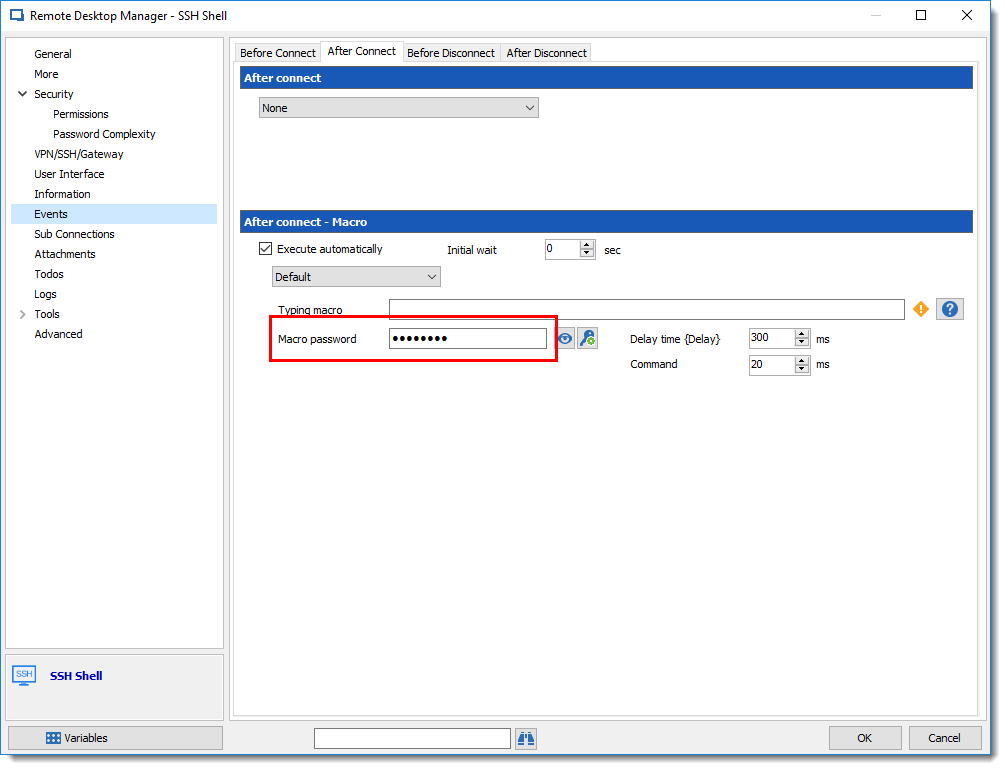
David Grandolfo
macro_pwd.png
macro_command.png
Hi David, thanks for this solution, this is a good tip. However, it does not a final solution for me, because if a password change is made for root, it has to be changed in several places (here in MACRO).
In the case I have described, the password refers to specific entry (credentials).
For example, we would have clients with different passwords, but the root password is the same (caution: It is not recommended!).
For the moment i will use the solution above. Perhaps it makes sense to mark it as wish.
Best Regards
Adriano
Hi,
I have another solution for you and it will be probably better, if you do not use the Tools for your SSH entry.
In the After login commands use the $TOOL_PASSWORD$ instead of the $MACRO_PASSWORD$.
After, in the Tools section select Use credential repository and them select the root credentials entry.
Information important, for the SSH entry and the Credential entry (root) you need to go in the Security section and check the box Allow password in variable.
Regards
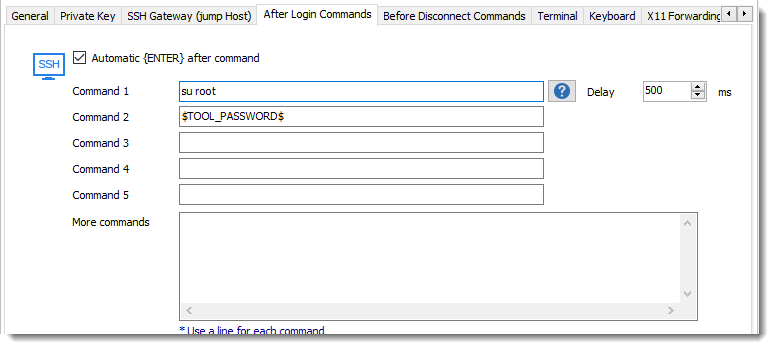

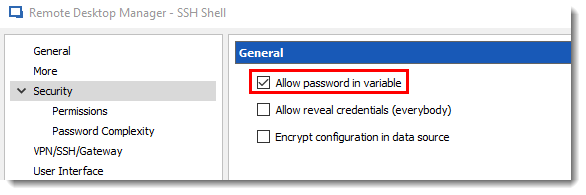
David Grandolfo
allow_pass_variable.png
tool_password.png
tool_cred_repo.png
Hi all,
Is this method always support on RDM ?
I try it, but root password is reject with bad password (the credential entry is correct).
With many test, I see that $TOOL_PASSWORD$ is send instead of the correct password, so the variable name seems to be incorrect.
How to do this ?
Thanks,
Yannick
Hello Yannick,
Could you please ensure that the Allow password in variable option in the Security Settings tab is enabled for the credential entry and the session entry?
Best regards,
Érica Poirier
Yes, it's enabled
And Credentials is set here 
Hello,
It is still supported in RDM 2022.1.27.
I can reproduce your problem only when the Allow password in variable option is not enabled in the SSH entry security settings. Once enabled, it's working properly.
Could you please verify that the option is enabled in the SSH Shell's properties and the Credential's properties?
Let me know if that helps!
Best regards,
Érica Poirier
ok. I'm check credential and ssh entries permissions settings -> same problem.
but I found where is the trouble.
If the primary credential are set to custom and the field are completed in the form (user/pwd) -> it's work.
If the primary credential are linked to another vault credential entry -> it doesn"t work.
Hello,
Thank you for your feedback.
Is your other credential entry has the Allow password in variable option enabled too?
I can reproduce the behaviour only if it's disabled. When the option is enabled for all 3 entries, then it works properly.
Let me know if that helps.
Best regards,
Érica Poirier
ok it's work.
All entries must be set with "Allow password in variable" : SSH Connection, User Credential, Root Credential.
Thanks a lot for your support,
Yannick
Hello,
Thank you for your feedback and glad it's working now.
That's right, the option must be enabled for all involved entries.
Best regards,
Érica Poirier