
operations
Regenerate Encryption Keys fails
Dear Devolutions server support,
we are trying to upgrade our DVLS from version 2019.1.20.0 towards 2021.2.10.0. After the upgrade some users lost their private faults and the following error was logged:
DevolutionsCryptoException - NativeError : InvalidSignature
===Original Message===
Exception of type 'Devolutions.Cryptography.DevolutionsCryptoException' was
thrown. ===Original StackTrace===
at Devolutions.Cryptography.Utils.HandleError(Int64 errorCode)
at Devolutions.Cryptography.Managed.Decrypt(Byte[] data, Byte[] key, ILegacyDecryptor legacyDecryptor)
at Devolutions.Cryptography.Managed.DecryptWithKeyAsUtf8String(String b64data, Byte[] key, ILegacyDecryptor legacyDecryptor)
at Devolutions.Server.ConnectionManager.DecryptDataAtRest(Guid contextId, String value, String context)
User Vault: c870fa2a-6775-4d6f-bb82-f7d6eb45283b, Data: ndSvXryez/9EPklKxj8TFAILVDn...
I read a similar issue here on the forum and the solution was to regenerate the encryption keys.
I am now trying the genereate the encryption keys via DPS console v 2021.2.14.0 for the DVLS version 2019.1.20.0 (not yet upgrade). While doing so it get the following message: Regenerating encryption keys...
Invalid column name 'ConsoleInfo'.
Stopping Application Pool...
Stopping scheduler service...
Logging off all sessions...
Creating new encryption config...
ReEncrypting PAM Credentials...
Invalid column name 'EncryptedSudoPassword'.
Invalid column name 'EncryptedOtpSettings'.
Encryption Keys Regeneration failed. Please manually restore the database and restart the app pool and scheduler service.
How can i resolve this issue?
Inplace upgrade from Server 2012R2 to Server 2019
Dear Devolutions,
We are in the process of updating our RDM infrastructure. To safe time and effort, we are planning to upgrade the DPS servers from Windows Server 2012R2 to Windows Server 2019, via an Inplace Upgrade.
As far as you know, is an inplace upgrade supported on servers with DPS installed? Or might we run into application issues?
With kind regards,
Valid Operations
2x SSH tunneling and RDP
Hi James,
Thanks for the reply. Frank and i have tested the beta version, but we can't find out how to configure multi hop ssh tunneling in the new beta version.
Could you please explain to us how to configure multihop ssh tunneling in the beta version?
Thanks in advance.
Kind regards,
Roel and Frank from Valid IT
Azure/Office365 Portal - Autologin with user specific credentials
Dear Devolutions,
I bet it has been asked numous times, but i can't find a post regarding my specific situation:
We managed Several customers which have their own Microsoft Azure and Office365 tenants.
Each of our engineers have their own admin account on the customers environment, which is also synced to AzureAD.
The engineers have all their admin accounts in their private vault in RDM.
I'm trying to create a autologin on the Azure and Office365 portals by using user specific settings->override credentials->Private vault credential.
However, login.microsoft.com is a two or three staged login. So the Control ID's are not doing the job all the way.
Is the above possible, and if yes, how?
Thanks in advance.
Kind regards,
Roel Beelen,
Valid IT Outsourcing.
2x SSH tunneling and RDP
Dear Devolutions,
Do you have a update on this one? Can we "chain" SSH tunnels after eachother?
Thanks in advance.
2x SSH tunneling and RDP
Hello Maurice,
We have done some tests with multi hop SSH tunneling, according to the link you mentioned in this thread.
If we do it as explained in the articel, multi hop ssh tunneling works.
However when we try to achieve this with RDM we can't get it to work with event chaining.
We've configured the following:
1 SSH shell session which goes to a switch.
1 SSH tunneling session which goes to our DMZ. (SSH tunnel DMZ)
1 SSH session which goes to the customers SSH server. (SSH Tunnel Customer)
the SSH shell session is configured to first open the SSH Tunnel Customer.
The SSH Tunnel Customer is configured to first open SSH Tunnel DMZ.
The first SSH tunnel to the DMZ is succesfully connected.
The second SSH tunnel to the SSH server can't connect. I suspect something in the settings, because when we do it by commandline like in the above article it works. So the connectivity is there.
Any idea's? Maybe a remote session is possible?
Kind regards,
Valid Operations
2x SSH tunneling and RDP
Hello Maurice,
Thanks a lot for searching with us for a solution. I will check if we can test the solution on our own environment too.
Let's stay in touch!
Kind regards,
Valid Operations.
2x SSH tunneling and RDP
Dear all,
Thanks for answering this topic. The picture of Maurice is correct.
From our DMZ all of our customers networks are reachable. Normally all servers will be acceccible through nat-ting the original ip address. We use a RD gateway to provide RDP access from RDM to the destination servers. For SSH and web (and in the future RDP too) we use SSH tunneling. See the attached picture:
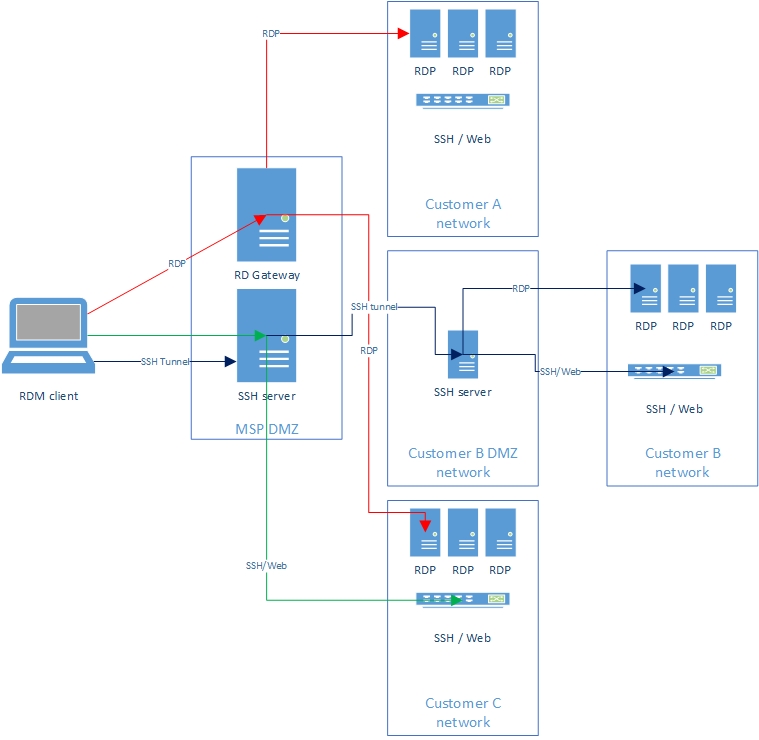
With this particular customer (Customer B in the diagram), we only have a small set of servers we can NAT, because of overlapping nat ranges, and networking difficulties. Thats why we use now RDM Jumphost, to provide access further down in the customers network.
However, we want to replace RDM Jumphost with SSH tunneling because of the broader possibilities, RDS licenses, and employee satisfaction.
Kind regards,
Valid
2x SSH tunneling and RDP
Dear Devolutions,
We are a MSP and run a RDM jumphost with one of our customers to provide access to their servers via RDP. However, we are in the process of replacing the Jumphost for SSH tunneling. There is some complexity in this one, so help is appriciated:)
the traffic will flow as following:
RDM client (laptop)->SSH tunnel->SSH server in MSP DMZ->SSH tunnel->SSH server in customers network->RDP session to destination host in customer network.
So as you can see it's a hop from one ssh tunnel to another one. We have already succesfully implemented the first ssh server in our DMZ, and SSH and Web sessions are working through the first SSH tunnel.
Could you please provide some information on how to configure the second SSH tunnel, and how to hop from one tunnel to the other? How should i configure this in RDM?
And how should i exactly configure the RDP sessions in order to make use of the SSH tunnel?
Thanks in advance.
Kind Regards,
Valid Operations.
DPS server not responding - Request aborted. Could not create secure SSL/TLS channel
Hi Erica,
I have done some further investigation, but i can't find out whats happening.
Is it possible to arrange a support session to gain further insights in this issue?
thanks in advance.
DPS server not responding - Request aborted. Could not create secure SSL/TLS channel
Hi Erica,
Thanks for the reply. I have tested with the above settings, but to no avail. I also tested with RDM v2019.1.38.0. I keep getting the same error message.
However, i might have an idea why.
We have 2 DPS servers deployed in an Active/Active config, with a netscaler in front of it, for loadbalancing. RDM connects to an dns name, which resolves to a virtual ip address on the netscaler, which then forwards the request to one of the DPS servers. The loadbalancer also presents the certificate to the client, which is valid.
However, i see that the loadbalancer only can speak TLS v1. SSLv2/v3 and TLS v1.1 and 1.2 are disabled.
Can it be that RDM only can speak TLS v1.1 and above which is changed in the last couple of versions? TLS v1.0 is flagged as insecure.
DPS server not responding - Request aborted. Could not create secure SSL/TLS channel
Hi Erica,
Thanks for the quick reply. I have applied the fix mentioned in the link, and as far as i can see the Errors are gone.
I also took a look in the windows event viewer, but couldn't find any events related to the SSL/TLS error in RDM.
What i find curious is that with RDM client 2019.1.25.0 i can connect to both the test and production datasource without any error.
There must some difference between RDM2019.1.25.0 and 2019.1.35.0 in how certificates or encryption is being handled?
DPS server not responding - Request aborted. Could not create secure SSL/TLS channel
Hi Erica,
We use indeed a certificate, but it is still valid. The production environment uses the same certificate and there i don't get this message.
I also noticed some errors in the DPS log of the test datasource and when i log into the DPS webinterface.
I see several errors regarding Null values:
InvalidOperationException - Nullable object must have a value.
Maybe something did go wrong?
Kind regards,
Valid Operations
DPS server not responding - Request aborted. Could not create secure SSL/TLS channel
Dear Devolutions,
yesterday i have upgrade the test datasource to the latest DPS version and RDM version:
DPS 2019.1.17.0 and RDM 2019.1.35.0.
However, when i connect to the test datasource, i get the error message: DPS server not responding - Request aborted. Could not create secure SSL/TLS channel.
i didn't had this error with DPS 2019.1.9 and RDM 2019.1.25.0.
What has been changed in the meantime, and how can i solve this error? :)
Thanks in advance.
RDM waiting dialogbox
Dear Devolutions,
I've made some SSH tunnel connections, and configured some web and ssh session to go through the ssh tunnel.
However each time the SSH tunnel is being made, a wait dialog counts down from 5 to 0 seconds. See the attached printscreen.
Also when i start the SSH session, first the countdown starts during the creating of the ssh tunnel, and after that another countdown starts while opening the actual ssh session.
I'v looked everywere in the vpn session and the ssh session but cant find the setting to shorten the countdown to like 2 seconds.
where is that setting hidden? :)
RDM freezes alot after update
Hi Erica,
Thanks for the reply. I have send the two reports and created a support ticket.
Kind Regards,
Valid Operations.
RDM freezes alot after update
Dear Devolutions,
A couple days ago, i upgraded the backend to DPS 6.1.3.0 and RDM client 14.1.3.0.
The upgrade itself went succesfull.
however, i have already 10 users (including me) who report that the new RDM client freezes a lot when opening and logging off RDP sessions.
RDM freezes then for like 10 seconds and the continues. Sometimes when you click with the mouse during a freeze, RDM goes to a not responding state.
Any idea what can cause this?
Kind regards,
Valid Operations
The Certificate for [domain] couldn't be verified
Hi Mathieu,
Both the Intermediate and the root CA certificate are installed in the windows certificate store.
The root CA certificate is installed in the trusted root Certification Authorities computer store.
The Intermediate certificate is installed in the trusted intermediate certification authorities computer store.
The Certificate for [domain] couldn't be verified
Hi,
thanks for the quick reply.
I see the whole chain, and the certificate status for the whole chain is: This certificate is OK.
The Certificate for [domain] couldn't be verified
Hi Jeff,
yes that's the topic i was referring to. Any idea why RDM comes up with the popup while the certificate is (still) valid?
The Certificate for [domain] couldn't be verified
Dear Devolutions,
Since the upgrade to RDM 14.1.1.0 i get the prompt that the certificate for [domain] couldn't be verified.
I read about it in the help section. there they describe the following:
Verify that the Certification Authority is properly installed in the certificate store.
I checked the Certificate path, and the certificate store on my computer.
The root ca is in my trusted root certifcation authorities store.
So the whole certificate chain is trusted.
Why do i still get this prompt?
And if all of our users (150) upgrade RDM, they all will get this prompt, which they don't expect.
how can i fix this that the certificate verification is succesfull?
Thanks in advance.
Valid Operations
audit logging
I found it. In DVLS 5.0.2.0 you can find it by logging in as an admin in the webinterface.
Thanks a lot!
audit logging
Dear Devolutions,
Tomorrow we have an external auditing.
I know that you can view who has accessed the sessions via right click on the session -> view->logs
But how can i view who has authenticated agains the DVLS server when they log into the data source?
We use DVLS 5.0.2.0.
Edit - I found in DVLS console the button logs, but when i do a refresh, some logs appear, but not who and when has authenticated.
Thanks in advance.
Valid Operations
SSH tunneling - How to configure?
Hi Jeff,
No problem. Everybody needs vacation :) I'll check in next week to see whats possible.
SSH tunneling - How to configure?
Hi Jeff,
Thanks for the answers. I will look into this.
Any idea on the remaining issues i described:
1. SOCKS proxy with Mozilla Firefox embedded browser. It cant load the page. Looks like the traffic is not going through.
2. RDP with SSH tunneling. When i configure RDP and a local tunnel like described in this article: https://help.remotedesktopmanager.com/howto-setupsshtunnel.htm i get an error message that no console session could be made because a console session is already active. But the checkbox open as console session is unthicked in the RDP session. When configuring a dynamic tunnel, the RDP session can't reach the destination.
Furthermore i tested with addons to use with ssh tunneling. For example SQL management studio. i didn't get it working.
How should i configure the tunnel, and should i use SQL management studio in conjunction with non default ports?
or are addons not supose to work with ssh tunneling?