
sam
SSH terminal session logging path variable issue
ssh logging, to clarify.
SSH terminal session logging path variable issue
Hi Support team,
I noticed if try and log to a UNC path to a hidden share the $NAME$ variable doesn't populate. Examples below.
\\san\ittemp$\vendor\TermLogs\%USERNAME%\$DATE_YEAR$\$DATE_MONTH$-$DATE_DAY$-$DATE_YEAR$\$NAME$ ($HOST_WITH_PORT$) - $DATE_MONTH$-$DATE_DAY$-$DATE_YEAR$.log
The log file will be named:
$NAME$ (10.1.x.x) - 5-22-2026.log
If I change it to a mapped drive, where I map B: to \\san\ittemp$ (it work properly)
B:\vendor\TermLogs\%USERNAME%\$DATE_YEAR$\$DATE_MONTH$-$DATE_DAY$-$DATE_YEAR$\$NAME$ ($HOST_WITH_PORT$) - $DATE_MONTH$-$DATE_DAY$-$DATE_YEAR$.log
Log file name:
IND-DEVICE (10.1.x.x) - 5-22-2026.log
if I use a nonhidden share, it works proper as well. If I use a custom variable set to the string "\\san\ittemp$", it works this way as well.
$CUSTOM_FIELD1$\vendor\TermLogs\%USERNAME%\$DATE_YEAR$\$DATE_MONTH$-$DATE_DAY$-$DATE_YEAR$\$NAME$ ($HOST_WITH_PORT$) - $DATE_MONTH$-$DATE_DAY$-$DATE_YEAR$.log
Question is.. is this a bug?
Thanks
Sam
Migrate DVLS to a new server
Hello Support team,
I am looking to migrate our current DVLS server from one server to a new server. We are using a SQL HA cluster to host the DB. I didn't really see a guide to do this. The only thing I saw close was the "Devolutions Server disaster recovery" here Devolutions Server - Devolutions Documentation . Could these steps be used to migrate to a new server? Is the steps provided in the documentation still valid?
Thanks!
Issue with Windows Terminal in RDM
Hello Sam,
Thank you for contacting us on that matter!
Could you please send us a recording showing the steps that led to the issue? This will allow us to investigate. I sent you all the information on where to send the recording in a Direct Message.
Please let us know when the recording has been uploaded. If you have any other questions, feel free to let us know.
Best regards,
Hi Max.. I uploaded the recording. Let me know if you need anything else.
Unable to launch applications after update to 2025.1.29
Curious... if you go to the terminal tab and change the application from default (Terminal) to Classic... does it work?
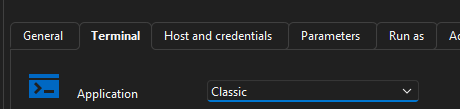
Also... any Windows application event logs?
trying to see if this is similar to my issue
Issue with Windows Terminal in RDM
So I am getting the following error when running a powershell terminal one line command. When connection is set to use "Windows Terminal" under Terminal/Application, the connection crashes with the two following Windows Events:


If I set Terminal/Application to classic. The connection launches correctly.
Computer OS: Windows 11 Enterprise - 24H2 w/ 2025-04 CU installed.
Running version 2025.1.30.0
This used to work on 2024 versions.
Please let me know.
Thanks in advance
Sam
Document Searching in 13.6.1
Hello Erica,
Were you able to gather any information from the engineering team regarding the document searching?
Thanks
Sam
Document Searching in 13.6.1
Actually... I was able to get it to show up after resetting layout...
However, it does go away with using our on-prem DVLS. Not compatible?
Document Searching in 13.6.1
We noticed in the release notes that you added document searching in 13.6
But where is it?
Thanks,
Sam
RDM iPad/iPhone App & two factor
Thanks Mathieu... and when say the next release, are you talking the next release of the iOS App or DVLS?
RDM iPad/iPhone App & two factor
Support Team,
I am not sure if this should be in the RDM forums or the DVLS forums, so here goes.
On our DVLS, we have radius two factor configured and it works well with RDM. However, with the iPad/iPhone app it will not prompt for the radius validation code, and therefore will not load any connections.
Is this a known issue? Is there a workaround to make radius two-factor work with the iOS app?
Thanks,
Sam
Moving Backend SQL Database
Great. Thank you Stefane for all your help.
Moving Backend SQL Database
We are going to be moving the SQL backend of our DVLS to another SQL cluster. Is there anything we should be cautious about or gotcha's that have come up from other people moving the database?
It appears its as simple as pointing to the new database server in the DVLS config.
Thoughts, comments?
Thanks,
Sam
RDM 13 Supported with the latest DVLS?
Thanks. Got it all working. Fixed a user issue we were having too. :)
RDM 13 Supported with the latest DVLS?
David,
What should be the upgrade order to take DVLS to 4.7?
RDM 13 Supported with the latest DVLS?
Support Team,
Just wondering if our DVLS users can upgrade to ver. 13 of RDM?
we are using version 4.5 of DVLS
Thanks,
Sam
Devolutions Client: Internal Server Error
Hi Sébastien,
Yes, the \ works for me as well for a work-around.
Thanks and look forward to the resolution.
Devolutions Client: Internal Server Error
I PM'd it to you
Devolutions Client: Internal Server Error
yes...
domain\username
Devolutions Client: Internal Server Error
Scratch that... it fixed the 500 error, but still unable to log in.
------------------------------------
The following error was received by a user at 1/4/2017 8:27:27 AM
Error:
NullReferenceException - Object reference not set to an instance of an object. at Devolutions.Server.Controllers.APIControllers.v2.BackendApiController.Login2(HttpRequestMessage request, JObject requestData, Boolean partialMode) in c:\Dev\devolutions\Websites\Server\Website\Controllers\APIControllers\BackendApiController.Login.cs:line 261 at lambda_method(Closure , Object , Object[] ) at System.Web.Http.Controllers.ReflectedHttpActionDescriptor.ActionExecutor.<>c__DisplayClass10.b__9(Object instance, Object[] methodParameters) at System.Web.Http.Controllers.ReflectedHttpActionDescriptor.ExecuteAsync(HttpControllerContext controllerContext, IDictionary`2 arguments, CancellationToken cancellationToken) --- End of stack trace from previous location where exception was thrown --- at System.Runtime.CompilerServices.TaskAwaiter.ThrowForNonSuccess(Task task) at System.Runtime.CompilerServices.TaskAwaiter.HandleNonSuccessAndDebuggerNotification(Task task) at System.Web.Http.Controllers.ApiControllerActionInvoker.d__0.MoveNext() --- End of stack trace from previous location where exception was thrown --- at System.Runtime.CompilerServices.TaskAwaiter.ThrowForNonSuccess(Task task) at System.Runtime.CompilerServices.TaskAwaiter.HandleNonSuccessAndDebuggerNotification(Task task) at System.Web.Http.Filters.ActionFilterAttribute.d__5.MoveNext() --- End of stack trace from previous location where exception was thrown --- at System.Web.Http.Filters.ActionFilterAttribute.d__5.MoveNext() --- End of stack trace from previous location where exception was thrown --- at System.Runtime.CompilerServices.TaskAwaiter.ThrowForNonSuccess(Task task) at System.Runtime.CompilerServices.TaskAwaiter.HandleNonSuccessAndDebuggerNotification(Task task) at System.Web.Http.Filters.ActionFilterAttribute.d__0.MoveNext() --- End of stack trace from previous location where exception was thrown --- at System.Runtime.CompilerServices.TaskAwaiter.ThrowForNonSuccess(Task task) at System.Runtime.CompilerServices.TaskAwaiter.HandleNonSuccessAndDebuggerNotification(Task task) at System.Web.Http.Controllers.ActionFilterResult.d__2.MoveNext() --- End of stack trace from previous location where exception was thrown --- at System.Runtime.CompilerServices.TaskAwaiter.ThrowForNonSuccess(Task task) at System.Runtime.CompilerServices.TaskAwaiter.HandleNonSuccessAndDebuggerNotification(Task task) at System.Web.Http.Controllers.ExceptionFilterResult.d__0.MoveNext() --- Default
Source:
Devolutions.Server
Devolutions Client: Internal Server Error
Erica,
Thank you. That fixed it for us.
Devolutions Client: Internal Server Error
I also upgraded this morning from 4.0.3 to 4.0.6 and getting the same error.
With that said...It only appears to me to be affecting the web browser UI. I have been able to connect via the RDM client and the iOS app.
Todo List Notifications
Hello Support Team,
Our team was wondering if you have added notifications for To-Do lists?
Thanks,
Sam
iOS missing \ from username field
doh... didn't even think about that. Just noticed that the keyboard was a different layout for the username field.
Thanks
iOS missing \ from username field
Dev. Team...
In the iOS app when setting up a Devolutions Server connection, the \ is missing from the keyboard for the username field. This makes it harder to use the format of domain\username.
Workaround is to type it in anther field and copy and paste it to the username field.
Version 1.2.3
Please let me know if you have any questions about what we are experiencing.
Thanks,
Sam