
Nealio
"This protocol is not supported" error when connecting using templates.
That's great news! I look forward to hearing from you.
"This protocol is not supported" error when connecting using templates.
I deployed a devolutions gateway as a POC for our high security environments. We have been long time users of RDM and DVLS and have a number of existing connections that are configured as "Host" connections that leverage assigned templates.
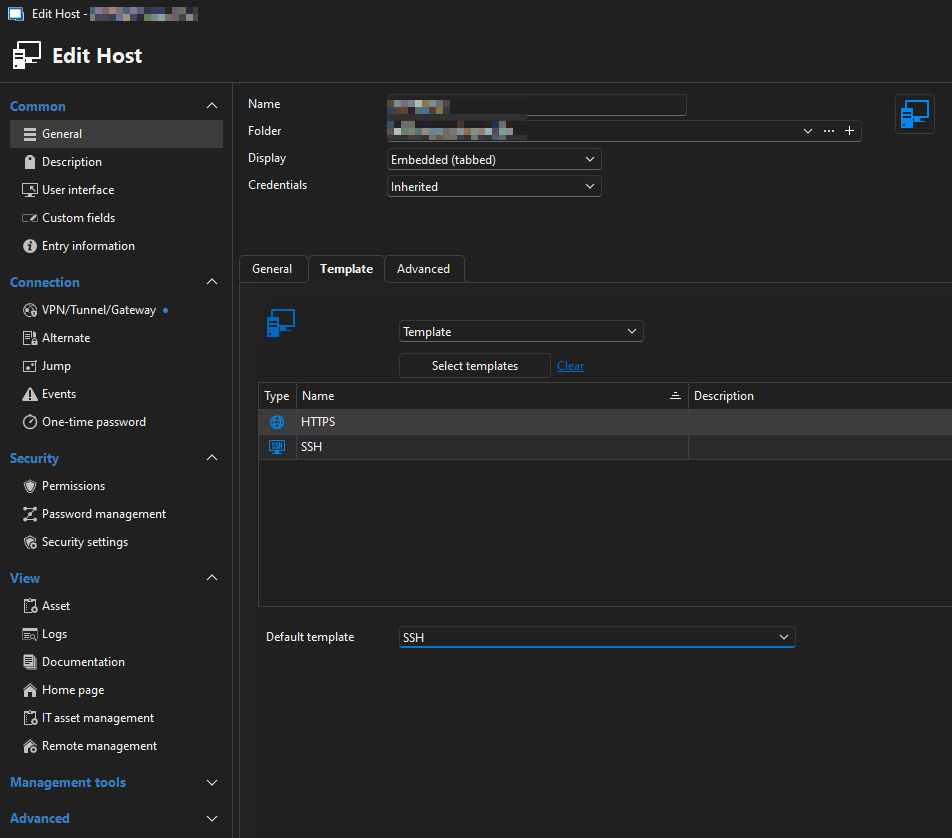
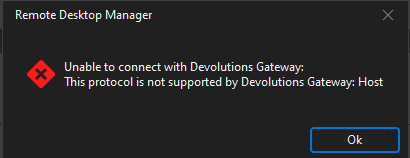
When the connection is reconfigured to use the Gateway, it immediately fails with the error message stating that the "Host" Connection type is unsupported. In reality, I'm not trying to launch a "Host" connection, I'm launching an SSH or a Web session using information from the Host entry.
Error when SSH windows close, Error Code: END_OF_FILE (-13) End of File or Data
I'm experiencing the same issue. Has any progress been made on resolving the issue? If not, I can provide logs if needed.
FortiClient VPN Client Support
I opened a ticket with Fortinet Support. I'll update when I hear back from the escalation team.
FortiClient VPN Client Support
Is there any plan/road-map to support the modern implementations of FortiClient (5.4.X and 5.6.X)?
Sub Connection Alternate Host
I'd like to bring this request back from the dead. I'm attempting to do the same thing as the OP, and it's frustrating that the functionality for sub-connections doesn't work.
...For your case, the "alternate hosts" feature must be used, and our variable substitution is for static fields, not dynamically resolved fields as would be required in this case. It is an interesting concept though, and we will look in the feasibility...
2 Possible Options:
Resolve the $PARENT_HOST$ using the alternate host configuration of the parent object, feeding only a single address to the sub-connection.
Create a new variable called $PARENT_HOST_ALTERNATE$ that is populated by performing the action of selecting the appropriate address based on the configuration of the parent. Same idea as #1, but leaves the original variable unchanged.
Currently, I favor using plain folders rather than sub-connections because the BatchEdit mode doesn't operate on sub-connections. Most strategies can be implemented using folders except for a few, therefore they're my goto choice. ...
The use of folders instead of hosts is quite undesirable for me as it requires a lot of information to be duplicated. While Batch edit makes it easier, any change to the host or additional connection methods requires an excessive amount of work that could be eliminated by setting the value on a root object, and inheriting that data to down to it's children.
I've figured out how to limit the templates that are available when you "Open" the host session, but it's less than ideal in my organization since you can't seem to open 2 templates on the same connection.
Missing Layout Objects
Thank you. I apparently did a terrible job googling that.
Missing Layout Objects
After rebooting my computer last night, the Navigation pane, and a number of other objects are no longer visible (see attached image). I've tried toggling the buttons, and using the keyboard shortcuts, but nothing happens. I had this happen once before, and it took an uninstall plus registry sweep to get it back. Is there a simpler way to fix this?
The only lines in the Log file:
[5/9/2013 9:07:44 PM]ERROR SILENT System.Runtime.InteropServices.InvalidComObjectException: COM object that has been separated from its underlying RCW cannot be used.
at WFICALib.IICAClient.IsConnected()
at AxWFICALib.AxICAClient.IsConnected()
at Devolutions.RemoteDesktopManager.Frames.Embedded.FreEmbeddedCitrix.Disconnecting()
[5/10/2013 10:14:15 AM]ERROR SILENT System.Runtime.InteropServices.InvalidComObjectException: COM object that has been separated from its underlying RCW cannot be used.
at WFICALib.IICAClient.IsConnected()
at AxWFICALib.AxICAClient.IsConnected()
at Devolutions.RemoteDesktopManager.Frames.Embedded.FreEmbeddedCitrix.Disconnecting()
[5/10/2013 4:13:08 PM]ERROR SILENT System.Runtime.InteropServices.InvalidComObjectException: COM object that has been separated from its underlying RCW cannot be used.
at WFICALib.IICAClient.IsConnected()
at AxWFICALib.AxICAClient.IsConnected()
at Devolutions.RemoteDesktopManager.Frames.Embedded.FreEmbeddedCitrix.Disconnecting()
[5/10/2013 6:59:44 PM]ERROR SILENT System.Runtime.InteropServices.InvalidComObjectException: COM object that has been separated from its underlying RCW cannot be used.
at WFICALib.IICAClient.IsConnected()
at AxWFICALib.AxICAClient.IsConnected()
at Devolutions.RemoteDesktopManager.Frames.Embedded.FreEmbeddedCitrix.Disconnecting()
Adding XenServer Host Entry
I have it set to prompt for credentials, and I've entered "root" in the username and the password in the password field, and left the domain field blank. It's not giving me any sort of authentication error, so I have no way to know whether it worked or not.
Adding XenServer Host Entry
I recently downloaded the RDM evaluation and I would like to setup entries for my XenServer Hosts. I've attempted to setup several connections for my a few of my hosts, but I'm not seeing any Guest VMs when i launch the entry.
I've entered the IP address and Hostname of the servers, and tried PORT 22, 80, and 443 without any luck.
What steps need to be done in order to connect to my XenServers?