
skaty666
Offline file - Database image is malformed
[25/09/2015 10:25:59]DEBUG Form load was not called
[25/09/2015 10:25:59]DEBUG Starting main form Load
[25/09/2015 10:26:00]DEBUG Showing main form...
[25/09/2015 10:26:01]DEBUG - Preloaded: 1518
[25/09/2015 10:26:01]DEBUG - Offline Mode : ReadWrite
[25/09/2015 10:26:01]DEBUG - Caching Type : SimpleCaching
[25/09/2015 10:26:01]DEBUG - Loading user info 103026
[25/09/2015 10:26:01]DEBUG - user.UserSecurity.IsAdministrator: False
[25/09/2015 10:26:01]DEBUG - OfflineManager.OfflineMode : ReadWrite
[25/09/2015 10:26:01]DEBUG - ConnectionManager.DataSource.OfflineMode : ReadWrite
[25/09/2015 10:26:01]DEBUG - ConnectionManager.DataSourceSettings.OfflineMode : ReadWrite
[25/09/2015 10:26:01]DEBUG - SecurityManager.CustomSecurity.OfflineMode : ReadWrite
Offline file - Database image is malformed
We are testing it for some days now.
It all works fine if I don't close the RDM.
If I close it and restart it (when I am online) the database is clear.
The Analyse/Vacuum/Repair/Delete buttons don't seem to fix it.
Here is the log file:
Offline file - Database image is malformed
Ok, I'll give it a try.
Offline file - Database image is malformed
I was running the latest non beta version, so I installed the latest beta.
I cleared the log, changed the option and restarted the program.
On start the program asks if I want to connect to the offline or online. I choose online...
Immediately the list is empty.
Attached you can find the log (only one line)
Offline file - Database image is malformed
Hereby I send you the logfile. Maybe it can help.
Offline file - Database image is malformed
A bypass solution I found is the manually copy the offline.db (when it is correct) and recopy it to the appdata folder when it is corrupted. It works, but it is of course no solution.
Offline file - Database image is malformed
I have got a feeling that the offline database is cleared when RDM connects, or try to connect to the RDM server.
When I get the popup to go offline en still press OK (when I am offline), the program may think it is online and clear the cache...
Just an idea..
Offline file - Database image is malformed
Any luck?
Offline file - Database image is malformed
Stefane, the full path of the SQLlite is C:\Program Files (x86)\Devolutions\Remote Desktop Manager and the fileversion is 1.0.84.0
The SQLlite.interop:
full path: C:\Program Files (x86)\Devolutions\Remote Desktop Manager\x86
version: 1.0.84.0
Offline file - Database image is malformed
We are having the same issue.
I can reproduce the error.
When I open RDM when there is no connection to de RDM server, I get the popup "Unable to connect to your data source".
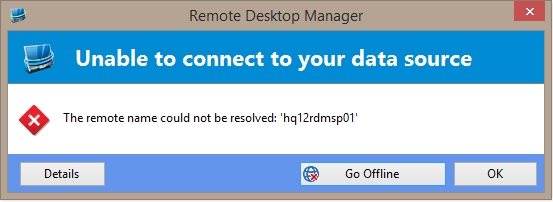
Whe I press OK, the complete tree is empty. If I reconnect my network tree remains empty.
I can use the clear cache option but even that won't work sometimes.
Ifso I need to manually delete the offline.db file in the appdata folder.
No sessions in Offline mode
Where do I activate this option?
If have the RDM installed a few days ago.
I haven't changed any options since then.
In the past I do have to manually remove the offline.db file in the folder you mentioned, but after a while I'm having the same problem.
There seems to be no systematic, but once in a while me and me collegues are having this problem.
No sessions in Offline mode
After this error, I tryed to Clear Offline Cache, but I got an errror that the offline cache could not be cleared
No sessions in Offline mode

No sessions in Offline mode
We are still having the problem that the offline database gets corrupted.
Today I got the following error when I tryed to go offline (even when the online server was available. After the error the offline database was cleared.
Devolutions.RemoteDesktopManager.Business.DataSources.GoOfflineException: Exception of type 'Devolutions.RemoteDesktopManager.Business.DataSources.GoOfflineException' was thrown.
at Devolutions.RemoteDesktopManager.Business.DataSources.RDMSConnectionDataSource.c5243a46e7a2f5b24d5d355f987bdcc9d(Boolean c5d807049ab3ae30aad5318fa57dc6159)
at Devolutions.RemoteDesktopManager.Business.DataSources.RDMSConnectionDataSource.get_Proxy()
at Devolutions.RemoteDesktopManager.Business.DataSources.RDMSConnectionDataSource.ExecuteAction[T](ExecuteActionDelegate`1 action)
at Devolutions.RemoteDesktopManager.Business.DataSources.RDMSConnectionDataSource.c56437f283bdc7af669aef8b0c11d5e95(String c8ec6dba322e00de5b07428c466db85a4, Byte[] ca45fa78b83f2776d602fa75b63e3a281)
at Devolutions.RemoteDesktopManager.Business.DataSources.RDMSConnectionDataSource.GetDataSourceSettings()
at Devolutions.RemoteDesktopManager.Managers.ConnectionManager.c29fbd34504079a3525ca4c390d5d4074(BaseConnectionDataSource cf40b69955d088020784eb92737f0a505)
No sessions in Offline mode
That might be the reason why the file couldn't be deleted, but I should not need to delete the file.
It get's frequently corrupt and then in offline mode the navigation tree is empty.
It is very annoying when I have a urgent intervention....
No sessions in Offline mode
Is there already a solution for this problem?
Me and my colleagues are still having this problem regularly (I guess every 2 weeks)
I upgraded to the latest version 10.0.2.0 and the Clear Offline Cache button gave 3 times an error that the file couldn't be deleted, the fourth time (1 hour later) it was cleared.
RDM: Offline: no password asked
I am using RDM 9.2.10.
I have a connection to a Remote Desktop Manager Server and connection with my domain username and password.
I have enabled the options "always ask password" and "Prompt for offline mode on startup".
But when I startup in offline mode, no password is asked.
Only when I startup in online mode my password is asked.
Can this be adjusted?
Thanks!
No sessions in Offline mode
Yes it works! The file was exactly 2MB and after recreation it was 1.979 KB.
The profiler window is not opened when I start with /Profiler in the latest version.
No sessions in Offline mode
When I do the procedure in the current RDM I get the error message that the database disk image is malformed when I restart RDM.
I can't click Send Trace to Support.
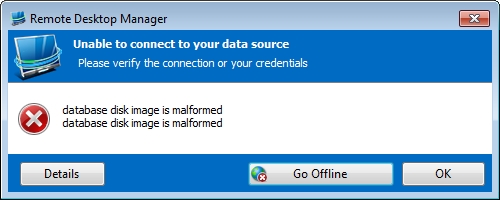
When I install the newest RDM. I don't get the popup, but I also don't get a popup of the profiler. Even when I open the popup of the profiler manually, it is empty.
I re-tested the offline mode, but it is still empty.
Regards
No sessions in Offline mode
My colleagues are having the same problem.
I am using RDM 9.2.6.0
I have send you the report.
Datasoureinfo:
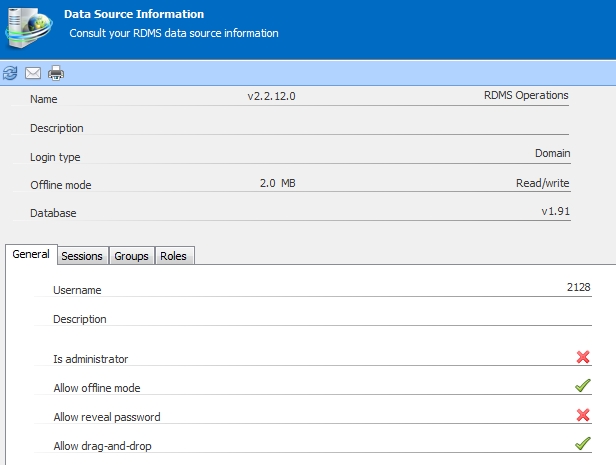
No sessions in Offline mode
Any progress on this?
No sessions in Offline mode
I tested this by clicking ctrl-refresh in online and the went offline, but this doesn't help.
Where is the cache stored, can I check this?
No sessions in Offline mode
When I start RDM when I am not connected to the Remote Desktop Manager Server I can choose to go Offline or Online.
When I choose to go offline, there are no Sessions in the manager, even when I choose Online there are no sessions after the timeout.
I only the the sessions offline when I connect tot the RDM server and the go offline.
I have activated the Offline read/write option of the datasource.
There is nothing in the application log after such a start.
FYI I am using Windows 7 pro 64bit
OpenVPN AddOn
It works super! Thanks!!!
OpenVPN AddOn
No, this is not fixed yet. dhervieux?