Offline file - Database image is malformed

Hello!
Sometimes it can happen that a user only sees some entries. In this case the offline cache is defective. After deleting and recreating it all entries are visible again.
In the application log of this user I can find these two lines a bunch of times a day:
Offline file - file has been deleted, will now recreate the file from scratch
Offline file - Database disk image is malformed, trying to delete the file: Path\to\offline.db
We are using RDM 10.1.9.0 with RDMS 2.2.21.0.
Best regards,
Andy
All Comments (40)
Hi,
Where the database cache is stored exactly? Do you know if it's a network drive or a shared folder?
David Hervieux
It is stored in the default path in LOCALAPPDATA
Hi,
again a user complained about this issue. Find the application log attached.
Best regards,
Andy
RemoteDesktopManager.log
Hi Andy
When this occurs, can you check if a process from another RDM is running? I suspect that this sometimes occurs and there is contention when accessing the cache.
Maurice
Hi Maurice,
yes, I can check that if it happens again. But how can there be another RDM process? I tried to manually start it twice, then there is a second process for about a second but then it ends. RDM works normal after I did that.
Best regards,
Andy
The issue appeared again for a user. There was only one process for RDM running. After clearing up the cache I could find this new messages in the log, never saw them before:
24.03.2015 13:59:53, 10.1.9.0 - 32-bit, 1, System.ArgumentOutOfRangeException: Der Index lag außerhalb des Bereichs. Er muss nicht negativ und kleiner als die Auflistung sein.
Parametername: index
bei System.ThrowHelper.ThrowArgumentOutOfRangeException()
bei System.Collections.Generic.List`1.RemoveAt(Int32 index)
bei System.Collections.Generic.List`1.Remove(T item)
bei Devolutions.RemoteDesktopManager.Business.DebugStopwatchManager.cb0aac59af60c51d7161165a47a2ad3ae(DebugStopwatch c84e8087bca95a5c8360dbc140f64f30d)
bei Devolutions.RemoteDesktopManager.Business.DebugStopwatch.Dispose()
bei Devolutions.RemoteDesktopManager.Managers.OfflineManager.c2003f33b05659ffe7ea3546ebd6ce300(BaseConnectionDataSource c7f28727fc7a5daa94ba08f688b2a5781, Boolean c0f381ad765fb6350e74d3bf32b4f4713)
bei Devolutions.RemoteDesktopManager.Managers.OfflineManager.Save(BaseConnectionDataSource dataSource)
bei Devolutions.RemoteDesktopManager.Managers.ConnectionManager.c17700cd39476a35b5d68da1c4cb61a28(BaseConnectionDataSource c01af917dca3518ff73ed69848f95f91a, Connection[] c50b46350a70ce17c145f8c929ee5883e)
bei Devolutions.RemoteDesktopManager.Managers.ConnectionManager.ca4799bebd8b706f34eea94a778843b55(BaseConnectionDataSource c01af917dca3518ff73ed69848f95f91a)
bei Devolutions.RemoteDesktopManager.Managers.ConnectionManager.LoadConnections(BaseConnectionDataSource connectionDataSource)
bei Devolutions.RemoteDesktopManager.Managers.ConnectionManager.RefreshConnections()
bei Devolutions.RemoteDesktopManager.Forms.FrmMainRibbonBase.RefreshAllConnectionView(Boolean saveState, Boolean checkOnline)
bei Devolutions.RemoteDesktopManager.Managers.MainFormManager.DoFirstLoad(IMainForm mainform)
bei Devolutions.RemoteDesktopManager.Forms.FrmMainRibbon.cae3b4c7c167cf0d9747ac4fee11ac00a(Object c19f185fd70cefc696ba148af1c4faf54, EventArgs cf1018bb83ec7debd818319fd3cb4844e)
bei System.Windows.Forms.Timer.OnTick(EventArgs e)
bei System.Windows.Forms.Timer.TimerNativeWindow.WndProc(Message& m)
bei System.Windows.Forms.NativeWindow.Callback(IntPtr hWnd, Int32 msg, IntPtr wparam, IntPtr lparam)
24.03.2015 13:59:53, 10.1.9.0 - 32-bit, 2, System.ArgumentOutOfRangeException: Der Index lag außerhalb des Bereichs. Er muss nicht negativ und kleiner als die Auflistung sein.
Parametername: index
bei System.ThrowHelper.ThrowArgumentOutOfRangeException()
bei System.Collections.Generic.List`1.RemoveAt(Int32 index)
bei System.Collections.Generic.List`1.Remove(T item)
bei Devolutions.RemoteDesktopManager.Business.DebugStopwatchManager.cb0aac59af60c51d7161165a47a2ad3ae(DebugStopwatch c84e8087bca95a5c8360dbc140f64f30d)
bei Devolutions.RemoteDesktopManager.Business.DebugStopwatch.Dispose()
bei Devolutions.RemoteDesktopManager.Managers.OfflineManager.c2003f33b05659ffe7ea3546ebd6ce300(BaseConnectionDataSource c7f28727fc7a5daa94ba08f688b2a5781, Boolean c0f381ad765fb6350e74d3bf32b4f4713)
bei Devolutions.RemoteDesktopManager.Managers.OfflineManager.Save(BaseConnectionDataSource dataSource)
bei Devolutions.RemoteDesktopManager.Managers.ConnectionManager.c17700cd39476a35b5d68da1c4cb61a28(BaseConnectionDataSource c01af917dca3518ff73ed69848f95f91a, Connection[] c50b46350a70ce17c145f8c929ee5883e)
bei Devolutions.RemoteDesktopManager.Managers.ConnectionManager.ca4799bebd8b706f34eea94a778843b55(BaseConnectionDataSource c01af917dca3518ff73ed69848f95f91a)
bei Devolutions.RemoteDesktopManager.Managers.ConnectionManager.LoadConnections(BaseConnectionDataSource connectionDataSource)
bei Devolutions.RemoteDesktopManager.Managers.ConnectionManager.RefreshConnections()
bei Devolutions.RemoteDesktopManager.Forms.FrmMainRibbonBase.RefreshAllConnectionView(Boolean saveState, Boolean checkOnline)
bei Devolutions.RemoteDesktopManager.Managers.MainFormManager.DoFirstLoad(IMainForm mainform)
bei Devolutions.RemoteDesktopManager.Forms.FrmMainRibbon.cae3b4c7c167cf0d9747ac4fee11ac00a(Object c19f185fd70cefc696ba148af1c4faf54, EventArgs cf1018bb83ec7debd818319fd3cb4844e)
bei System.Windows.Forms.Timer.OnTick(EventArgs e)
bei System.Windows.Forms.Timer.TimerNativeWindow.WndProc(Message& m)
bei System.Windows.Forms.NativeWindow.Callback(IntPtr hWnd, Int32 msg, IntPtr wparam, IntPtr lparam)
Another point is that this issue mostly happens for the same users.
Thank you for the logs they have been proven very helpful. I will resolve the issue. Should be in the next beta release.
Best regards,
Stéfane Lavergne
I've made a fix that should resolve the issue. It will be in the next beta build.
Best regards,
Stéfane Lavergne
Should it be in V 10.4.1.0 ?
Yes that's correct.
http://remotedesktopmanager.com/Home/Download#beta
Stéfane Lavergne
Thank you! We will test it immediately.
Hello Stefane,
unfortunately the same issue appears again with V 10.4.1.0 and 10.5.0.0.
Can I somehow offer you more information to eliminate it?
Best regards,
Andy
edited by andybandy on 4/1/2015
Could you please double check the file version of the following files: (it should be v1.0.84.0)
System.Data.SQLite.dll
x86\SQLite.Interop.dll
x64\SQLite.Interop.dll
Back in v9.? we had issues with a version of SQLite (causing malformed file errors), could it be that for some reason that machine still has the other version of SQLite.
Best regards,
Stéfane Lavergne
This 3 files have version 1.0.84.0
That would have been too easy :-(
Ok so I re-read the entire thread and nothing else has jumped out that could help me. So let's try this, please:
- on the affected machine
- close RDM
- find and delete the offline.db file
- start RDM
- open Profiler (Help -> Profiler)
- CTRL + refresh (F5)
- the trace information should be normal, no crash or anything
- keep the profiler running
- provoke, if possible, the malformed issue
- CTRL + refresh
- send me the trace information via "Send Trace to Support" with "Attn: Stefane"
I hoping there is something in the trace to can pint point the issue. In the mean time I will add an option in the next build to force the offline cache on the main thread (not background). It will slow down the load but should stop this issue from happening in this particular case.
Best regards,
Stéfane Lavergne
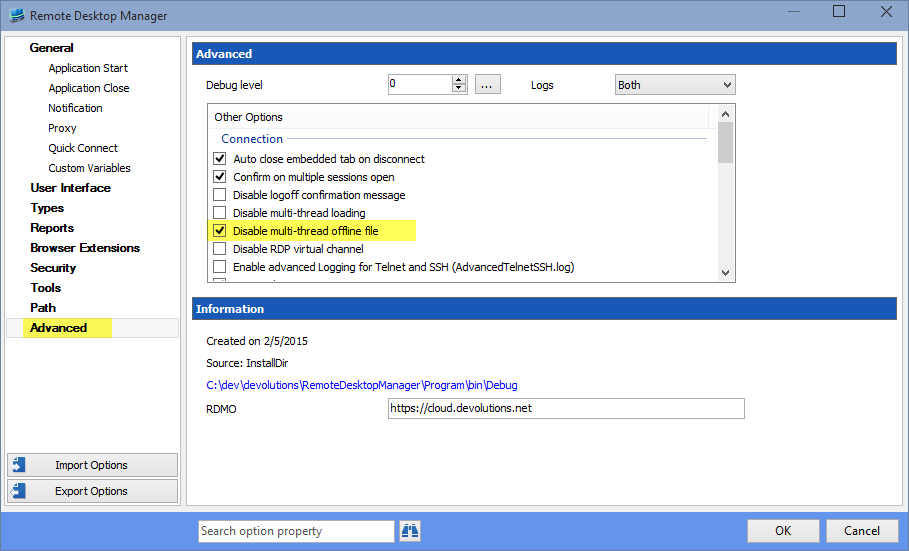
In the next release you will have an option (File -> Options -> Advanced) called "Disable multi-thread offline file". Please check the option to see if this resolves the issue.
Best regards,
Stéfane Lavergne
2015-04-02_13-54-11.png
Hello Stefane,
sorry for the late answer, I was not in the office at the end of last week.
This morning I've sent you information from the profiler of two affected machines. Hope this helps.
We will also test the option when you release the next version.
Best regards,
Andy
Hello Stefane,
we've updated RDM to V 10.5.4.0 and set the new option. With that it looks much better now!
Best regards,
Andy
Andy,
Good to here, thank you for the update.
Best regards,
Stéfane Lavergne
Hello!
This issue appears again for a lot of users now very often. I'm not sure but I think it started more often with the new version of DVLS (2.5.0.0).
I found also this entry here in the forum what looks the same: https://forum.devolutions.net/topic14013-no-sessions-in-offline-mode.aspx
Here David asked to try to make an exception in the Anti-Virus software for the offline.db file. We will do that, however, on a fresh installed PC without Anti-Virus software this issue also appeared.
Again, find a logfile attached.
Best regards,
Andy
RemoteDesktopManager.log.db
Andy,
Just to let you know we are still investigating the issue.
I will get back to you when we have progress.
Regards,
Stéfane Lavergne
We are having the same issue.
I can reproduce the error.
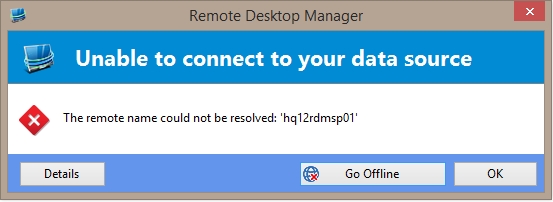
When I open RDM when there is no connection to de RDM server, I get the popup "Unable to connect to your data source".
Whe I press OK, the complete tree is empty. If I reconnect my network tree remains empty.
I can use the clear cache option but even that won't work sometimes.
Ifso I need to manually delete the offline.db file in the appdata folder.
RDM offline error.jpg
Hi Andy & @skaty666,
When you have a few minutes, could you please perform the following and get back to me? Thanks
On a machine that has had this issue (or currently has it).
- start RemoteDesktopManager.exe
- start Process Explorer
- find RemoteDesktopManager.exe
- bottom pain, find the System.Data.SQLite.dll
- What is the full file path? Does it match the path of RemoteDesktopManager.exe?
- Right-click properties, what is the file version?
- What about the SQLite.Interop.dll
- Path? Version?
Thanks,
Stéfane Lavergne
2015-06-26_8-07-01.png
2015-06-26_8-06-09.png
Stefane, the full path of the SQLlite is C:\Program Files (x86)\Devolutions\Remote Desktop Manager and the fileversion is 1.0.84.0
The SQLlite.interop:
full path: C:\Program Files (x86)\Devolutions\Remote Desktop Manager\x86
version: 1.0.84.0
C:\Program Files (x86)\Devolutions\Remote Desktop Manager\System.Data.SQLite.dll - 1.0.84.0
The SQLite.Interop.dll is also located in C:\Program Files (x86)\Devolutions\Remote Desktop Manager\x86 with version 1.0.84.0 but I cannot see it in Process Explorer.
Best regards,
Andy
Any luck?
Nothing yet, we've been suspecting a multi-threading issue with the SQLite library even though the library is as they say is threading compatible and we follow the recommendations outlined here: (https://system.data.sqlite.org/index.html/doc/trunk/Doc/SQLite.NET.chm?mimetype=application/x-chm)
I've created an multi-threaded test app and are unable to reproduce an "malformed" file. Until we find the actual cause we woun't be able to find the real solution. Disabling multi-thread loading in RDM looks like it might solve it on some machines but not all the time. I'm starting to think that maybe the app closes before a SQLite background thread has fully completed.
More investigated is still needed. If anything comes to mind on what action occurred just prior to seeing the issue, please don't hesitate anything can help.
Sorry it's taking so much time solving the issue...
Best regards,
Stéfane Lavergne
I have got a feeling that the offline database is cleared when RDM connects, or try to connect to the RDM server.
When I get the popup to go offline en still press OK (when I am offline), the program may think it is online and clear the cache...
Just an idea..
For us it happens almost every morning. In the evening I close RDM and then shut down the pc. When I start it again in the morning the offline.db is malformed.
We have the "Disable Multi-Thread offline file" check activated. Unfortunately it was only a solution at the beginning when you added this function.
A bypass solution I found is the manually copy the offline.db (when it is correct) and recopy it to the appdata folder when it is corrupted. It works, but it is of course no solution.
Almost every day!!! That is crazy bad. A malformed db is usually cause by the internal structure of sqlite db file having "bad/empty" pages/blocks due to a bad write operation. The question is what write operation and why?
Could one of you (or both) send me a copy of your malformed offline.db file?
***** Keep in mind the fill will contain your encrypted sensitive information, so feel free to say no. *****
In the case where you are OK with it, send me an email at slavergne.at.devolutions.net or (private email) and I will elaborate the steps needed for me to be able to open the offline file.
FYI - I'm actually on vacation at the moment but would very much enjoy solving the issue once a for all, then I could truly relax. :-)
Best regards,
Stéfane Lavergne
Hello Stefane,
I really want this problem to be solved. It is very important for us. My offline.db just got malformed again when I tried to add a new local favorite.
If I compare the filesize:
normal: 1727 KB
malformed: 92 KB
I'll send you the file because I know that you will treat confidentially with this data and I don't think that there is too much information in it. Perhaps only the few sessions left...
Best regards,
Andy
edited by andybandy on 7/8/2015
Hereby I send you the logfile. Maybe it can help.
RemoteDesktopManager26-08-2015.log
Thank you for the log file, I'm analyzing it now.
Are you running v10.9.9.0? If not, could you upgrade and perform the following?
- Clear application logs
- Run the app until it fails on malformed offline file
- Send me the logs
- Check the system option File -> Options -> Advanced -> “Enable offline read/write locks”
- Run the app until it fails on malformed offline file
- Send me the logs
- Did the flag change anything?
Regards,
Stéfane Lavergne
I was running the latest non beta version, so I installed the latest beta.
I cleared the log, changed the option and restarted the program.
On start the program asks if I want to connect to the offline or online. I choose online...
Immediately the list is empty.
Attached you can find the log (only one line)
RemoteDesktopManager28-08-2015.log
Hi all,
A new beta is out that has a lot of work done to try to fix the malformed issue. The system should be able to auto-recover from a malformed and all should be transparent to the user. You can give it a try and let me know how it goes.
If not you an try the manual method. File -> Data Sources -> Advanced (tab) -> Manage Cache (button)
The form has 4 action buttons:
• Analyse : Will output information about the cache file. If you get errors when the form first opens, run this.
• Vacuum : The VACUUM command rebuilds the entire database. (SQLite documentation)
• Repair : Run automatically when you open the form. Run it again if it returns errors.
• Delete : If all else fails, delete the file and start over.
v10.9.13.0 - http://remotedesktopmanager.com/Home/Download#beta
Best regards,
Stéfane Lavergne
Ok, I'll give it a try.
We are testing it for some days now.
It all works fine if I don't close the RDM.
If I close it and restart it (when I am online) the database is clear.
The Analyse/Vacuum/Repair/Delete buttons don't seem to fix it.
Here is the log file:
[25/09/2015 10:25:59]DEBUG Form load was not called
[25/09/2015 10:25:59]DEBUG Starting main form Load
[25/09/2015 10:26:00]DEBUG Showing main form...
[25/09/2015 10:26:01]DEBUG - Preloaded: 1518
[25/09/2015 10:26:01]DEBUG - Offline Mode : ReadWrite
[25/09/2015 10:26:01]DEBUG - Caching Type : SimpleCaching
[25/09/2015 10:26:01]DEBUG - Loading user info 103026
[25/09/2015 10:26:01]DEBUG - user.UserSecurity.IsAdministrator: False
[25/09/2015 10:26:01]DEBUG - OfflineManager.OfflineMode : ReadWrite
[25/09/2015 10:26:01]DEBUG - ConnectionManager.DataSource.OfflineMode : ReadWrite
[25/09/2015 10:26:01]DEBUG - ConnectionManager.DataSourceSettings.OfflineMode : ReadWrite
[25/09/2015 10:26:01]DEBUG - SecurityManager.CustomSecurity.OfflineMode : ReadWrite
@skaty666
Could you please send me the output of the Analyse/Vacuum/Repair actions? You send it via private message or email me slavergne-at-devolutions-dot-net
Could you also start RDM with the "/Profiler", once RDM is started in the profiler window, use the "Send Trace to Support" button to send us the trace information. Please add "Attn: Stefane" in the message. /Profiler will trace the app startup and data load, this should be helpful to figure out what is going on.
(Ex: "C:\Program Files (x86)\Devolutions\Remote Desktop Manager\RemoteDesktopManager.exe" \Profiler)
Best regards,
Stéfane Lavergne