
info
How to use Password Management under My Account Settings
Hi there
I tried to find out exactly what the "Password Management" settings under "My Account Settings" can be used for. Unfortunately, I can't find any information about it in the online help. We use 1Password to manage our passwords online. The idea now would be that we connect our entries (mainly RDP connections) to the respective entry in 1Password, so that no passwords etc. have to be stored in RDM.
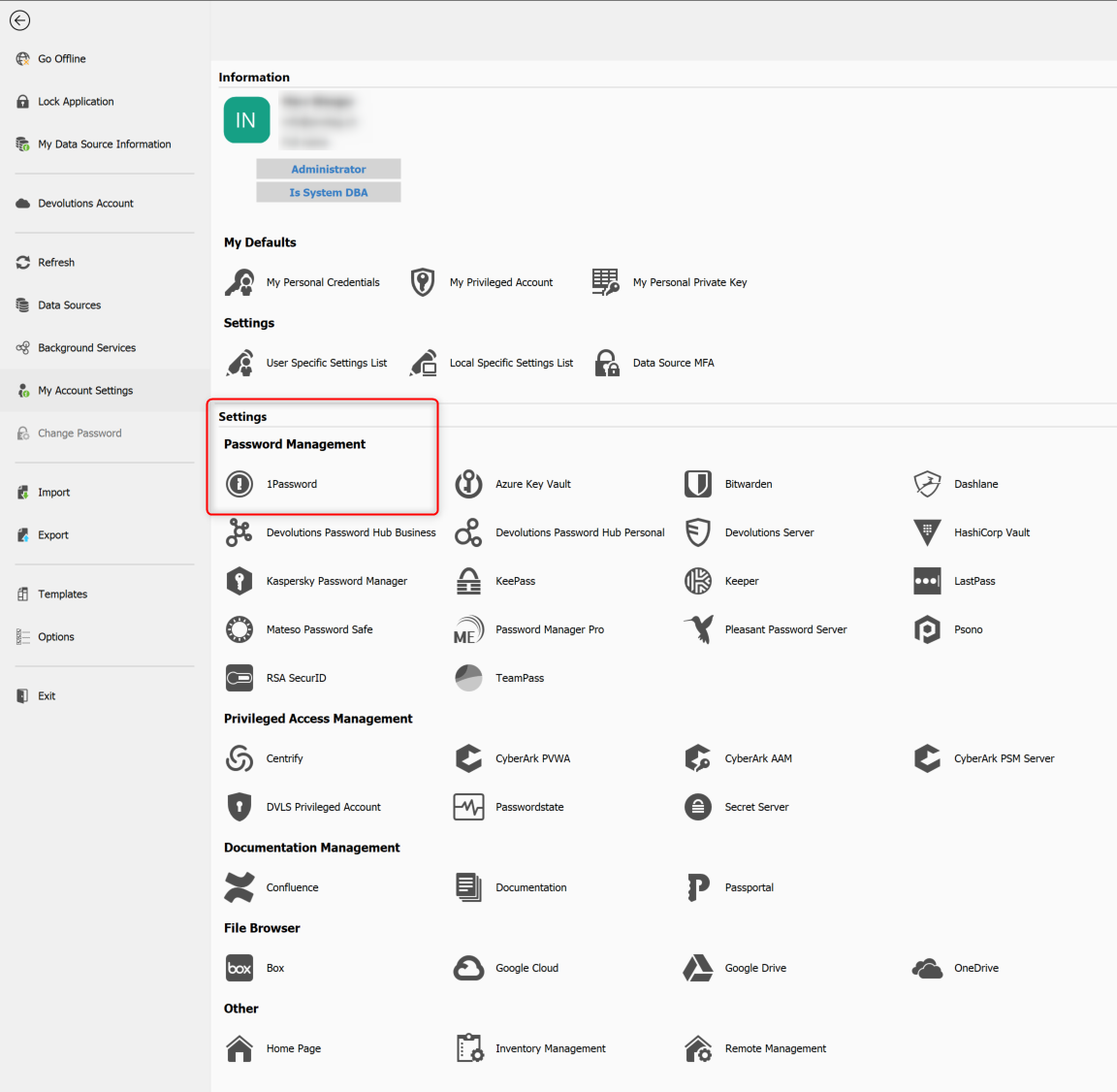
What is the correct way to use stored passwords from 1Password for connections in RDM?
Thanks a lot for your help!
Regards
Michael
AltGr key disabled by RDM
Hi Jeff DAgenais
OS: Windows 10 English
RDM: 13.6.6.0 (64-bit)
Well, disabling all shortcuts in RDM is like killing a bee with an Apache Helicopter - isnt' it? I mean the shortcuts in RDM are really useful... I'll try the solution from the link you provided. Although it is a workaround and not a real solution.... :(
Thank you and best regards
Mike
AltGr key disabled by RDM
Sorry to bring up such an old thread but I have the exact same problem. Suddenly AltGr stops working. However ctrl + alt works. I have to close RDM and as soon as RMD is closed AltGr works again. It is very frustrating as it happens at least 3 times a week... Are there any news?
Best regards
Mike
Remote Desktop Manager is constantly crashing
Hi
No crash since two days! Seems like it is fixed! :)
Thank you very much!
Merry Christmas and a happy new year
Mike
Remote Desktop Manager is constantly crashing
Hi
Thank you very much! I just installed the new beta and will let you know about my experience!
Best regards
Remote Desktop Manager is constantly crashing
aaaaaargh, can I have an early access preview of the next beta? I'm going nuts! Every second time I switch to RDM it crashes...
:( :\:
Remote Desktop Manager is constantly crashing
Great! Can't wait for the beta :)
Best regards
Remote Desktop Manager is constantly crashing
Hi
Didn't helped. Same error...
Best regards
Remote Desktop Manager is constantly crashing
Hi
OK, I'll try and will let you know about the results.
Best regards
Remote Desktop Manager is constantly crashing

Remote Desktop Manager is constantly crashing
Just right now RDM freezed when I tried to maximize the window. I got the following error in a message box:
ERROR SILENT: System.NullReferenceException: Object reference not set to an instance of an object.
at DevExpress.XtraBars.Docking2010.Views.BaseView.DocumentClosedContextKey..ctor(BaseView view, BaseDocument document)
at DevExpress.XtraBars.Docking2010.Views.BaseView.DocumentClosedContext.IsDocumentClosing(BaseView view, BaseDocument document)
at DevExpress.XtraBars.Docking2010.Views.BaseView.IsDocumentClosing(BaseDocument document)
at DevExpress.XtraBars.Docking2010.ContainerControlManagementStrategy.CheckFocus(Int32 Msg, BaseView view, Control control, IntPtr wParam)
at DevExpress.XtraBars.Docking2010.DocumentManager.CheckFocus(Int32 msg, BaseView view, Control control, IntPtr wParam)
at DevExpress.XtraBars.Docking2010.Views.BaseDocumentCollection.CheckFocus(Int32 msg, Control control, IntPtr wParam)
at DevExpress.XtraBars.Docking2010.Views.BaseDocumentCollection.PostFilterMessageCore(Int32 Msg, Control wnd, IntPtr HWnd, IntPtr WParam, IntPtr LParam)
at DevExpress.XtraBars.Docking2010.Views.BaseDocumentCollection.DevExpress.Utils.Win.Hook.IHookController.InternalPostFilterMessage(Int32 Msg, Control wnd, IntPtr HWnd, IntPtr WParam, IntPtr LParam)
at DevExpress.Utils.Win.Hook.HookManager.InternalPostFilterMessage(HookInfo hInfo, Int32 Msg, Control wnd, IntPtr HWnd, IntPtr WParam, IntPtr LParam)
at DevExpress.Utils.Win.Hook.HookManager.WndHook(Int32 ncode, IntPtr wParam, IntPtr lParam)
Remote Desktop Manager is constantly crashing
Hi
Since 03.11.2017 I get this error quite a few times:
[13.12.2017 14:38:00 - 13.0.6.0 - 32-bit] Error Silent: System.NullReferenceException: Object reference not set to an instance of an object.
at DevExpress.XtraBars.Docking2010.Views.BaseView.DocumentClosedContextKey..ctor(BaseView view, BaseDocument document)
at DevExpress.XtraBars.Docking2010.Views.BaseView.DocumentClosedContext.IsDocumentClosing(BaseView view, BaseDocument document)
at DevExpress.XtraBars.Docking2010.Views.BaseView.IsDocumentClosing(BaseDocument document)
at DevExpress.XtraBars.Docking2010.ContainerControlManagementStrategy.CheckFocus(Int32 Msg, BaseView view, Control control, IntPtr wParam)
at DevExpress.XtraBars.Docking2010.DocumentManager.CheckFocus(Int32 msg, BaseView view, Control control, IntPtr wParam)
at DevExpress.XtraBars.Docking2010.Views.BaseDocumentCollection.CheckFocus(Int32 msg, Control control, IntPtr wParam)
at DevExpress.XtraBars.Docking2010.Views.BaseDocumentCollection.PostFilterMessageCore(Int32 Msg, Control wnd, IntPtr HWnd, IntPtr WParam, IntPtr LParam)
at DevExpress.XtraBars.Docking2010.Views.BaseDocumentCollection.DevExpress.Utils.Win.Hook.IHookController.InternalPostFilterMessage(Int32 Msg, Control wnd, IntPtr HWnd, IntPtr WParam, IntPtr LParam)
at DevExpress.Utils.Win.Hook.HookManager.InternalPostFilterMessage(HookInfo hInfo, Int32 Msg, Control wnd, IntPtr HWnd, IntPtr WParam, IntPtr LParam)
at DevExpress.Utils.Win.Hook.HookManager.WndHook(Int32 ncode, IntPtr wParam, IntPtr lParam)
Faulting module: the whole application is crashing...
Windows Event log:
Faulting application name: RemoteDesktopManager.exe, version: 13.0.6.0, time stamp: 0x5a273d89
Faulting module name: DevExpress.XtraBars.v17.1.ni.dll, version: 17.1.6.0, time stamp: 0x59afee96
Exception code: 0xc0000005
Fault offset: 0x00b32a4f
Faulting process id: 0x4780
Faulting application start time: 0x01d373592efc6a24
Faulting application path: C:\Program Files (x86)\Devolutions\Remote Desktop Manager\RemoteDesktopManager.exe
Faulting module path: C:\WINDOWS\assembly\NativeImages_v4.0.30319_32\DevExpress.2845491a#\2e7cf1bf6379f561475bdb2643b6d8c6\DevExpress.XtraBars.v17.1.ni.dll
Report Id: c884e990-94ba-4199-9d91-7af297582432
Faulting package full name:
Faulting package-relative application ID:
Application: RemoteDesktopManager.exe
Framework Version: v4.0.30319
Description: The process was terminated due to an unhandled exception.
Exception Info: System.NullReferenceException
at DevExpress.XtraBars.Docking2010.Views.BaseView+DocumentClosedContextKey..ctor(DevExpress.XtraBars.Docking2010.Views.BaseView, DevExpress.XtraBars.Docking2010.Views.BaseDocument)
at DevExpress.XtraBars.Docking2010.Views.BaseView+DocumentClosedContext.IsDocumentClosing(DevExpress.XtraBars.Docking2010.Views.BaseView, DevExpress.XtraBars.Docking2010.Views.BaseDocument)
at DevExpress.XtraBars.Docking2010.Views.BaseView.IsDocumentClosing(DevExpress.XtraBars.Docking2010.Views.BaseDocument)
at DevExpress.XtraBars.Docking2010.ContainerControlManagementStrategy.CheckFocus(Int32, DevExpress.XtraBars.Docking2010.Views.BaseView, System.Windows.Forms.Control, IntPtr)
at DevExpress.XtraBars.Docking2010.DocumentManager.CheckFocus(Int32, DevExpress.XtraBars.Docking2010.Views.BaseView, System.Windows.Forms.Control, IntPtr)
at DevExpress.XtraBars.Docking2010.Views.BaseDocumentCollection.CheckFocus(Int32, System.Windows.Forms.Control, IntPtr)
at DevExpress.XtraBars.Docking2010.Views.BaseDocumentCollection.PostFilterMessageCore(Int32, System.Windows.Forms.Control, IntPtr, IntPtr, IntPtr)
at DevExpress.XtraBars.Docking2010.Views.BaseDocumentCollection.DevExpress.Utils.Win.Hook.IHookController.InternalPostFilterMessage(Int32, System.Windows.Forms.Control, IntPtr, IntPtr, IntPtr)
at DevExpress.Utils.Win.Hook.HookManager.InternalPostFilterMessage(DevExpress.Utils.Win.Hook.HookInfo, Int32, System.Windows.Forms.Control, IntPtr, IntPtr, IntPtr)
at DevExpress.Utils.Win.Hook.HookManager.WndHook(Int32, IntPtr, IntPtr)
Remote Desktop Manager is constantly crashing
Hi
Thank you for the links. Unfortunately we already have printer redirection disabled but it still crashes. And yes, it is Windows 10 1709, all Updates applied.
Any other suggestions?
Best regards, Mike
Remote Desktop Manager is constantly crashing
Hi there
Since version 13 RDM is constantly crashing. After establishing some connections and multiple minimize / maximize the RMD window it suddenly crashes / windows is freezing... Only way to restart RDM is to kill the process via TaskManager. It doesn't matter wheter I use 32 or 64 bit version of RDM.
What do you need (Windows log / App log etc.) to find the root cause of this problem?
Thank you for your help.
Mike