
Logharn
Issues after updating to 12.4.4.0
Hi!
I've worked for two days without issues after the caching mode change, so problem solved!
Erica, thank you for your remote support.
Anyway when you found "Simple" in the caching mode I tried to remember why it was there...
I found a three years old thread where I tell why I changed it :P
(I think that after three years that issue is gone :D)
Best regards!
Issues after updating to 12.4.4.0
Yes!
Issues after updating to 12.4.4.0
Hi!
I've updated from version 12.0.11.0 to the latest 12.4.4.0 and noticed several problems with sessions and credentials...
Offline mode:
If I start the application directly in offline mode no entry is displayed even if I then go in online mode.
While online I've to CTRL+F5 to show entries.
If I start the application in online mode all entries display, but if I then go offline and back online all entries disappear again. Going back and forth a couple of times all entries get back again...
Filter:
In online mode if I use the filter sometimes it works as expected but soon as I clear the filter all entries disappear.
Instead frequently while online the filter finds nothing and all entries disappear.
If I've a session open this doesn't happen until I close the session.
In offline mode there's no issues with the filter.
Entry properties:
When I click on properties for a session or a credential entry, a small progress bar with "Migrating data content to version 1.1" appear briefly but the property window doesn't appear...
I've two PCs (work and home) and have the same problems...
Into the logs there's nothing relevant.
Best regards.
Unable to copy username for any Credential Entry
I've updated today to version 12.0.11.0 and I can copy usernames also while working offline.
Issue solved for me!
Thanks, best regards.
Unable to copy username for any Credential Entry
No it's a standard credential entry.
When I right click on other types of entry the copy username works as intended.
Below a screen when I'm working offline...
Unable to copy username for any Credential Entry
I've deleted the cache with CTRL+F5 and also inside the "Manage Cache" window, but as soon as I go offline "Copy Username" is grayed out...
Unable to copy username for any Credential Entry
Yes, version 12.0.10.0.
I just edited my reply because I forgot to write it...
Best regards
Unable to copy username for any Credential Entry
Hi,
the issue is still there when you work offline...
I've an SQL Server as datasource and I work mostly offline, this way "Copy username" is grayed out but active when working online...
Best regards.
EDIT: RDM Enterprise v. 12.0.10.0
Shared template missing - RDM 11.7.0.0
Yes, templates are back with CTRL + Refresh, thanks.
Best regards
Shared template missing - RDM 11.7.0.0
Hi,
No I'm not using Integrated Security, but in "Data Source Settings" I've set "Force application security with Windows credentials".
Offline mode is read-only and caching mode is set to simple...
Best regards.
Shared template missing - RDM 11.7.0.0
Hi!
When I start RDM in offline state (Options -> General -> Application Start -> "Startup online state") and then go online, my shared templates are missing.
If I start directly in online state, shared templates are loaded correctly...
I'm using a remote SQL server as datasource...
Best regards
All settings lost when upgrading from 11.0.20.0 to 11.0.21.0
Hi David.
I've sent you the error I get into the log and my CFG.
As layout I've just set the "Default (Menu)" into the User Interface section.
I hope this will bring the devs to develop an error dialog when RDM finds something strange inside the CFG, just to not have the settings blanked upon exit... :greenp:
Anyway it seems almost everyone here do the backups regularly ;) :D
All settings lost when upgrading from 11.0.20.0 to 11.0.21.0
Ok I've played a bit inside the CFG and tried deleting random options...
In my case worked again after deleting this line "<DisableRibbon>true</DisableRibbon>".
After starting it correctly I changed back the UI and looked again inside the CFG and it seems that the "Default Menu" option is now provided by this line "<Style>DockingMenu</Style>".
I'll check if everything is working correctly...
Bye
All settings lost when upgrading from 11.0.20.0 to 11.0.21.0
The same to me just now! Upgrading from 11.0.20 to 11.0.22...
But mine isn't a portable install, my cfg is located under AppData...
Luckly I've a current CFG backup but placing it back inside the folder is ignored and overwrited on exit...
:(
Extension: Opera Browser
Hi!
I don't know if I had to post this topic here or into the AddOns forum, but I would like to see a native extension for the Opera Browser.
Till now I've installed in Opera the Chrome extension following this guide since Chrome and Opera share the same web engine.
It works but since Chrome project recently disabled NPAPI by default (bringing havoc and famine), maybe tomorrow they change something else and it won't be possible to use this trick.
Just to be provident.
Thank you, best regards.
Data source Ping online method not working
Hi, I got 4 replies...
Issues between configs of RDM x86 and x64
Ok, I've found out what was the cause of the "Deserialization" error happened this morning...
It's caused by the "Password Generator" templates.
Yesterday I've restored some of my templates and this morning the error.
Now I've done the same and again deserialization.
I saw that custom templates are stored directly into the cfg.
This happens with any template mode (readable, pattern...)
Maybe this is also the problem that made the conflict between 32 and 64 bit versions, since with 32bit version I had many custom password templates.
Best regards.
edited by Logharn on 3/8/2015
Issues between configs of RDM x86 and x64
This morning I started RDM 64 bit on my laptop and was back in trial with default config...
Copied those files from Workstation and opened normally...
However this time an error has been logged
[08/03/15 09.30.32 - 10.1.13.0 - 64-bit] Error Silent: Devolutions.RemoteDesktopManager.Business.XmlDeserializationException: Errore nel documento XML (2, 6). ---> System.InvalidOperationException: Errore nel documento XML (2, 6). ---> System.Xml.XmlException: Il carattere '`', valore esadecimale 0x60, non può essere utilizzato in un nome. Riga 2, posizione 6.
in System.Xml.XmlTextReaderImpl.Throw(String res, String[] args)
in System.Xml.XmlTextReaderImpl.ParseElement()
in System.Xml.XmlTextReaderImpl.ParseDocumentContent()
in System.Xml.XmlReader.MoveToContent()
in Microsoft.Xml.Serialization.GeneratedAssembly.XmlSerializationReaderList1.Read5_ArrayOfPasswordConfiguration()
--- Fine della traccia dello stack dell'eccezione interna ---
in System.Xml.Serialization.XmlSerializer.Deserialize(XmlReader xmlReader, String encodingStyle, XmlDeserializationEvents events)
in System.Xml.Serialization.XmlSerializer.Deserialize(XmlReader xmlReader, String encodingStyle)
in Devolutions.RemoteDesktopManager.Managers.SerializationManager.LoadObjectFromString(String str, Type type, Boolean createAnInstanceIfNotExists, String nameSpace)
--- Fine della traccia dello stack dell'eccezione interna ---
in Devolutions.RemoteDesktopManager.Managers.SerializationManager.LoadObjectFromString(String str, Type type, Boolean createAnInstanceIfNotExists, String nameSpace)
in Devolutions.RemoteDesktopManager.Managers.XmlLoaderManager.c89fbb26b2875e974c83837ca8209b112(Object c5b7a41272702648f46cf77ee6b3a92cb, XElement cdc71bbd303008ff6de2ea3bc67006d8c, PropertyInfo c718f9d338cda3dfcd418b16c1bf307fa)
in Devolutions.RemoteDesktopManager.Managers.XmlLoaderManager.LoadXml(Object source, String fileName)
in Devolutions.RemoteDesktopManager.Managers.OptionManager.c428c199685fb3d03304efc3b5a48ada5(String cac93450b2ad63adc067b608718610365)
in Devolutions.RemoteDesktopManager.Managers.OptionManager.c817cf4847ff0cff890d82c9d77ada47d()
[08/03/15 09.30.32 - 10.1.13.0 - 64-bit] Error Silent: Devolutions.RemoteDesktopManager.Business.XmlDeserializationException: Errore nel documento XML (2, 6). ---> System.InvalidOperationException: Errore nel documento XML (2, 6). ---> System.Xml.XmlException: Il carattere '`', valore esadecimale 0x60, non può essere utilizzato in un nome. Riga 2, posizione 6.
in System.Xml.XmlTextReaderImpl.Throw(String res, String[] args)
in System.Xml.XmlTextReaderImpl.ParseElement()
in System.Xml.XmlTextReaderImpl.ParseDocumentContent()
in System.Xml.XmlReader.MoveToContent()
in Microsoft.Xml.Serialization.GeneratedAssembly.XmlSerializationReaderList1.Read5_ArrayOfPasswordConfiguration()
--- Fine della traccia dello stack dell'eccezione interna ---
in System.Xml.Serialization.XmlSerializer.Deserialize(XmlReader xmlReader, String encodingStyle, XmlDeserializationEvents events)
in System.Xml.Serialization.XmlSerializer.Deserialize(XmlReader xmlReader, String encodingStyle)
in Devolutions.RemoteDesktopManager.Managers.SerializationManager.LoadObjectFromString(String str, Type type, Boolean createAnInstanceIfNotExists, String nameSpace)
--- Fine della traccia dello stack dell'eccezione interna ---
in Devolutions.RemoteDesktopManager.Managers.SerializationManager.LoadObjectFromString(String str, Type type, Boolean createAnInstanceIfNotExists, String nameSpace)
in Devolutions.RemoteDesktopManager.Managers.XmlLoaderManager.c89fbb26b2875e974c83837ca8209b112(Object c5b7a41272702648f46cf77ee6b3a92cb, XElement cdc71bbd303008ff6de2ea3bc67006d8c, PropertyInfo c718f9d338cda3dfcd418b16c1bf307fa)
in Devolutions.RemoteDesktopManager.Managers.XmlLoaderManager.LoadXml(Object source, String fileName)
in Devolutions.RemoteDesktopManager.Managers.OptionManager.c428c199685fb3d03304efc3b5a48ada5(String cac93450b2ad63adc067b608718610365)
in Devolutions.RemoteDesktopManager.Managers.OptionManager.cc85977e0212438c18ef7354bb67d8a4b()
Data source Ping online method not working
Done as you asked.
Data source Ping online method not working
Hi!
Just now I tried the Advanced option "Ping online method" under the data source settings but whatever I choose, Ping or port scan, it always reports that the data source is offline.
I checked the Firewall rules on my remote server and tried a ping and it replies correctly...
Connection to SQL is made using Server DNS name, but the issue persists also using its IP Address...
I'm missing something?
Best regards.
Issues between configs of RDM x86 and x64
Hi!
I've always worked on my laptop (Windows 8.1 Pro x64) with RDM 32 bit version.
Recently I bought a Workstation (Windows 8.1 Pro x64) for my office and after installing RDM I thought well to use the 64 bit version.
So from my laptop I've exported all settings into a cfg file and after importing it I restarted RDM to find that nothing was imported...
I tried to import it again but this time RDM told me that the file was corrupt... Made another one from my laptop, imported correctly, restarted, nothing, trying to import it again pops the warning that the file is corrupt...
Strange, I thought. So I started the 64 bit version on my laptop thinking to export the settings from there, but the x64 exe told me that I was under the trial period and I had 30 days left...
OMG x86 and x64 have different configs. So I registered the software and started to manually change all the settings, then I exported the cfg from the 64 bit version.
x86 cfg 54KB, x64 cfg 5KB, mmmm...
Placed the cfg into the workstation, imported, confirmed, restarted RDM, nothing changed, still in trial...
Imported again the same cfg, no warning message but again nothing imported...
As a last resort, I gone under \AppData\Local\Devolutions\RemoteDesktopManager, copied RemoteDesktopManager.cfg, .exb and .lyt from laptop to workstation, started RDM 64bit and now everything is setup and running flawlessly on my new Workstation.
I haven't told but importing the cfg made from RDM 32 bit to the new installation of RDM 32 bit worked without issues...
I've done this all with RDM 10.1.12.
Thanks, best regards.
No context menu on empty folder
Downloaded the zip, overwrote all files, it works again! Thanks for the quick fix!
No context menu on empty folder
Hi!
Just updated to the latest 10.1.8.0. Now if I right click on an empty group/folder no context menu appears, I can still use the "Edit" menu...
Is just me or someone else is experiencing the same?
I tried uninstalling and reinstalling, rebooting... Nothing helped, only downgrading to 10.0.4.0 worked (I hadn't kept MSI for 10.1.7.0).
To test just create a group/folder and then right click it...
Regards.
RDM Session Entries disappear
Hi!
After two weeks of test I can tell you that changing the "Caching mode" from "Intelligent" to "Simple" solved the issue for me...
Best regards.
Date/Time Settings
Hi!
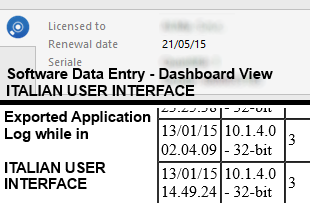
I've just discovered that your software change date/time settings based upon the User Interface language option, here some screens:
Italian UI
English UI
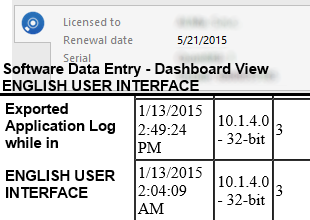
Wouldn't it be better to add an option for date/time settings or just follow the system regional settings?
Not all dates and times seems to be affected by this because in any language, into the Application Log view (before exporting), the date column shows its value following the system settings (dd/MM/yy in my case)...
Best regards.
edited by Logharn on 1/13/2015