
FSchneider
User cant move any entrys
Hey together,
can you give me any update for this topic.
May you can tell me in which Version the new Move privilege will be implemented ?
Best regards,
Florian
User cant move any entrys
Hey together,
we have some weird problems since we upgraded to the RDM Enterprise Version 12.6.8.0.
Until now the normal User-Accounts were able to move Sessions via the Context-menu (no Drag&Drop) and the "Move Group / Folder"-option. Futhermore the Users were not allowed to delete Sessions.
Now the "Move Group / Folder"-option is greyed out. If i set the "Delete"-Right to a normal User, the "Move Group / Folder"-Option is useable. If i take away the "Delete"-Right vom the User he can´t use the "Move Group / Folder" Option anymore....
Because of our company policies, its not allowed for a user, to have the right to delete any Session, but he should be able to move them (like always)
Can you help me here ?
Best regards,
Florian
Password generation template for all user
Hello everybody,
i just wanted to ask, if our request was already implemented. If so, I would like to update our RDM installation.
I have already read the change informations of the last versions, but I am not sure if this change has already been implemented.
Best regards,
Florian
Password generation template for all user
Happy New Year together,
we know about the entry settings, but we also would like to use the RDM as central platform for Password generation.
It woul be great, if a once created template (by the Admistrators) in the Password Generator would be visibly and usable for all users.
Example: I create the Template "COMPANY PASSWORDS" and all other colleagues see this template in the Password Genereator an can use it.
Is this possible ?

Best regards,
Florian
Password generation template for all user
Hello together,
we know how to create password templates.
We would like to know, if its possible to provide a created password template to all users of our RDM from an central point.
With this all colleagues can use the once greated template which is corresponding to our company guidlines.
Best regards,
Florian
Password generation template for all user
Hello together,
maybe you could help us here.
We use the RDM as a central password generation platform corresponding to the password specifications of the company. We would like to provide all users appropriate central templates for password generation, so that the created passwords always correspond to the company guidelines.
Is there any possibility to do this ?
Best regards,
Florian
Export SSL Certifcates / Documents without Export-Option
Hey,
that looks exactly like what we needed !
Thanks for the good support !
Best regards,
Florian
Export SSL Certifcates / Documents without Export-Option
Hi,
through double click or "open", the certificate wizard will start and we have to import the certificate directly into a certifcate store. Vecause we store customers SSL Certificates in the RDM, we dont need to import them to our local support systems. We use the RDM as central point of documentation for passwords and certificates, because of the logging functions of the RDM.
With the "Save Document"-Option we can copy/export the Certificate.pfx to the customers environment and import them (if needed) on the actually server.
Best regards,
Florian
Export SSL Certifcates / Documents without Export-Option
Hi,
the Certificate entrys are document entrys !
Best regards,
Florian
Export SSL Certifcates / Documents without Export-Option
Hello together,
we have the following problem:
On basis of our company policies our colleagues which use the RDM dont have the right to export sessions out of the RDM. So the "Export Sessions"-Option under "User" - "Privileges" is not set.
The problem is, that we store SSL-Certificates from our customers in the RDM-Folders with the RDP (etc.) sessions, but without the Export-Option the users can´t export this Certificates.
Is it possible to seperate the SSL-Certificate-Export from the generally Session-Export Option/Role ?
Best regards,
Florian
RDM and Azure Export
Hey,
if we try to login to our Azure-SQL-Database via SSMS and Windows authentication we receive te following error:

So this is a limitation of the SQL Server provider ?
Best regards,
Florian
RDM and Azure Export
Hello together,
we have the following problem at the moment: (RDM Version 11.1.0.0)
As an internal project, we have to export our RDM-Database from our local SQL-Server to an Azure-PaaS-Database.
Until now, our local RDM works with Windows Authentication - Integrated Security. For the export to Azure we had to delete all Windows-Authentications from the RDM-Database via SQL Management Studio, because as long the Windows Authentications were existent, the Azure Export showing the Error "Windows Logins are not supported in this Verison of SQL-Server..".
After we succeded to export the RDM-Database via SQL Management Studio 2016 (Release Candidate 4) to our Azure-PaaS-Database, we have set our Windows-Users (synct to our Azure-AD-Domain via ADFS) as authorized Users on the RDM-Database via SQL-Management Sudio.
Now we are able to login via Management Studio 2016 (Release Client 4) using our AD-Accounts, but if we try to connect to the RDM Database via RDM we receive the following error:
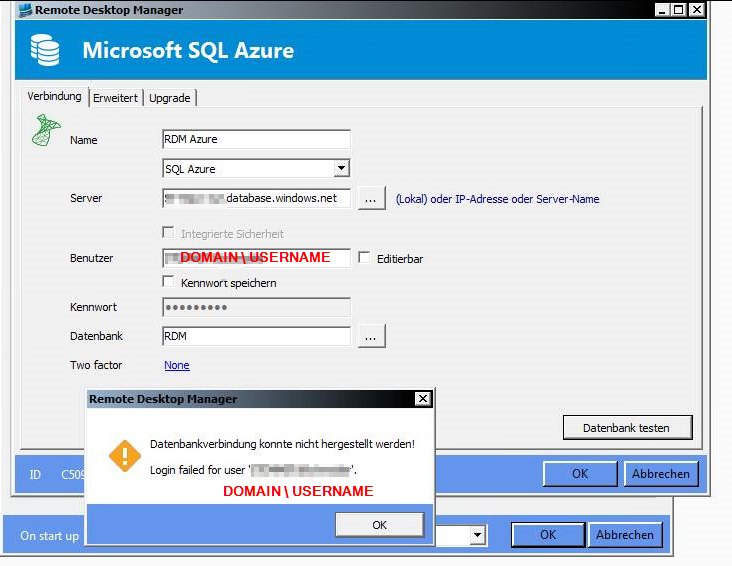
Therefore we cant find any error in our ADFS-Sync, we would like to ask were our mistake is.
I already found your Support-Article here: http://help.remotedesktopmanager.com/index.html?datasource_choosing.htm
So, RDM doesnt support AD Authentication using Azure SQL ?
€: Connecting to our Azure-RDM-Database via RDM and SQL-User works fine by the way.
Best regards,
Florian Schneider
Cisco ASDM Sessions - No Credentials
Hey David,
thanks to your hint about the ASDM Versions i think i already could solve the misery.
The colleagues does not have the current version of the Addon. The last ASDM Addon update in user context through our RDM publication obviously doesn't have worked.
Now we have tried the update of the addon directly on our RDM / Support Server in user context.
Now my colleagues can see the credentials of the ASDM Session !
Thanks ! Case closed ;)
Best regards,
Florian
Cisco ASDM Sessions - No Credentials
Hey David,
sorry for my late response.
The problem only affects the ASDM Sessions !
Best regards,
Florian
Cisco ASDM Sessions - No Credentials
Hello everybody,
we have got the problem, that the most users no longer can see the credentials of ASDM-Entrys.
Users which possess administrative rights for a longer time (like me), can do a right click on a ASDM entry -> Show Password / Username -> and look up the Informations (which usually everybody could do).
I have checked several settings and also the rights of the users, but i could not determine, why the users suddenly can´t see the Credential-information any more. If the normal users do a right click on the ASDM entrys and select -> Show Password / Username- > they just see blank fields.
I also gave some users admin-rights (for testing) and also cleared the cache / do complete reconnect of the database, but they can´t see the credential information of ASDM entrys. Currently the user have to do a right click an have to select "Properties" to see the credentials.
Can you help me here?
Best regards
Florian
RDMS Authentication problems
Hey Maurice,
thanks alot for the information ! I just asked because i see the pictures in the RDMS manual and wanted to know if something is missing in my installation.
Thanks for the support !
RDMS Authentication problems
One last question ;).
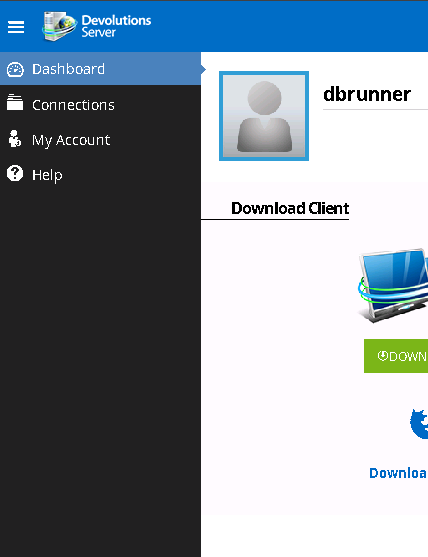
Since i can login to the webinterface now, i wonder were i can find the user/roles management in the webinterface:
RDMS Authentication problems
#Update:
After i changed the date/time format to Englisch (US) it seems to work now !!!
RDMS Authentication problems
Hey !
I have changed the date/time format from German to English (Great Britain) and restarted the server.
The error is still there.
RDMS Authentication problems
Hey,
i just tested the login with the "dbrunner"(Windows Local) user from last week. If i try to login with this user, the Login itself seems to work because the "Login failed, ivalid user or password !" message did not appear.
But now following error appears:

RDMS Authentication problems
Hi,
yes i used the button inside the embedded console window

edited by FSchneider on 6/19/2015
RDMS Authentication problems
If i try to add a new datasource to our RDMS i got the following error:
Your login is valid but your user does not have any access for the datasource !
RDMS Authentication problems
Hello together,
we have the following szenario:
We are planning to integrate the RDMS in our company, to manage several RDM-Databases in different locations.
For testing reasons, i have a got an VM without connection to our Doamin.
I have installed the RDMS in v.2.5.2.0 and the RDM in v.10.6.3.0.
I have set up an IIS Website and an SQL Server 2014.
I was even possible to generate an Database through the RDMS Setup at the SQL-Server.
The Identity-settings for the RDMS Website-Application Pool are "NetworkService". I have granted "db_owner" permissions for "NT AUTHORITY\NetworkService" to the RDMS Database at our SQL-Server.
Because we have no Domain access at the moment, i have set up authentication permissions for "Devolutions Server custom user", "local machine user" and "Database user".
Now the problem is the following: If i try to login to the RDMS webinterface with ANY kind of user (i have tried any kind), i get the message "Login failed, ivalid user or password !". This happens with local users, DB users and also with RDMS users i have added through the RDMS console.
I have allready read some Threads and tried the solutions but the login still doesn´t work.
Can you guys help me out here ?
Thanks alot !
Best regards,
Florian Schneider
edited by FSchneider on 6/19/2015
Enterprise Licence Renewal
Hi,
we received an corrected confirmation with our (real) new Enterprise Licence Key.
Thanks alot !
Best regard,
Florian
Enterprise Licence Renewal
Hi,
i´ve send an email to support@devolutions.net.
Best regards,
Florian