RDM and Azure Export

Hello together,
we have the following problem at the moment: (RDM Version 11.1.0.0)
As an internal project, we have to export our RDM-Database from our local SQL-Server to an Azure-PaaS-Database.
Until now, our local RDM works with Windows Authentication - Integrated Security. For the export to Azure we had to delete all Windows-Authentications from the RDM-Database via SQL Management Studio, because as long the Windows Authentications were existent, the Azure Export showing the Error "Windows Logins are not supported in this Verison of SQL-Server..".
After we succeded to export the RDM-Database via SQL Management Studio 2016 (Release Candidate 4) to our Azure-PaaS-Database, we have set our Windows-Users (synct to our Azure-AD-Domain via ADFS) as authorized Users on the RDM-Database via SQL-Management Sudio.
Now we are able to login via Management Studio 2016 (Release Client 4) using our AD-Accounts, but if we try to connect to the RDM Database via RDM we receive the following error: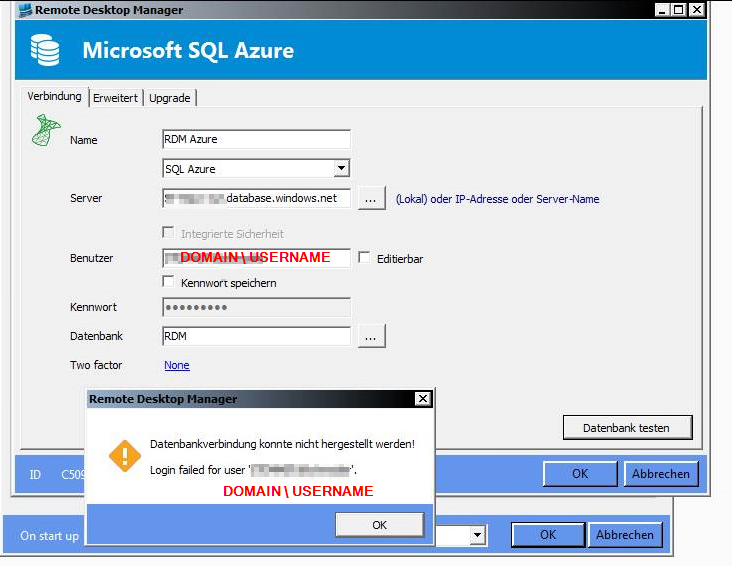
Therefore we cant find any error in our ADFS-Sync, we would like to ask were our mistake is.
I already found your Support-Article here: http://help.remotedesktopmanager.com/index.html?datasource_choosing.htm
So, RDM doesnt support AD Authentication using Azure SQL ?
€: Connecting to our Azure-RDM-Database via RDM and SQL-User works fine by the way.
Best regards,
Florian Schneider
All Comments (3)
Hello,
Using Windows authentication against SQL Server means that the username/password is NOT sent over the wire, but that the authentication token from your windows session is used instead.
That is not a limitation of RDM, that's how the .net SQL Server provider works.
Can you login to your Azure database by using the windows authentication method in SSMS?
Best regards,
Maurice
Hey,
if we try to login to our Azure-SQL-Database via SSMS and Windows authentication we receive te following error:
So this is a limitation of the SQL Server provider ?
Best regards,
Florian
Hello,
As per the error message, it is the SQL Server engine itself that doesn't support it. The .net Provider must follow suit.
Best regards,
Maurice