
Cody24
Import TeamViewer CSV
Is there a better way to import TeamViewer connections?
Also wondering how you can export a list from TeamViewer. We are switching to TeamViewer and will have about 1,500 connections to import.
Windows 10, cannot start Microsoft VPN from Open VPN option in session
Yes, it works thanks!
Microsoft VPNs do no connect
It works in 11.0.7.0 thanks!
Microsoft VPNs do no connect
Awesome, thank you
Microsoft VPNs do no connect
external VPN
Microsoft VPNs do no connect
Sent you a private message
Windows 10, cannot start Microsoft VPN from Open VPN option in session
I have the same issue, it works with 11.0.4.0
I'm also running Windows 10
Does not work with 11.0.5.0 or 11.0.6.0
Microsoft VPNs do no connect
I found older versions.
11.0.5.0 is broke too
11.0.4.0 confirmed working
Microsoft VPNs do no connect
It did nothing originally. I turned on Show console error and get the attached error.
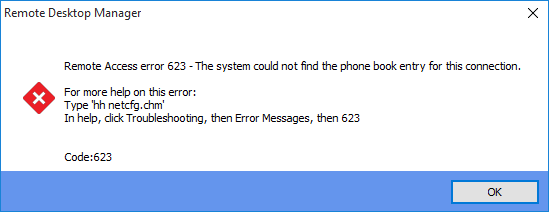
Microsoft VPNs do no connect
After updating to version 11.0.6.0 this morning, VPNs will not connect. Going back to an earlier version (version 10.9.11.0), that's latest older version I have saved locally , it works fine.
I don't have a download for 11.0.5.0 to test it, but I'm positive it will work as it was working fine all last week until I updated to 11.0.6.0
Format Exception Error
Thank You!
Format Exception Error
gC((nhG#$U!"f
If that is what you mean, that doesn't work.
Format Exception Error
I receive the below error when launching a TightVNC session, it does not fill out the password.
I'm using the following Typing macro{WINDOW:Vnc Authentication}$MACRO_PASSWORD${ENTER}
the password =gC(nhG#$U!"f
It works fine if I take out the(
The top of the below picture is with version 9.2.5.0 along with the below code, the bottom part of the picture is after I upgraded to 9.2.6.0.

FormatException - One of the identified items was in an invalid format.
at Devolutions.RemoteDesktopManager.Managers.SendKeyManager.ReadParenthese(CharReader charReader, StringBuilder stringBuilder)
at Devolutions.RemoteDesktopManager.Managers.SendKeyManager.SplitCommands(String commands)
at Devolutions.RemoteDesktopManager.Managers.SendKeyManager.Send(String sequence, Int32 delay, Connection connection, Boolean includePassword)
at Devolutions.RemoteDesktopManager.Business.ConnectionEvents.ExecuteTypingMacro(Connection connection)
at Devolutions.RemoteDesktopManager.Business.ConnectionEvents.ExecuteAfterConnection(Connection connection)
at Devolutions.RemoteDesktopManager.Managers.ConnectionManager.OpenConnection(Connection connection, OpenConnectionParameter parameter)
at Devolutions.RemoteDesktopManager.Managers.ConnectionManager.OpenConnections(Connection[] connectionList, OpenConnectionParameter parameter)
at Devolutions.RemoteDesktopManager.Managers.ActionManager.DoOpenConnection(Connection[] currentConnections, OpenConnectionMode openConnectionMode, IConnectionSource source)
at Devolutions.RemoteDesktopManager.Managers.ActionManager.OpenConnections(Connection[] currentConnections, OpenConnectionMode openConnectionMode, IConnectionSource source)
at Devolutions.RemoteDesktopManager.Frames.ConnectionViews.FreBaseConnectionView.OpenConnection(Connection[] currentConnections, OpenConnectionMode openConnectionMode)
at Devolutions.RemoteDesktopManager.Frames.ConnectionViews.FreConnectionTreeListView.OpenOnDoubleClick(Boolean isEmbedded)
at Devolutions.RemoteDesktopManager.Frames.ConnectionViews.FreConnectionTreeListView.<>c__DisplayClass7.<OnDoubleClick>b__6()
at Devolutions.RemoteDesktopManager.Managers.ThreadManager.pushTimer_Tick(Object sender, EventArgs e)
at System.Windows.Forms.Timer.OnTick(EventArgs e)
at System.Windows.Forms.Timer.TimerNativeWindow.WndProc(Message& m)
at System.Windows.Forms.NativeWindow.Callback(IntPtr hWnd, Int32 msg, IntPtr wparam, IntPtr lparam)
Searching + Shortcuts
Feature request similar to the shortcuts, when I want to delete 20 shortcuts at once.
I have to go and click Delete only this entry 20 times, similar to Windows can we have an option for (pick this option for all 20)
Would it be easy to have folders capable of being a shortcut as well?

edited by Cody24 on 3/13/2014
Searching + Shortcuts
thank you
Searching + Shortcuts
Searching CCDC, we have 2 sites that have a server named CCDC.
Each site has a shortcut for CCDC as well. If we can hide duplicates within a certain group/folder otherwise hiding the shortcut part would work too.

Searching + Shortcuts
Is there a way to hide the shortcuts when I search for things?
Shortcut Icons
Any chance to get a feature so that anything new created in 'Folder B' would automatically create a shortcut in 'Folder A'
So right now I have shortcuts set up for everything, but if I add something new to Folder B... it would be a 2 step process every time something new is created. I would have to additionally create a shortcut for it.
Shortcut Icons
Exactly what I was looking for, thanks!
VPN Session List
sweet thank you!
Shortcut Icons
Can we have an option to where only the "shortcut" has the shortcut icon on it.
Shown below, the top half are all shortcuts. The bottom half has an original server entry, but it has the shortcut icon too.

VPN Session List
In the picture below on the right, when browsing to a group/folder you can expand or collapse everything.
On the left, when browsing to a VPN session there isn't an option like that. Everything is expanded, would be really nice if it was the same as the example on the right where it takes you straight to the folder you're currently in.
Accidentally modified entry
that worked, thank you!
Accidentally modified entry
I found the spot to view deleted entries.
I modified an entry, I took the "other" data entry off by mistake and now all that information is gone. Anyway to recover that?
User Specific Settings
Is it possible to have more User Specific Settings?
The main one in question would be the VPN settings, specifically the Close On sessions close option. The ability to choose Manually later or Confirm disconnect.