Windows 10, cannot start Microsoft VPN from Open VPN option in session
Windows 10, cannot start Microsoft VPN from Open VPN option in session

Hi,
I have a session with a configured Microsoft VPN entry (PPTP). I can select and edit this from within the session entry in RDM.
However, Open VPN does nothing.
When I start the VPN manually, Close VPN works fine.
Any ideas?
It worked fine when I used Windows 8.1
In Windows 10 I have enabled the option in this VPN: Apps may use this VPN automatically.
Kind regards,
Ray
All Comments (17)
Hello,
What version of RDM are you using?
Could you give a try to RDM 11.0.6.0
http://remotedesktopmanager.com/Home/Download
Best regards,
Jeff Dagenais
Hi,
I tried it with both 11.0.5.0 and 11.0.6.0.
Same, doesn't do anything on Open VPN, I see a quick flash in the center of the screen, so fast I can't read it. VPN does not start.
Hello,
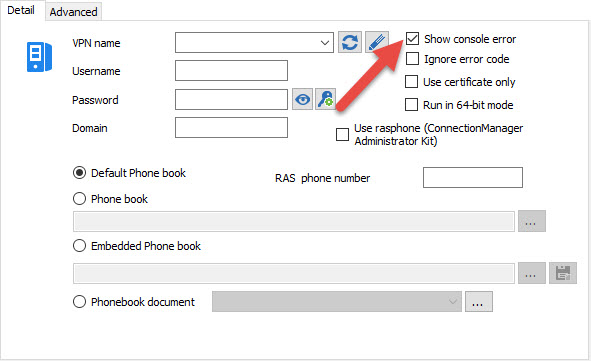
In the properties of your Microsoft VPN, you can enable the Show console error.
Could you enable this option and let us know of the error
Best regards,
Jeff Dagenais
2015-10-23_14-23-50.jpg
Hi,
I have enabled this, error: Remote Access error 623 - The system could not find the phonebook entry for this connection.
However, if I have manually enabled this VPN, I can disable it from Close VPN in the session.
Kind regards,
Ray
Could you try to check the checkbox Use rasphone (Connection Manager Administration Kit)?
David Hervieux
Or try the Run in 64 bit.
David Hervieux
Did not have the 64 bit option, I was running the 64 bit version of RDM.
I tried both, in both 32 and 64 bit RDM, still same error.
Could you try to open the VPN with the command line?
David Hervieux
I refactor VPN, copied command line url. That connects when I execute.
This works fine, also later, when I Open VPN from the session again.
Really weird!
Thanks a lot!
Kind regards,
Ray
Really strange. I have no explanation
David Hervieux
Just for fun I rebuilded the session back to normal Microsoft VPN, filled all fields and again not working.
Doesn't matter, it works when I set VPN type to session...
Must be a Windows 10 thing. I used this for years fine with previous versions of Windows.
Thanks!
I have the same issue, it works with 11.0.4.0
I'm also running Windows 10
Does not work with 11.0.5.0 or 11.0.6.0
Hello Raymond and Cody24,
Could you give a try to RDM 11.0.7.0
http://remotedesktopmanager.com/Home/Download
Best regards,
Jeff Dagenais
Yes, it works thanks!
Works for me too!
DON'T USE ANY SPACES!
Even if you store the Phonebook file in a document you'll get the 623 error if there is a space in its name.
I'm using Windows 10 Pro 64bit / RDM EE 13.5.6.0
@Maarten,
Thank you for your feedback, it's appreciated.
Best regards,
Jeff Dagenais