Microsoft VPNs do no connect

After updating to version 11.0.6.0 this morning, VPNs will not connect. Going back to an earlier version (version 10.9.11.0), that's latest older version I have saved locally , it works fine.
I don't have a download for 11.0.5.0 to test it, but I'm positive it will work as it was working fine all last week until I updated to 11.0.6.0
All Comments (20)
Hello,
Do you receive an error message?
If yes, could you post a print screen of that error please.
Best regards,
Jeff Dagenais
It did nothing originally. I turned on Show console error and get the attached error.
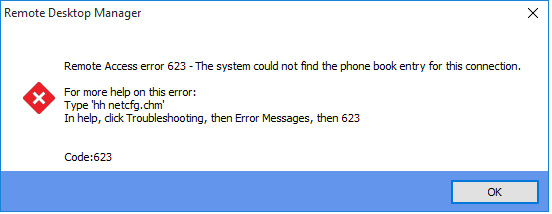
error623.png
I found older versions.
11.0.5.0 is broke too
11.0.4.0 confirmed working
Is it possible for one of to send me an export of your VPN session? I don't need the credentials. I just want to see how it's linked. You can send me a private message.
David Hervieux
Sent you a private message
Thank you. Just to be sure do you use it as an external VPN or it directly saved in the session?
David Hervieux
external VPN
I have made fix for this. I will build a new version really soon.
David Hervieux
Awesome, thank you
Could you try RDM 11.0.7.0?
Regards
David Hervieux
It works in 11.0.7.0 thanks!
Hi,
We have updated to version 11.0.16.0 and also get this error 623. Any other versions we can try to fix this problem?
Hi,
We have analyzed it further. We are using "Use rasphone" option and the problem is, that RDM is executing rasphone.exe with the
session name as the parameter instead of the VPN name from rasphone.pbk. Maybe that can be fixed again in a future version?
Hello,
You mean that it does not use the VPN Name? Do you use it as a standalone connection or as a linked VPN?
David Hervieux
Hi David,
Yes, it does not use the VPN Name. We have checked that with process monitor and rasphone exe is executed with the session name as the parameter instead of the VPN Name. We configured the VPN inside the session.
Hello,
You're right. It's not fixed internally.
Regards
David Hervieux
Hi David,
It works again now in 11.0.17.0. Thanks
in 11.0.18.0 I get this error also we using a rasphonebook link to file. if I use it local on my computer it works but if I want to use is it in the jump host I get the 623 error. From the jump host server I can access the rasphonebook.
You need to have the rasphone book on the server. It's not transferred with the jump when it's a link.
David Hervieux
I change the configuration to a local rasphone.pbk and now it works