
d.heppt
Gateway Tunnel for SAP Connections
Hi,
we are using RDM and are on the road to get an PAM Tool.
Cause of using RDM now for 14 years, we had a look on many diffrent PAM Tools.
All of them are not able to open an SAP GUI connection without RDS.
Is it possible to use it by tunneling through the Devolutions gateway?
x2go support?
Update..... for those of you with the same Problem:
You have to allow or add x2Go at Vault settings too ^^
x2go support?
Hi,
sorry for bringing up a dead post.
I am looking for the integration of x2Go but i cant find any option or session to add with x2go.
How do i set up an x2go Session by RDM?
Thanks and have a nice day
RDM Protocol Tab vanished
sometimes its that easy thank you.....
RDM Protocol Tab vanished
Hi,
is there a possibility to authorize a normal User to the Protocol Tab?
Reason for Asking,
the whole time any user could access the protocol tab but since 4 weeks the tab vanished for normal Users

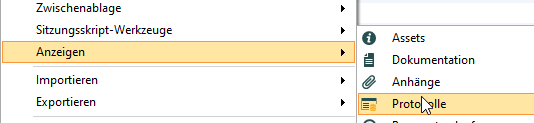
In this Menu it is gray for normal Users
The pictures are Admin view
RDM API create Entrys by script
Thank you =)
i forwarded the your links to the team.
RDM API create Entrys by script
Hi, we are using scripts to create Virtual Machines.
The Question we have, is it possible to add RDM Entries by an API or something like this?
I now there is an option to import via CSV but there has to be manual work.
Another Question, is it possible to change Username and password via an API?
I Think it is not possible to do this via database cause the entries are encrypted right?
Cannot use PuTTY SSH key
Hi Hubert,
are there any news?
Cannot use PuTTY SSH key
Hi Hubert,
thanks. Yeah i already told the colleagues that its an layer 8 Problem =)
Cannot use PuTTY SSH key
Hey Hubert, i can recreate the "bug"
if you use the Settings undocked and open the session its an undocked session without the possibility to right click

it then looks like this

instead of this

Cannot use PuTTY SSH key
Hi Hubert, this is what a got from the colleagues,
All the features
you described work fine for us. One addition to changing font size and session
colors. For us it would be important, that you don’t need any rights to edit
the connection entry to change the color of the session.
Additional buttons
in the window would work great for us:

Btw: some features
only work when the window is docked and not undocked? Is there a technical
background for this?
Cannot use PuTTY SSH key
Hi Hubert,
thanks for the update.
we used Putty SSH Rebex and not SSH Shell. So the colleagues are testing now and i will post a feedback tomorrow
Regards
Dieter
Cannot use PuTTY SSH key
Hi Hubert,
i asked the colleagues and this are the functions they need
Type size in the session (on the fly in the running session)
Change background and type color in the session (on the fly in the running session)
Open a scp session to the connected server
Logging to a drive
Copying files to the server (prefered drag and drop to the session)
Using x forwarding through the session
Duplicate sessions
Cannot use PuTTY SSH key
Hi Hubert,
i have to use this thread to not open an new one.
we have similar Problem.
We are using Keyfiles for our Putty connections.
At the moment we are storing this keyfiles on an Networkshare and using Putty with paramater -i
We cant use the internal Putty/SSH Rebex cause we need more functions which are not integrated in the internal "Putty"
Is there a possibilty to store the Keyfiles at RDM and still using Putty?
Cause we get an error when we are doing the following:


So the Question:
Is it possible to store Keyfiles at RDM and using putty somehow?
SAP GUI FrontEnd and SAPUILandscape.xml
Hey, i found an old post from David about this
But i could only find it via Google not the search function of the Forum.
https://forum.devolutions.net/forum/topic17843-sap-netweaver-business-client-integration.aspx
SAP GUI FrontEnd and SAPUILandscape.xml
Hi Hubert,
thanks.
That's all I could find for NWBC
Regards
Dieter
SAP GUI FrontEnd and SAPUILandscape.xml
Anything new here?
And is it possible to get an SAP NWBC AddOn?
SAPGuiAddon Citrix
2.0.4.0
SAPGuiAddon Citrix
Hi David,
yes i installed it as Administrator. Everything is working except of SAPGUI i will ask the Backoffice Team to reinstall the RDM.
SAPGuiAddon Citrix
Hi David,
its nearly the same problem as 3 Years before (http://forum.devolutions.net/topic1437-use-remotedesktopmanager-at-citrix.aspx)
At the local Workstations the Addon is working. At Citrix it doesn´t.
So what have we done?
We have installed the RDM V9 at the Citrix Server and copied the Files like the are on a local Workstation.
Everything is working fine except of the SAP Gui Addon.
After you start RDM at a Citrix Terminal Session it says you have to install the SAPGUIAddon. If you press Install you will get an abort cause you dont have access to the installation Folder.
If you press ignore you can use RDM without the SAP Gui sessions.
SAPGuiAddon Citrix
Hello,
we are using Citrix at our Company.
The Problem we have, with V8 it was possible to place the Addons at the Appdata Folder.
With V9 its only possible to save the Addons at installationFolder of RDM.
Since we updated to V9 its no longer possible to use SAPGUI Connections via RDM.
Any ideas?
Quick Launch for Putty or WinSCP
Damn thx David that´s what i need =)
User Administration // Security Groups
Thanks David then we have to wait =)
@ James, you didnt understand the problem, if i do it like you said, the persons who have the rights to edit/add etc. can do this on all costumers not at only one
User Administration // Security Groups
Hey all,
following scenario:
we have round about 70 Employes and 50-60 Customers at our company.
we are using RDM since 2-3 Years and want to use the new User Adminstration System.
So we have about 8-10 Employes with access to add/delete/edit some Connections.
And we have one Security Group for each Customer (Connections).
The Problem we have now is that we have an new Customer and creat an new Folder with the Security Group New customer we need to go to every User and grant the right to view the new customer cause every User should and can see nearly all connections but only some should be able to add/delete/edit this connections.
Is there any possibility to grant all users with one action to view the new security group? or do i really have to edit every user?
Windows 7 and shared connection Log
Hi David,
yes you´re right =)
thats no more the problem.
For our new Problem its not an RDM fault so think you can close this thread =)