
bzowk
SFTP: Browsing Folders Fails Due to Colons (:) Being Inserted in Path
Thanks for the reply. Unfortunately, I only have SFTP access to the remote host, so can't SSH (tried & failed). Was able to get a bit of host information via WinSCP, though; which is below. Hope it helps...
File transfer protocol = SFTP-3
Cryptographic protocol = SSH-2
SSH implementation = OpenSSH_6.7p1 Debian-5+deb8u8
Encryption algorithm = AES-256 SDCTR (AES-NI accelerated)
Compression = No
------------------------------------------------------------
Additional information
The server supports these SFTP extensions:
posix-rename@openssh.com="1"
statvfs@openssh.com="2"
fstatvfs@openssh.com="2"
hardlink@openssh.com="1"
fsync@openssh.com="1"
------------------------------------------------------------
Thanks!
SFTP: Browsing Folders Fails Due to Colons (:) Being Inserted in Path
Hey Guys -
Running 2020.2.13.0 x64 and having issues connecting to SFTP servers. I'm able to connect without issue and see root directory, but am unable to enter other directories. When I turned on logging, I see that colons are being inserted into their names after the first character. Below is a log from when I connected to a server then tried entering a folder named "downloads" followed by one named "logs." (see last 4 lines) Only settings I made to session were hostname, username, & password - the rest are defaults. Connection works just fine using WinSCP.
Any suggestions or is this a bug? Thanks!
[6/16/2020 11:30:24 AM] Connected to a windows server
[6/16/2020 11:30:24 AM] Sending session channel open request: 0/-
[6/16/2020 11:30:24 AM] Received channel open confirmation: 0/1 WS 200000/0 MPS 32000/32768
[6/16/2020 11:30:24 AM] Sending subsystem request: 0/1 sftp
[6/16/2020 11:30:24 AM] Received channel success: 0/1
[6/16/2020 11:30:24 AM] -> sftp init request
[6/16/2020 11:30:24 AM] <- version reply
[6/16/2020 11:30:24 AM] -> real path request: .
[6/16/2020 11:30:24 AM] <- name reply
[6/16/2020 11:30:24 AM] -> open dir request: /
[6/16/2020 11:30:25 AM] <- handle reply
[6/16/2020 11:30:25 AM] -> read dir request
[6/16/2020 11:30:25 AM] -> read dir request
[6/16/2020 11:30:25 AM] <- name reply
[6/16/2020 11:30:25 AM] -> read dir request
[6/16/2020 11:30:25 AM] <- status reply: eof
[6/16/2020 11:30:25 AM] <- status reply: eof
[6/16/2020 11:30:25 AM] -> close handle request
[6/16/2020 11:30:25 AM] <- status reply: ok
[6/16/2020 11:30:30 AM] -> open dir request: d:ownloads
[6/16/2020 11:30:30 AM] <- status reply: no such file
[6/16/2020 11:30:33 AM] -> open dir request: l:og
[6/16/2020 11:30:34 AM] <- status reply: no such file
Accessing RDP Connections Over VPN Using RDM Agent Possible?
Thanks -
I actually just tried it out and it worked, but have one more question, please.
Once I set everything up and tested, here's what happened...
1. I opened the session to the session going over the jump box from my workstation
2. RDM opened an RDP connection to my VM
3. RDM launched on the VM then auto-connected to the remote server
The problem is that now I have RDM running within RDM (below) which is confusing plus taking up valuable real estate. Is there a way to get the remote session to appear like a typical RDP session? I tried setting back the default for .rdp files of using mstdc.exe on the jump host, but that didn't work. The process was a bit slow as well, but guess that all comes down to resources.
Any suggestions? Thanks

Accessing RDP Connections Over VPN Using RDM Agent Possible?
Hey Guys -
I've been using Remote Desktop Manager for years now and love it. If I can figure out how to do one task (if possible), it would be a tremendous help for me, so wanted to post.
In my current position, I work mostly from home where I access environments of multiple companies. To make it easier, I have set up a dedicated Win10 VM (ESX) per company which I generally keep connected to their VPN at all times. Therefore, if I need to work on something, I just connect to the VM and go. An important note that local LAN connectivity is still allowed for these VPN connections.
My Question
If I were to install the RDM Agent, a plugin, specific configuration, (or anything, really) onto each VPN-connected VM, would I be able to RDP to the systems for each company from RDP installed on my primary PC which is not VPN-connected? If so, how? I first considered setting up RemoteApp, but would have to rebuild each VM so thought perhaps the agent or something similar which would act as a relay may do the trick while keeping things secure.
Any suggestions or thoughts? Thank You!
Unable to Connect to ESXi 6.x & Hyper-V (Win10) VMs
Hey Guys -
I've used a lot of software like RDM, but for the past couple of years; RDM's been my favorite! While in between jobs, I didn't use it for a couple of months but after starting a new one, I installed the Enterprise version (which I have a key for) and started adding things. Unfortunately, I'm having difficulty as I cannot connect to either of the two system types below:
ESXi 6.7 VMs - Hosted on my ESXi 6.7 server
Hyper-V VMs - Hosted on my Windows 10 laptop
I've tried adding the ESX ones using all VMWare options, but I cannot connect. One of the options requires the path to vSphere's EXE, but 6.5+ doesn't use vSphere and to my knowledge is only web-based. To note, I also do not have a vCenter server as resources are limited. :) So far, the only thing I've been able to do is add a web entry and connect to the console but it doesn't differ than doing so in Chrome. I can connect to the ESXi server via SSH so know it's authenticating correctly. Below is what I see when connecting no matter which mode I select

For Hyper-V, I've tried default, v1, and v2. It seems to connect to the host as an interface appears and I'm not told it isn't successful, but no VMs are listed - even after refreshing. I've also tried adding RDP entries configured for Hyper-V embedded, but cannot get those to work, either. Here's what I get no matter the mode selected for it as well

All of this is currently on my home network which isn't too complex as it's a single subnet without a domain so everything's authenticated with a simple username / password.
I wanted to post to see if anyone had suggestions, if there session types were currently being updated, or what...
Thanks!
ownCloud / WebDAV Cloud Accounts
I should have thought of that!
Unfortunately, I tried it tonight and got the same results. :( I'll try to verify again that webdav for my site is up, but was as recently as a week ago. If you have any other suggestions, please let me know.
Thanks
ownCloud / WebDAV Cloud Accounts
Good Morning -
Been a while since my initial post, but when upgrading to 12.0.2, thought I'd take another shot at it. "ownCloud" isn't listed as a session / entry to add, however, it does support WebDAV connections so tried setting one of those up. I entered the URL and credentials; but when I clicked OK, it said I must specify a "Home directory" so I simply put in "/". When trying to connect, it did not work.
My Question / Issue
What would the default Home Directory be if you just want to go to the root and if "/" is correct, any idea why this wouldn't work? I've been able to connect to my ownCloud's WebDAV using a variety of basic methods before without issue.
Free ownCloud Account
I'd prefer not putting the URL for it here since it's for personal use only - but - I would be willing to create a dedicated account / user on my ownCloud site with a good chunk of space + great bandwidth if one or more Devolution devs or anyone in the community that writes plugins wishes to try some things out with it. If anyone gets a plugin or whatever to work, I wouldn't mind you keeping it for use if you wish. For those unfamilier, it's very similar to Dropbox / Google drive as it offers sync clients and a web interface - just better IMO and open source. Let me know.
Thanks!
UPDATE
I forgot to mention, my site is secured by a 3rd party SSL cert so did check the option to use SSL when attempting the WebDAV connection plus verified the port was 443. I also tried using both "/" and "\" for the Home and Root directories. Even though I didn't think it would make a difference, I tried removing "https://" from the beginning of the host address which is in the format of: "mysite.com/owncloud/remote.php/webdav". It's the same address I use with other WebDAV tasks and the reason behind it is discussed here. However, no matter how I configure it, once I open the session, the right side of the screen is blank. After a minute or so with no change, I click on the refresh button towards the top and an error message appears. Below is what it says:
Enterpirse Edition: 12.0.2.0 64-bit
Memory Usage: 536 MB
Running Since: 1 hours 16 minutes
NullReferenceException
NullReferenceException - Object reference not set to an instance of an object. at Devolutions.RemoteDesktopManager.Frames.Embedded.FreEmbeddedFileExplorerGeneric.ToTreePath(String path) at Devolutions.RemoteDesktopManager.Frames.Embedded.FreEmbeddedFileExplorerGeneric.ClearNode(String path) at Devolutions.RemoteDesktopManager.Frames.Embedded.FreEmbeddedWebDav.c2219c61694f9eb77c023576cdf9b9008(Object c19f185fd70cefc696ba148af1c4faf54, EventArgs cf1018bb83ec7debd818319fd3cb4844e) at System.Windows.Forms.ToolStripItem.RaiseEvent(Object key, EventArgs e) at System.Windows.Forms.ToolStripButton.OnClick(EventArgs e) at System.Windows.Forms.ToolStripItem.HandleClick(EventArgs e) at System.Windows.Forms.ToolStripItem.HandleMouseUp(MouseEventArgs e) at System.Windows.Forms.ToolStrip.OnMouseUp(MouseEventArgs mea) at System.Windows.Forms.Control.WmMouseUp(Message& m, MouseButtons button, Int32 clicks) at System.Windows.Forms.Control.WndProc(Message& m) at System.Windows.Forms.ToolStrip.WndProc(Message& m) at Devolutions.RemoteDesktopManager.Controls.EnhancedToolStrip.WndProc(Message& m) at System.Windows.Forms.NativeWindow.Callback(IntPtr hWnd, Int32 msg, IntPtr wparam, IntPtr lparam)
Thanks
Ability for Sessions Without Hostname Field Populated to Prompt for a Hostname When Opened + Extras
Hey Guys -
This feature may already exist, but if so I haven't found out how to do it...
My Idea / Desire
I'd like the ability to add a sessions (any type to any folder) which I may pre-configure yet not enter a hostname. When it's session is opened, I'd like for it to then prompt me for a hostname to connect to. The hostname is NOT saved in the session so that the next time its run it would prompt again. Leaving the hostname field empty currently simply won't allow saving of the session.
Extra Credit
Automatically Paste From Clipboard - When opening one of these sessions and being prompted for the hostname, have it automatically paste whatevers in the clipboard in the hostname field if it seems to be in a netbios or FQDN format. This option could perhaps be disabled in global or per-session settings
Prompt to Save Into New Session - Once one of the sessions is closed, it would be nice to have an optional prompt appear asking if I'd like to save the used hostname/session as a separate session and if so allow me to choose the folder to save it into. The session which prompted would remain unchanged so that on next run it would still prompt.
Prompt for Desired Credentials - When configuring this feature, it would be great to have a credential option to prompt for desired credentials from repo or manual entry. Still, my hope is that multiple sessions like this would be possible so I could just pre-configure a few in various folders with different credentials already set so really doesn't matter
Why I Think it Would Be Useful
I have numerous entries which use a variety of protocols (mostly RDP, VNC, & SSH) for which each has a defined host. Especially when troubleshooting, I often must either create "one-time" entries which I delete later or use standard tools outside of RDM to connect. This feature would mean I could still use RDM for all my session needs plus be able to easily have my credentials and settings re-entered.
Just an idea. If anyone knows how to do this already, please let me know. I'm sure there's a workaround using variables, but thought I'd suggest how I imagined it.
Thanks!
Configure HotKey / Shortcut to Reconnect or Enter Credentials in Session
Hello All -
I use numerous servers throughout the day - each which has a policy to lock after X minutes. When switching tabs back to them, it is a pain to enter my lengthy credentials as I must do this at least 30 times a day. I briefly used Caffiene on frequent ones for my profile, but management wasn't too happy about that :(.
I searched the forums for a shortcut for this and all I've found so far is a post in Feature Request which mentioned Reconnecting. This would work well for local systems so would like to see if there's a way to create a shortcut for initiating it on the currently selected system - or - even a per-session option to automatically have RDM reconnect every x minutes of inactivity.
The post mentioned double clicking on the tab which would be best for me if possible, but I also went to keyboard shortcuts, but seemingly you can only set key combinations for existing commands - not make new ones.
Any suggestions for a shortcut to reconnect - or - an alternate method of addressing the issue?
Thanks!
Data Source Empties When Choosing to Edit Session Properties
Just reread what you wrote. It wasn't checked before and I recently checked it. Don't know if related, but about 5 minutes after doing so, I was remoted (RDP) into a server and RDM locked up completely. I'll disable the option now. As for rebuilding it, you mean the entire store? As mentioned before, I experience this on 3 different computers which use the same data source.
Thanks
Data Source Empties When Choosing to Edit Session Properties
No, but it is now. Actually, after editing the data source, enabling it, saving, and exiting the menu; the data source was again empty. i closed out of RDM, reopened it, and it was again back to normal...
Data Source Empties When Choosing to Edit Session Properties
Good Morning -
Thanks for the reply. It just occurred again about a minute ago. I tried clicking the "Refresh" icon as well as "Ctrl" + "Refresh" which caused the window to flicker for a split second, but nothing changed and my data did not come back. I'm moving to another session for a while and leaving this as is in case you can reply soon with another suggestion.
Thanks
Data Source Empties When Choosing to Edit Session Properties
Hey Guys -
Thanks for the great app - I love it! I try to stay on the newest release if possible and for the past month or so, I've been having an issue which hasn't been resolved in the past couple of updates. I saw a similar issue in forums today, but as it wasn't the same as mine, created this new post:
The Issue
When going to edit the properties of a session, I right click on it, choose Properties, and instead of the Properties dialog box appearing after a couple of seconds; the entire session list empties / is blank. (Below after issue occurs)
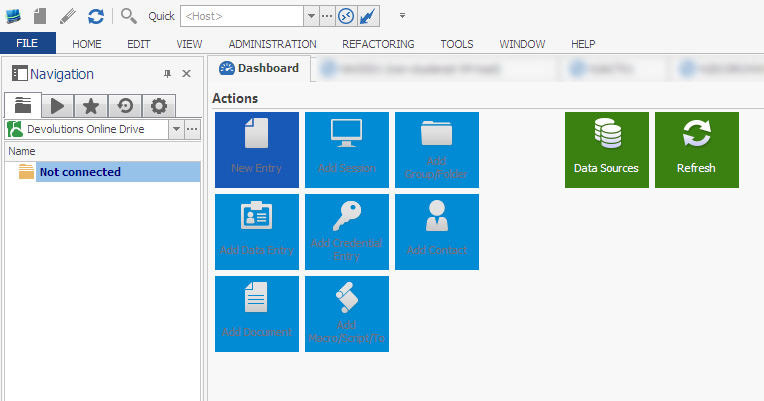
I don't often edit sessions, but the issue doesn't occur every time I follow the steps. In the past month, it's probably occurred about 10 times. To resolve, i simply have to exit out of RDM completely and reopen it. Also, it's happened in two separate environments so know it isn't machine-specific. Below are the specs for the main environment I'm using:
- Windows 8.1 x64 (Fully Patched)
- RDM Enterprise 10.6.7.0
- Devolutions Online Drive DataSource
- Had 3 RDP sessions open at the time in embedded tabs
I looked through the "Devolutions" folder in both AppData folders, but only found a single log file - Connections.log - which didn't list anything abnormal. It only showed past connections which none were taking place at the time of the last event.
That's about it. If there's anything you'd like for me to try or files to submit, please let me know.
Thanks!
Unable to Set Custom Images for Session Folders Anymore
Good Morning -
I'm a huge advocate of RDM - so much so that I lobbied for our company to purchase a site license. I used Smartcode VNC Manager prior to it, but love options and RDM brings many!
A couple of months ago, I went through and set custom icons for each of my Session folders. This helped me to find things faster plus made it look a bit more cool :). When reorganizing the Sessions today, I tried adding icons to some new folders I created, but can't do it! When going to the properties of the folder, it shows the icon, but there is no option to change it.
I searched your site and found this post which says you must enable "Custom Icons" in your data source. I went to my data source options, but the choice isn't there. Below is a screenshot showing the same window where it should be, but no option for the Custom Icons
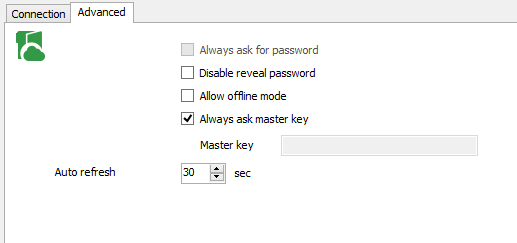
The only thing I can think of being the culprit is that about a month ago, I started using Devolutions Online Drive for my Data Source instead of RDMO.
A few weeks ago, my license for RDM & RDM Online came up for renewal. I chatted with a sales rep and said my only complaint was that when trying to add many things to it including product keys, I wasn't allowed to because my RDMO license had a limit of synced content. I can understand this for corporate users, but I use RDM / RDMO for personal use and as I own a license would simply like to be able to use it to it's full potential. The rep said that I should be using the Online Drive instead of RDMO which has unlimited connections. I asked, then verified later that the offered features were the exact same as I honestly didn't mind paying for the RDMO license and each time was told yes - 100% the same except for the fact that the datasource couldn't be shared amongst others others which is something I don't need anyways.
So... is that why I can longer add Custom Icons? If so, what are my options? Thanks!
Automatically Bypass Logon Message Screen
Sorry for the extremely late reply, but just remembered the post again this morning. I found it, tried it, and it worked! The only additional thing i must do is for local systems must have it wait 1 second before executing the command.
I tried to find a way to add this to groups of my RDP connections, but didn't see the option unfortunately. If you know of a way, it would be helpful. If not, no big deal.
Thanks again!
Automatically Bypass Logon Message Screen
Hey Guys -
This is more of an annoyance than anything else, but have been meaning to post for a while, now.
As many, I connect to many Windows sessions daily. Our company / domain has a policy which shows a disclaimer upon login (screenshots below.) It's a standard Windows GP setting and clicking OK allows you to continue.
My question is, is there any way to have RDM bypass this screen or basically send an "Enter" command a couple of seconds after initializing the connection? I considered the feature to run an application after connecting, but don't know what to run.
Just thought I'd ask - Thanks!
Creating Session to Connect to SCVMM 2012 VMs
Good Morning -
After switching from S-Code a couple of months ago, I am just now starting to use some of the features besides RDP in RDM. One thing which would be extremely helpful is to add sessions for direct access to some VMs we have. CUrrently, we have a SCVMM (System Center Virtual Machine Manager) server which is basically a souped up Hyper-V console controlling VMs on 6 different nodes.
I created a new Session in RDM using "Hyper-V Console", filled out everything appropriately, and enter the name of the VM I wanted to connect to. When I tried to connect the session, I got the error:
The Error
"This version of Virtual Machine Connection cannot be used to manage servers running Hyper-V in Windows Server 2012 and earlier versions."
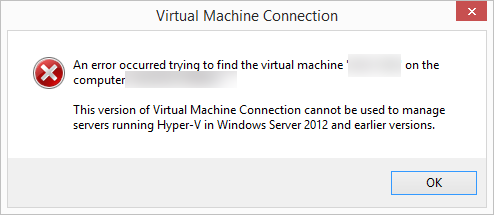
Also attached as VMMError.png if embed fails
What I Tried
- I tried changing the session's settings to connect to the console instead of a direct VM. The session then seemed to connect, but looked like a web interface and everything was greyed out.
- I also tried connecting to one of the nodes instead of to VMM directly. These nodes are basically the back end for VMM anyways and you can still manage and VMs hosted on them. When connecting the session, I got the same error as I did when trying to connect to VMM
Session Config
Below is a screenshot of my session configuration even though it's pretty straightforward. I used credentials from my DB, but know it wasn't the issue as the error didn't mention security plus I use the same setting for many RDP connections.
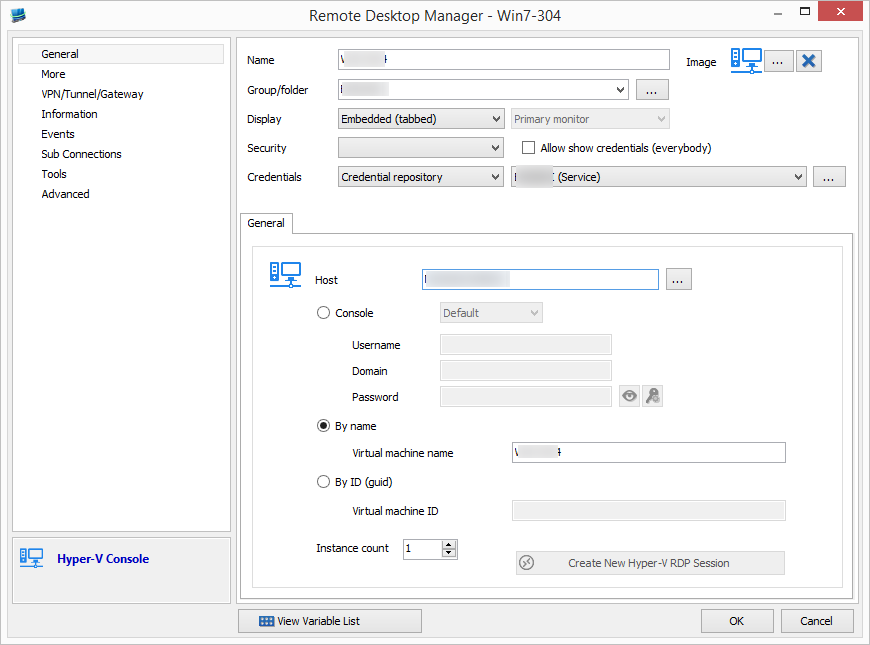
Also attached as VMMSession.png if embed fails
I looked through other types of sessions to create, but didn't see anything I thought would work.
Environment Specs
- Remote Desktop Manager
- Version: 10.0.4.0
- Registered User / Purchased
- Remote Desktop Version 6.3.9600.16384
- Running on Windows 8.1 Update 1 x64
- SCVMM Server
- SCVMM 2012 SP1 (2.04521.0 SP1)
- Runs on Windows Server 2008 R2 Standard
- I have full admin rights to the server and in VMM
- Node VM Resides on
- Windows Server 2008 R2 Standard
Any suggestions for how I may create a working session? Thanks!!
edited by bzowk on 10/29/2014
edited by bzowk on 10/29/2014
edited by bzowk on 10/29/2014
edited by bzowk on 10/29/2014
edited by bzowk on 10/29/2014
edited by bzowk on 10/29/2014
"Full Screen with Auto-Hide Tabs" Option
Hey Guys -
When connecting to an RDP Session - especially on my laptop with a smaller screen - I try to get it to use as much of the screen as possible. However, I like to have a few options viewable, but only the ones required. Therefore, I'd like to have the option to do something similar to the below scenario:
Full Screen with Auto-Hide Tabs
- When you connect to RDP session (if you select this option), the remote session goes to full screen.
- A ribbon (or same dropdown native RDP has) with tabs to other connections is on the top and may be pinned
- A ribbon (or similar to your current navigation bar) to navigate or start new sessions will "auto-hide" and may be pinned to the left
A good example of the above example except with static navigation and tabs would be with Smartcode VNC Manager (s-code.com). It's the only thing I prefer from it to RDM.
Is this possible or is there something like this already with a slimmed-down setting?
Thanks!
edited by bzowk on 4/23/2014
edited by bzowk on 4/23/2014
ownCloud / WebDAV Cloud Accounts
Hey Guys -
After I got tried of paying a lot each month for a large Dropbox and being a bit technically inclined, I discovered and started using ownCloud. I LOVE it and now use it for everything over Dropbox. The only cost is my $7 hosting fee which gives me 6tb of space.
ownCloud may be connected to via an API (open source) or via WebDAV. If there could be an option to add WebDAV connections - or better yet - an ownCloud account, it would be fantastic.
Thanks!
Dropbox - Cannot Validate
Hey All -
After using Smartcode VNC Manager for a while, I bought Remote Desktop Manager yesterday and it's growing on me...
One thing I like is the ability to add cloud services (Please add ownCloud / WebDAV!!!) When trying to add Dropbox, though, it somewhat freezes. I can still click through options in the new session window, but cannot cancel and it never validates. I eventually must End Task to get out of the app. Below is what I've tried to resolve it
What I've Tried to Fix Issue
Ensured I'm on newest version (Also running Windows 8.1 Update 1 x64 - Fullly Patched)
Signed into Dropbox Account before trying to add in both Chrome (default browser) and IE
Unchecked option to "Use current session"
Ensured Dropbox credentials are correct
Tried adding it on 2nd computer running differnt OS (Windows 7 x64 - Fully Patched) but same version of Remote Desktop Manager
Any ideas or suggestions? Thanks!