Ability for Sessions Without Hostname Field Populated to Prompt for a Hostname When Opened + Extras
Ability for Sessions Without Hostname Field Populated to Prompt for a Hostname When Opened + Extras
0 vote

Hey Guys -
This feature may already exist, but if so I haven't found out how to do it...
My Idea / Desire
I'd like the ability to add a sessions (any type to any folder) which I may pre-configure yet not enter a hostname. When it's session is opened, I'd like for it to then prompt me for a hostname to connect to. The hostname is NOT saved in the session so that the next time its run it would prompt again. Leaving the hostname field empty currently simply won't allow saving of the session.
Extra Credit
Why I Think it Would Be Useful
I have numerous entries which use a variety of protocols (mostly RDP, VNC, & SSH) for which each has a defined host. Especially when troubleshooting, I often must either create "one-time" entries which I delete later or use standard tools outside of RDM to connect. This feature would mean I could still use RDM for all my session needs plus be able to easily have my credentials and settings re-entered.
Just an idea. If anyone knows how to do this already, please let me know. I'm sure there's a workaround using variables, but thought I'd suggest how I imagined it.
Thanks!
All Comments (1)
Hello,
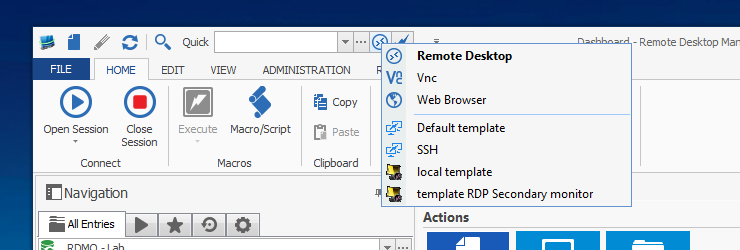
The secret is to use the QuickConnect feature. http://help.remotedesktopmanager.com/view_quickconnect.htm
Simply create templates for all of the technologies that you use, the trick is instead of the host name to use the $QUICKCONNECT$ variable.
Then in the quickconnect toolbar, you have a drop down which will list RDP, VNC and Web Browser, followed by the list of templates that you have.
Simply select the template, type in the host/ip in the quick connect bar, then hit the connect button.
Best regards,
Maurice
qc.png