New Multi or Single Select Component for UniversalDashboard
New Multi or Single Select Component for UniversalDashboard

This component originated from the request for help here:-
I’ve got a scenario where I would like to provide users with the ability to select multiple options from a long dropdown list, then take the input in my Endpoint section as an array and loop through for each item they select. Is this a functionality someone has managed to get UD to do yet? Based off my knowledge and searching both the docs and poshud demo site, I’m not seeing a built in method to do it.
You can download this awesome component right here:-
PowerShell Gallery | UniversalDashboard.UDSelector 1.0.0
Once again I was blessed to receive some extra help from @AnonymousUser who was very kind and donated his personal time to help on this project. I mean I build all these components in my spare time, so it’s great to receive some extra help, and some good banter at the same time.
I had actually managed to build the component, bind the component (from taking the same steps from his previous help which I blogged about here:- Number Mask Input Component | Powershell Blog) so had the component fully working. But the way I was passing the data to the menu was in an array so @AnonymousUser constructed it as a scriptblock, and even developed a handy mini-funtion to load the data into the multi-select. I have tested this component for a few days, and it is very responsive, so far I have only loaded 250 items into the selection menu via a hashtable, and this is lightning fast and responsive. You can also use this as a single select, as well as a multi select.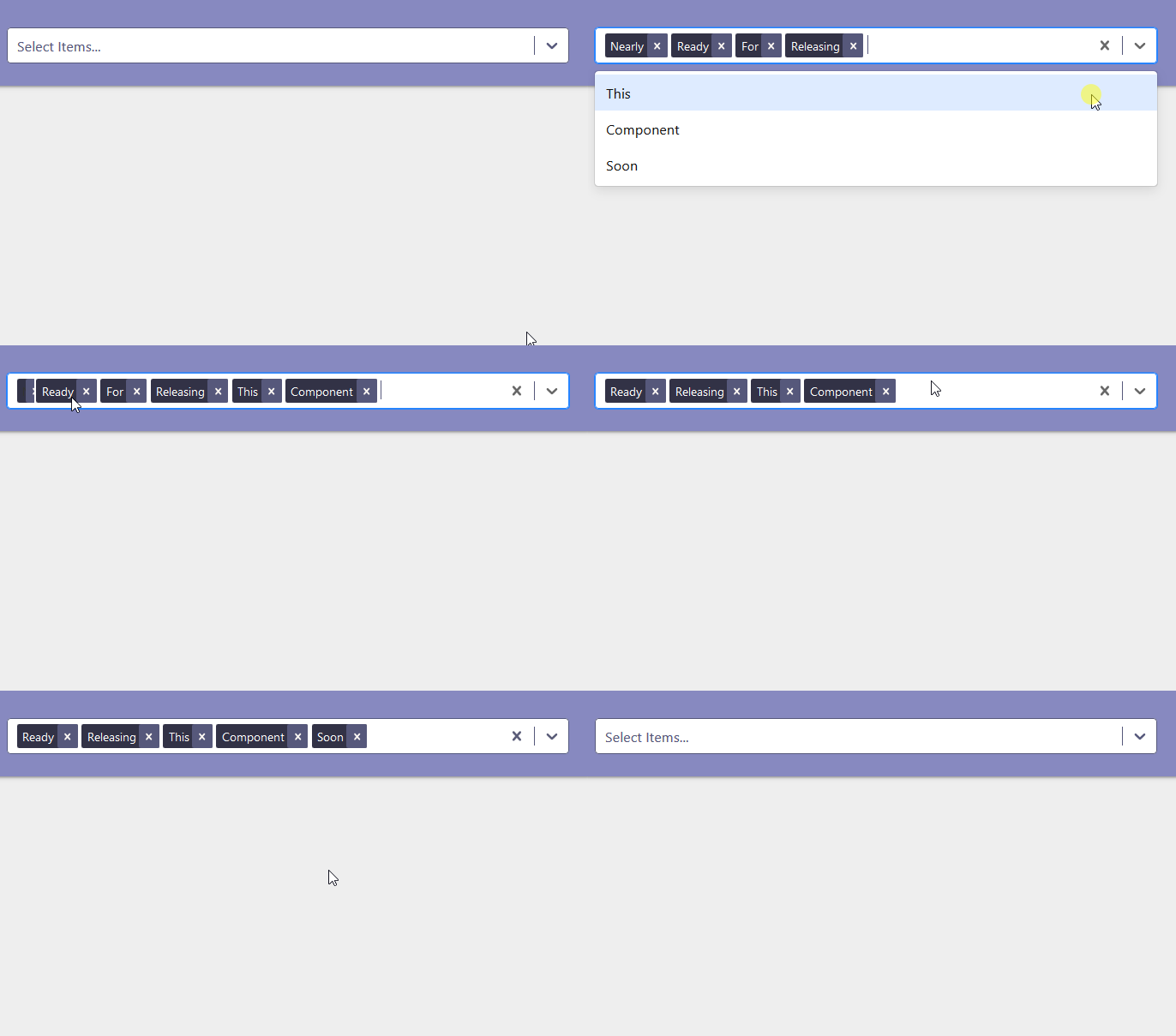
I decided to name this New-UDSelector as it can be used for single selection as well as multi-selection.
It can be a tad tricky getting the values back, but I have put a demo file here:-
https://github.com/psDevUK/UD-Selector/blob/master/UniversalDashboard.UDSelector/ImprovedDemo.ps1
Which shows the mini-function in-use and it also shows how this component can be styled to your requirements.
This component is like the 5th most popular react component out there. So hopefully this will prove the same for fellow dashboarders and give me loads of downloads
Ok this is by no means the prettiest code out there, but this is showing how you can get the values from a multi selection, or a single selection:-
Import-Module UniversalDashboard.Community
Import-Module UniversalDashboard.UDSelector
Get-UDDashboard | Stop-UDDashboard
$theme = New-UDTheme -Name "Basic" -Definition @{
    '.css-1wa3eu0-placeholder'        = @{
        'color' = "rgb(164, 174, 193) !important"
    }
    '.css-1okebmr-indicatorSeparator' = @{
        'background-color' = "rgb(164, 174, 193) !important"
    }
    '.css-1hwfws3'                    = @{
        'height'      = "30px"
        'align-items' = "flex-start"
        'box-sizing'  = "initial !important"
        'flex-wrap'   = "initial !important"
    }
    '.css-1rhbuit-multiValue'         = @{
        'background-color' = "rgb(183, 195, 219) !important"

    }
    '.css-xb97g8'                     = @{
        'background-color' = "rgb(164, 174, 193)"
        'color'            = "#fffaf4"
    }
    '.css-12jo7m5'                    = @{
        'color' = "rgb(255, 255, 255) !important"
    }
    '.css-tlfecz-indicatorContainer'  = @{
        'color' = "rgb(164, 174, 193) !important"
    }
    '.css-yk16xz-control'             = @{
        'border-color' = "rgb(164, 174, 193) !important"
    }
    '.css-1g6gooi'                    = @{
        'padding-top' = "9px !important"
        'color'       = "rgb(164, 174, 193) !important"
    }
} -Parent "Default"
$dashboard = New-UDDashboard -Title "New Component" -Theme $theme -Content {
    New-UDRow -Columns {
        New-UDColumn -size 5 -Content {
            New-UDCard -BackgroundColor "#8789c0" -Content {
                New-UDSelector -Id "stuff" -options {
                    @{ value = "merry"; label = "Merry" },
                    @{ value = "christmas"; label = "Christmas" },
                    @{ value = "everyone"; label = "Everyone" },
                    @{ value = "pal"; label = "Pal" }
                }
            }

            New-UDButton -Text "Toast" -OnClick {
                $val2 = (Get-UDElement -id "stuff").Attributes.selectedOption.Count | ConvertTo-Json | ConvertFrom-Json
                if ([int]$val2 -gt 1) {
                    $val = (Get-UDElement -id "stuff").Attributes.selectedOption | ConvertTo-Json -Depth 1 | ConvertFrom-Json | Select-Object -ExpandProperty SyncRoot
                    [array]$source = $val | Select-Object -ExpandProperty SyncRoot
                    $c = 0
                    $values = $source | ? { $c % 2 -eq 0; $c++ }
                    $length = $values.length
                    $i = 0
                    Do {
                        $value += "'$($values[$i])'" + ","
                        $i++
                    }
                    While ($i -le $length)
                    $Session:value2 = $value.Substring(0, $value.Length - 4)
                    Show-UDToast -Message "Selected Values:- $Session:value2" -Position topLeft -Duration 4000
                    @("GridData", "InsideGrid") | Sync-UDElement
                }
                elseif ([int]$val2 -eq 1) {
                    $single = (Get-UDElement -id "stuff").Attributes.selectedOption
                    $selection = $single | Select-Object Root | ConvertTo-Json -Depth 2 | ConvertFrom-Json
                    $finalvalue = $selection | Select-Object -ExpandProperty Root
                    $Session:value2 = $finalvalue | Select-Object -First 1
                    Show-UDToast -Message "You Selected $Session:value2"
                }
            }
        }
    }
}
Start-UDDashboard -Dashboard $dashboard -Port 10005
Once again massive respect to @AnonymousUser for the help, and secondly download your copy today
d9b5b2cf65662d3e7ec1a84c7a17de0ed376dfe0.gif
All Comments (61)
This is awesome! Thank you again @AnonymousUser for your contributions to the community. One thing it appears in using the link to the improved demo is that it doesn’t have the same handling if there is only a single value selected (like the nested script does). Or, very possible, am I missing something on that? When I load the improved demo and only select one item, I’m not getting a value returned to the toast.
I am happy you think this is a good addition. This is a super popular react component, so was very pleased to bring this to the UD world, and get contributions/improvements, from some other UD forum members. Ok so I am using the multi-select aka New-UDSelector to select a load of codes from the DB and do a search on those products in an sql query…so I needed all my items or item in a fashion of ‘item’,‘item2’,‘item3’ etc…this is how I achieved this:-
New-UDCard -BackgroundColor "#8789c0" -Content {
New-UDButtonParticle -Id "Explode" -Text "Search" -Color "#2e3d55" -BackgroundColor "#2e3d55" -Icon search -onClick {
function Get-UDSelectorValue {
param($SelectorId)
$value = (((Get-UDElement -Id $SelectorId).Attributes.selectedOption | Select-Object Root -ErrorAction SilentlyContinue) | ConvertTo-Json -Depth 2 | ConvertFrom-Json | Select-Object -ExpandProperty Root -ErrorAction SilentlyContinue) | Select-Object -First 1
if (!$value) {
$val = ((Get-UDElement -Id $SelectorId).Attributes.selectedOption | ConvertTo-Json -Depth 1 | ConvertFrom-Json | Select-Object -ExpandProperty SyncRoot) | Select-Object -ExpandProperty SyncRoot
$length = $val.length
$i = 0
Do {
if (($i % 2) -eq 0) {
$value += "'$($val[$i])'" + ","
}
$i++
}
While ($i -le $length)
$value = $value.TrimEnd(",")
}
return $value
}
###so I gave my new-udselector the -id of 'selector'
$Selected =  (Get-UDSelectorValue -SelectorId 'selector') -replace ",''"
if (($Selected) -notmatch "\A'" )
{
$Selected = "'$Selected'"
}
###### $Selected > C:\Adam\output.txt ##verify the result by outputting them somewhere
$Session:Selected = $Selected


Show-UDToast -Message "You selected $Selected"
@("GridData","InsideGrid","GridData2","InsideGrid2") | Sync-UDElement
start-sleep -Seconds 5
}
}
I am also using my UDButtonParticle in this dashboard I have running, as think it is a great indicator to the user that they clicked the button, and something is happening as you suddenly see grids loading below…I hope this helps, if you need further advice, or information I can provide on this control just let me know, as it has become a super-handy component for me, or anyone who needs multiple or single selection, and do something with all the item(s) selected.
Hi,
this is a great plugin, is there a sample code that shows how to use the selected options to tie it with the other report elements like a grid or chart to actually filter the data based on the selection.
Thanks @AnonymousUser and a big welcome to UDForums. Yep more than happy to share a full working page to show this in action. I am using this on my work dashboard to populate grids and charts with the information selected…I can even then put this into my pivot-table component which is another nice way to break data down…at work now will post later. Peace
One demo file is here:- https://github.com/psDevUK/UD-Selector/blob/master/DEMO.ps1
I will edit the README on github, which should then refresh the marketplace.
Hi @AnonymousUser,
Thanks for your quick response, I have setup the environment on my windows 10 machine with PS version 5.1.1773 , when i try to execute the script through the ISE i get the below error.
What could be the issue?
0cbe050accb1e754e6ed8799ebf83d007a3236a3.png
Sorry at work…doh…this component had some community love put into it by other members so the demo file is now out of date as a newer release has changed the options to be a script block instead of an array
so where it goes -options @( ) you need the options parameter to be a scriptblock -options { }
I promise I will update the readme on this component to make it easier for others to understand and use, as it is really handy…
Sorry this is the updated link which shows it as a script block
github.com
@AnonymousUser
FYI: The demo is not showing values if only one item is selected
I had a look into the demo and you can use the following simplified code for your Toast button
New-UDButton -Text "Toast" -OnClick {
    $values = (Get-UDElement -id "stuff").Attributes.selectedOption | %{if($_){ConvertFrom-Json -InputObject $_.ToString()}} | Select -ExpandProperty value

    Show-UDToast -Message "Selected Values: $($values -join ', ')" -Position topLeft -Duration 4000
}Thanks man…gonna dig out my working code I got real soon and post it on the official readme then link that here for future reference.
Right my homework is now complete please read the brand new readme I just finished writing and hopefully this component will make a lot more sense to you…if there is anything I have missed out let me know…
github.com
looks good, maybe you can use the following code snipped in your Get-UDSelectorValue function in order to simplify it
$values = (Get-UDElement -id "stuff").Attributes.selectedOption | %{if($_){ConvertFrom-Json -InputObject $_.ToString()}} | Select -ExpandProperty valueHi @AnonymousUser,
Many thanks for looking into my query. The new code works and I am able to populate the dashboard page only minor issue is that I am getting the message " Component not registered: UD-Selector" I tried to google\follow this article Component not registered but couldnt find any corresponding code in the file
C:\Program Files (x86)\WindowsPowerShell\Modules\UniversalDashboard.UDSelector\1.0.0\UniversalDashboard.UDSelector.psm1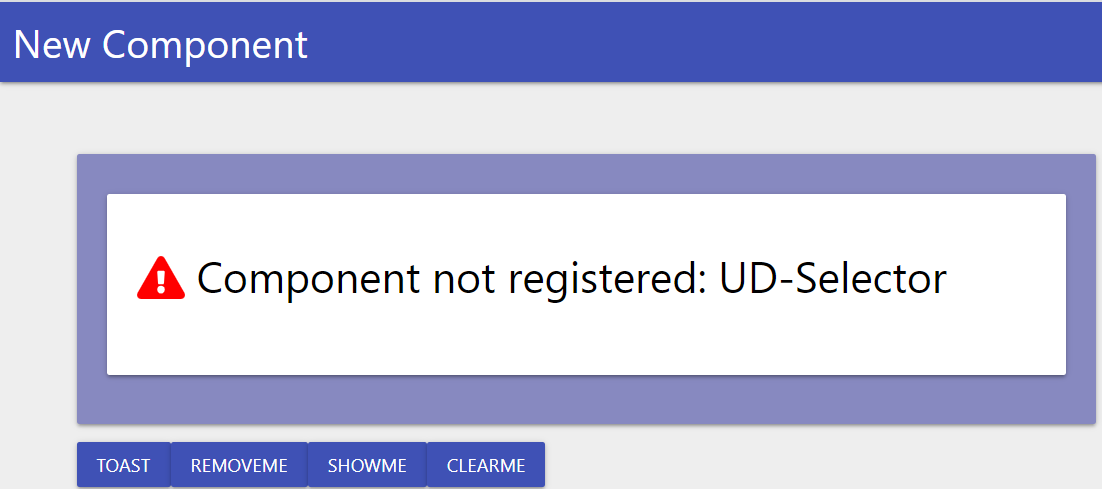
a343fa8222e66089be36d51af13a9535155cf048.png
Sorry to hear you still having issues man…you have imported the module yeah? I assume you are just using the demo script? I am kind of getting ready for work now…will test on a machine once I get into work and post the code…
sing the demo script? I am kind of getting ready for work now…will test on a machine once I get into work and post the code…
Yes the module has been imported, but it says its not registered module. No hurry please reply when you can . thanks for your support and quick response on this . appreciate it.
So as long as you followed the readme and done the following command with admin rights:-
Install-Module UniversalDashboard.UDSelector
Then try running the following script:-
Import-Module UniversalDashboard.Community -RequiredVersion 2.8.1
Import-Module UniversalDashboard.UDSelector
function New-UDSelectorItem {
    [CmdletBinding(DefaultParameterSetName = "Default")]
    param(
        [Parameter(
            ValueFromPipeline = $true,
            Mandatory = $true,
            Position = 0
        )]
        [string]$Value,
        [Parameter(
            ValueFromPipeline = $true,
            Mandatory = $false,
            Position = 1
        )]
        [string]$Label,
        [Parameter(
            Mandatory = $false,
            ParameterSetName = "Disabled"
        )]
        [switch]$isDisabled
    )
    Begin {
        $out = @{ };
    }

    Process {
        if ($null -eq $Label) {
            $Label = $Value
        }

        $out.label = $Label
        $out.value = $Value


        if ($isDisabled.IsPresent) {
            $out.isDisabled = $true
        }
    }

    End {
        return $out
    }
}
Get-UDDashboard | Stop-UDDashboard
$theme = New-UDTheme -Name "Basic" -Definition @{
    '.css-1wa3eu0-placeholder'        = @{
        'color' = "#56587b !important"
    }
    '.css-1okebmr-indicatorSeparator' = @{
        'background-color' = "#56587b !important"
    }
    '.css-1hwfws3'                    = @{
        'height'      = "30px"
        'align-items' = "flex-start"
        'box-sizing'  = "initial !important"
        'flex-wrap'   = "initial !important"
    }
    '.css-1rhbuit-multiValue'         = @{
        'background-color' = "#323246 !important"

    }
    '.css-xb97g8'                     = @{
        'background-color' = "#56587b"
        'color'            = "#fffaf4"
    }
    '.css-12jo7m5'                    = @{
        'color' = "rgb(255, 255, 255) !important"
    }
    '.css-tlfecz-indicatorContainer'  = @{
        'color' = "#56587b !important"
    }
    '.css-yk16xz-control'             = @{
        'border-color' = "#56587b !important"
    }
    '.css-1g6gooi'                    = @{
        'padding-top' = "9px !important"
        'color'       = "#56587b !important"
    }
} -Parent "Default"
$dashboard = New-UDDashboard -Title "New Component" -Theme $theme -Content {
    New-UDRow -Columns {
        New-UDColumn -size 7 -Content {
            New-UDCard -BackgroundColor "#8789c0" -Content {
                New-UDSelector -id  "stuff" -Options {

                    New-UDSelectorItem -value "SomeStuff1" -label "FancyLabel1"
                    New-UDSelectorItem -value "SomeStuff2" -label "FancyLabel2"
                    New-UDSelectorItem -value "SomeStuff3" -label "FancyLabel3"
                    New-UDSelectorItem -value "SomeStuff4" -label "FancyLabel4" -isDisabled
                } -PlaceHolder "New Fancy Component..."
            }
            New-UDButton -Text "Toast" -OnClick {
                $val = (Get-UDElement -id "stuff").Attributes.selectedOption | ConvertTo-Json -Depth 1 | ConvertFrom-Json | Select-Object -ExpandProperty SyncRoot
                $source = @(($val | Select-Object -ExpandProperty SyncRoot))
                $length = $source.length
                $i = 0
                Do {
                    if (($i % 2) -eq 0) {
                        $value += $source[$i] + ","
                    }
                    $i++
                }
                While ($i -le $length)
                $value = $value.TrimEnd(",")
                Show-UDToast -Message "Selected Values:- $value" -Position topLeft -Duration 4000

            }
            New-UDButton -Text "RemoveMe" -OnClick {
                Remove-UDElement -id "stuff"
            }
            New-UDButton -text "ShowME" -OnClick {
                Set-UDElement -id "stuff" -Attributes @{
                    hidden = $false
                }
            }
            New-UDButton -Text "ClearMe" -OnClick {
                Clear-UDElement -Id "stuff"
            }

        }

    }
}

Start-UDDashboard -Dashboard $dashboard -Port 10005
This should give you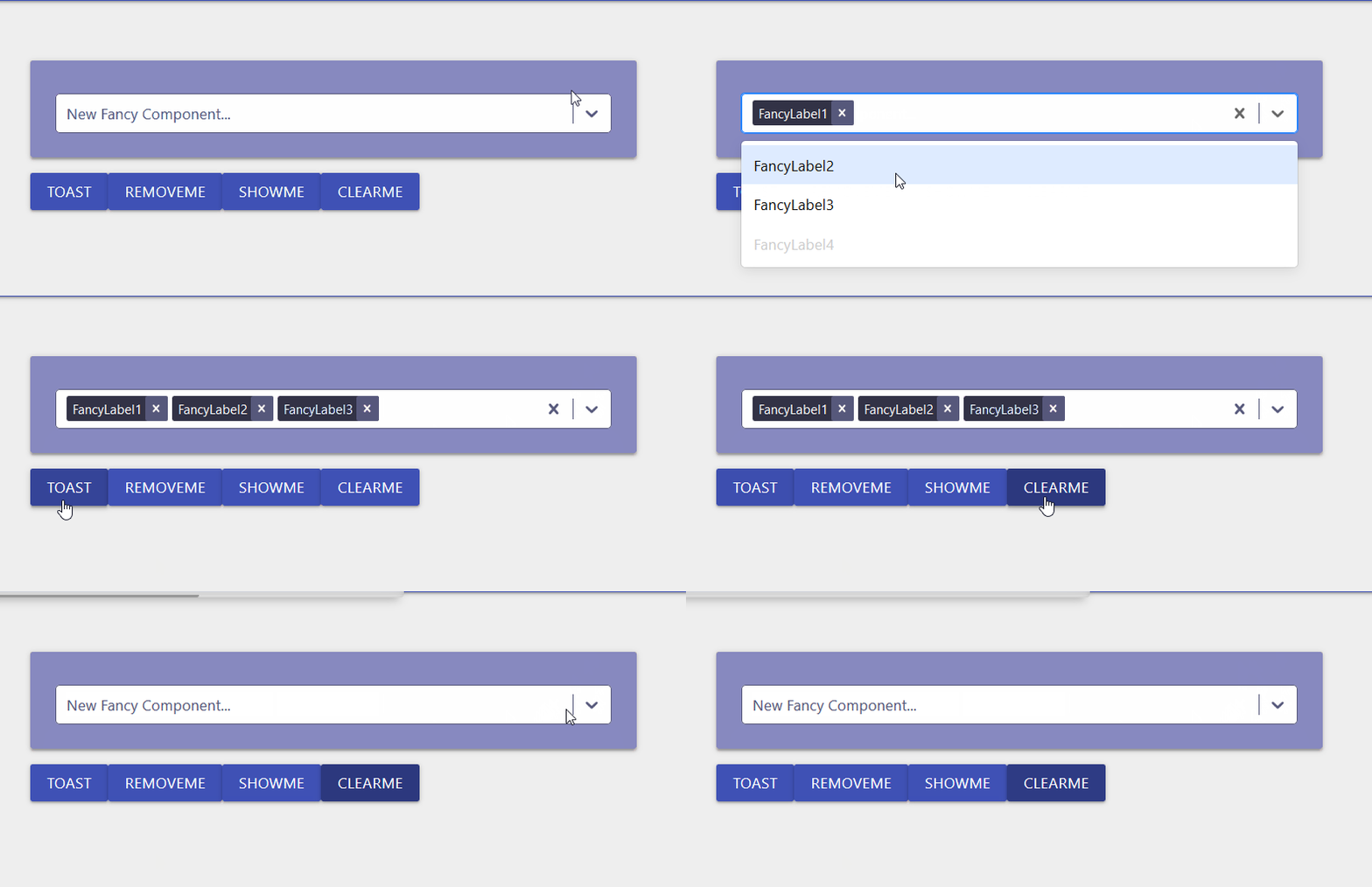
This works in every browser I tried Chrome, FireFox even IE
04c0a81dc51a780bbd467c6a88b6ffb48d760bdb.gif
Many Thanks! it works now. I am great full for your timely support and quick response.
I will now try to hook it up to data and see if i am able to make it work .
What I am trying to do it take baby steps towards building a dashboard which will look as below,
I will experiment to move this plugin to the extreme left and use it a slicer \criteria for data.
so ideally this plugin would take the top column and replace with the Filter1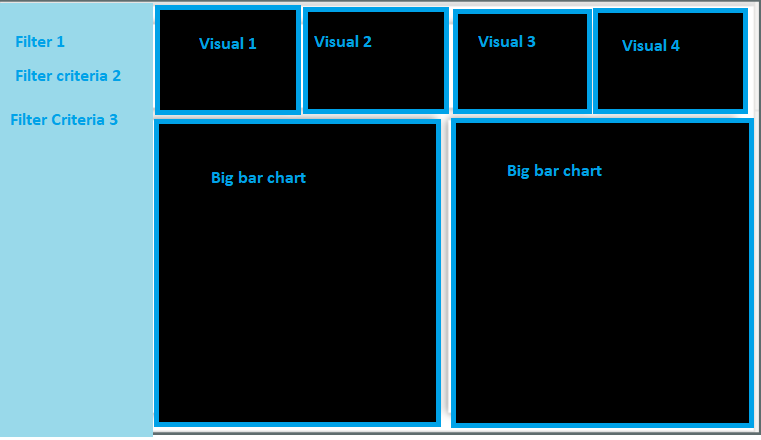
Side note: I had to go back one version to 2.8.1 to get this working, not sure if there is additional plugin registration requirement in version 2.8.2. However 2.8.1. also works for me to explorer and create the sample.
Thanks again.
8600f88c50f3cd70cab637188daa6b06fed78459.png
Yes. 2.8.1 appears to really be required. Failing is similar fashion when using 2.9.0
Hey @AnonymousUser I am only running on 2.8.1 at home and at work…waiting for the big release of v3 before I look at upgrading…it does however seem really odd, as it only seems to be this component which other users seem to be having issues with running in any other version of UD other than 2.8.1…I would need to call upon the advice of @Adam Driscoll or @AnonymousUser to explain this, as seems so odd it, doesn’t want to work in other versions of UD? As mentioned not had same issue reported with any of the other 40 odd components I put out there so really cannot explain this behaviour I will re-look through my code see if I done anything weird, but to my knowledge I built this the same way I do with all other components…
Not a big deal for me. I’ve just been testing several of the controls individually. I do appreciate the time and effort you put into creating new controls. Thanks.
I have been running this component on 2.9.0 with no issues. Not sure why it is working for me and not for others.
Well that is great to hear I hope you are finding this component useful @AnonymousUser ?
I do have to admit that you have made me look like a superstar with our techs. They have been asking for the ability to multi select things in the past but have never been able to do so. When I introduced this last month (I officially rolled out the new dashboard for techs to manage users at the beginning of last month), I got “wows” when I got to that section.
So awesome to hear I am super happy to get that kind of response for a component I put out there…glad this has ticked the box for your end-users…It is also working well on this sales dashboard I got.
Hi,
first thanks for this cool component, really makes a lot of UD workflows so much easier
unfortunately we do have a weird problem - our implementation of the UD-Selector component runs perfectly fine on a Windows Server 2019 but fails on a Server Core 2019 (PS-Version and .Net identical).
For the exact same code we get the error
“16:10:18 [Warn] PowerShellExecutionService Error executing endpoint CreateDistributionGroup. Property “SyncRoot” cannot be found. at Get-UDSelectorValue, : line 23”
on the core server when UD calls the Get-UDSelectorValue function.
We implemented this exactly as shown here: https://github.com/psDevUK/UD-Selector.
Any ideas?
some progress - it also works on the core server when started from CLI. UD usually runs as service (as the same user I successfully tested CLI with) and only then we are getting the SyncRoot cannot be found error.
I have no idea how this could be related to the service? does this function somehow need an interactive session or something? quite out of ideas here
Hey @AnonymousUser first off massive thanks for using this component. As I build these components to purely extend the amount of components availble to end-users, and I do this in my own time on my own personal laptop, it does limit me to how much testing I can do on it…this component does seem to cause the most weird issues for people…I am running it on windows 10 iis and works great, showing my 1000+ results in a drop-down list with no lag which is great, but I think I said this before I built this component the same as I build my other components…I never personally tried running UD as a service, as it works great in IIS for me. I am really at a loss as to what to suggest…as had people saying it doesn’t work in 2.9.0 but does in 2.8.1 then someone else was like nah runs for me in 2.9.0…so maybe I need to go back and revisit this…on the plus-side both @Adam Driscoll and @AnonymousUser are bringing so many new components to V3 of UD I am pretty sure there is a multi-select in V3 of UD. I am sorry I don’t have access to any server 2019 boxes
Sorry re-reading your error message it is failing on the sub-function Get-UDSelector…so just for clarity to maybe compare the functions…this is how I am using it on a New-UDSelector -ID “selector1”
function Get-UDSelectorValue {
param($SelectorId)
$value = (((Get-UDElement -Id $SelectorId).Attributes.selectedOption | Select-Object Root -ErrorAction SilentlyContinue) | ConvertTo-Json -Depth 2 | ConvertFrom-Json | Select-Object -ExpandProperty Root -ErrorAction SilentlyContinue) | Select-Object -First 1
if (!$value) {
$val = ((Get-UDElement -Id $SelectorId).Attributes.selectedOption | ConvertTo-Json -Depth 1 | ConvertFrom-Json | Select-Object -ExpandProperty SyncRoot) | Select-Object -ExpandProperty SyncRoot
$length = $val.length
$i = 0
Do {
if (($i % 2) -eq 0) {
$value += "'$($val[$i])'" + ","
}
$i++
}
While ($i -le $length)
$value = $value.TrimEnd(",")
}
return $value
}
$Selected =  (Get-UDSelectorValue -SelectorId 'selector1') -replace ",''"
if (($Selected) -notmatch "\A'" )
{
$Selected = "'$Selected'"
}
$Session:SelectedValues = $Selected
I hope this helps in some way shape or form…I put it into a $session variable so it can be sync with the other components on my page to display the results from the selected list.
I mean if you haven’t already try outputting the $Selected to > C:\myfolder\something.txt and looking at the results of $Selected, or toast it on-screen…
Seems like it is this line it doesn’t like in the function:-
$val = ((Get-UDElement -Id $SelectorId).Attributes.selectedOption | ConvertTo-Json -Depth 1 | ConvertFrom-Json | Select-Object -ExpandProperty SyncRoot) | Select-Object -ExpandProperty SyncRoot
guess you need to inspect the difference between the $val on the server it does work on to the server it doesn’t work on…maybe powershell is casting it as something else on the server it doesn’t work on so it doesn’t have the syncroot? Please have a look at the posts @AnonymousUser made:-
New-UDButton -Text “Toast” -OnClick { $values = (Get-UDElement -id “stuff”).Attributes.selectedOption | %{if($){ConvertFrom-Json -InputObject $.ToString()}} | Select -ExpandProperty value Show-UDToast -Message “Selected Values: $($values -join ', ')” -Position topLeft -Duration 4000 }
on the server that is not working to see if this does work…
wow, thanks for the long reply!
I finally figured it out and have to correct my initial presumption. it was indeed the PS version - the service was running with v7 whereas starting from CLI runs it with v5.
so long story short: the function only fails with PSv7 and runs ok with v5 - both as a service and when run via CLI.
so, this fixed it for us since we don’t have a hard requirement for v7 - but I would be really curious as to why this fails with v7.
This component is great! Is there a way to limit the user to only selecting one item? The list will contain a lot of items (users, in my case) so the search ability is great but I only want the user to be able to select one.
Hi @hugepickle thanks for taking the time to download and explore this component. I did do a super-hero team-up with @AnonymousUser to get this component completed. Having a quick butchers at https://react-select.com/home it does look possible. However I am thinking this would mean rebuilding this component, to only allow single option. I know UD v3 has so many super-cool new components that both @Adam Driscoll and @AnonymousUser have been doing amazing work on. Just worried if I was to look into doing this, I would only be duplicating one of the new controls in UD v3 if you get me?
I do build all these components in my spare-time, and having 4 young daughters to entertain in lock-down and working full-time, is giving me less free time
So I will ask @AnonymousUser if we can do another team-up, or might just wait till v3…I mean you could build a process which automatically clears the input if more than one item selected, and show a toast or message on the screen to say only one item to be selected or something similar, but I know that is only a work-around solution to the one you want. Which I believe will mean building another version of this component. I hope this answers the question
Update!
I have re-looked at this and wasn’t as hard as I initially thought, so made the change and it works…so will publish this soon, but fam all moaning at me for being on laptop…will update once done and published…
Hey @hugepickle I have now published this same component that works and behanves exactly like New-UDSelector, but only allows you to select a single item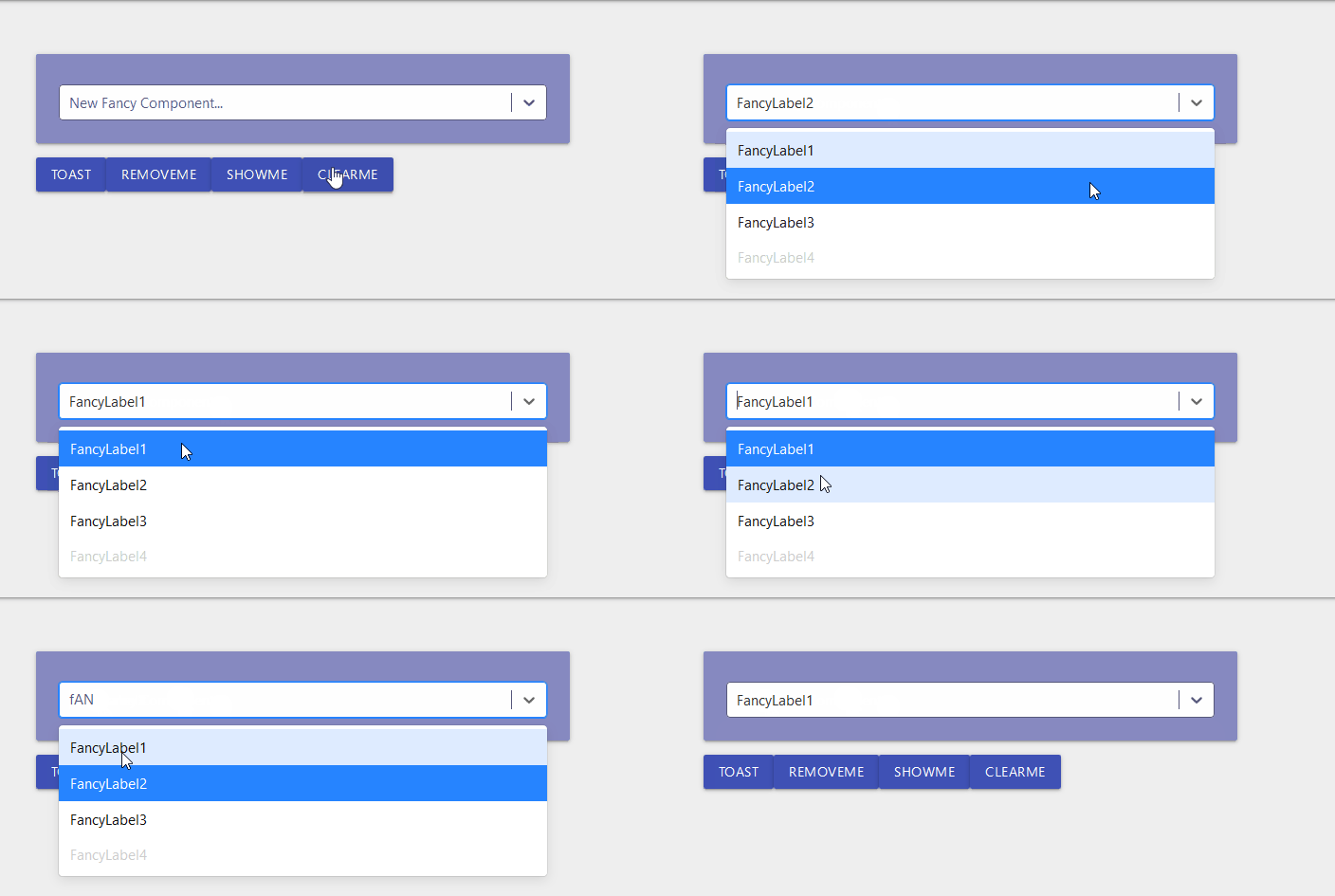
I just published this to the powershell gallery
cec4cc257873a0b93eddcff7edfc9133025960de.gif
Yay! Thanks!
I just installed, looks like I am your first download. Thanks so much, it works great!
One question: I noticed when I clicked an item to select it from the dropdown list, it appears in the main box. However, the dropdown list doesn’t disappear, it stays there, covering controls below it. Is there something I need to do to make it close after I select an item, such as run set-udelement?
8de474568c3cfd6527134a3c96481b45a042bf6f.png
Hello @hugepickle didn’t really do much testing on this other than it only allowed you to select one item. I only removed one line of code from the original project. Guess I need to do some reading on the options available on this component, see if there is an auto close
Update
Ok I found the option I needed to change, I’m just re-building the component now, hopefully you will see a 1.0.2 version real soon…if this all works out
Another Update
I cannot believe I been up less than an hour, and rebuilt this component 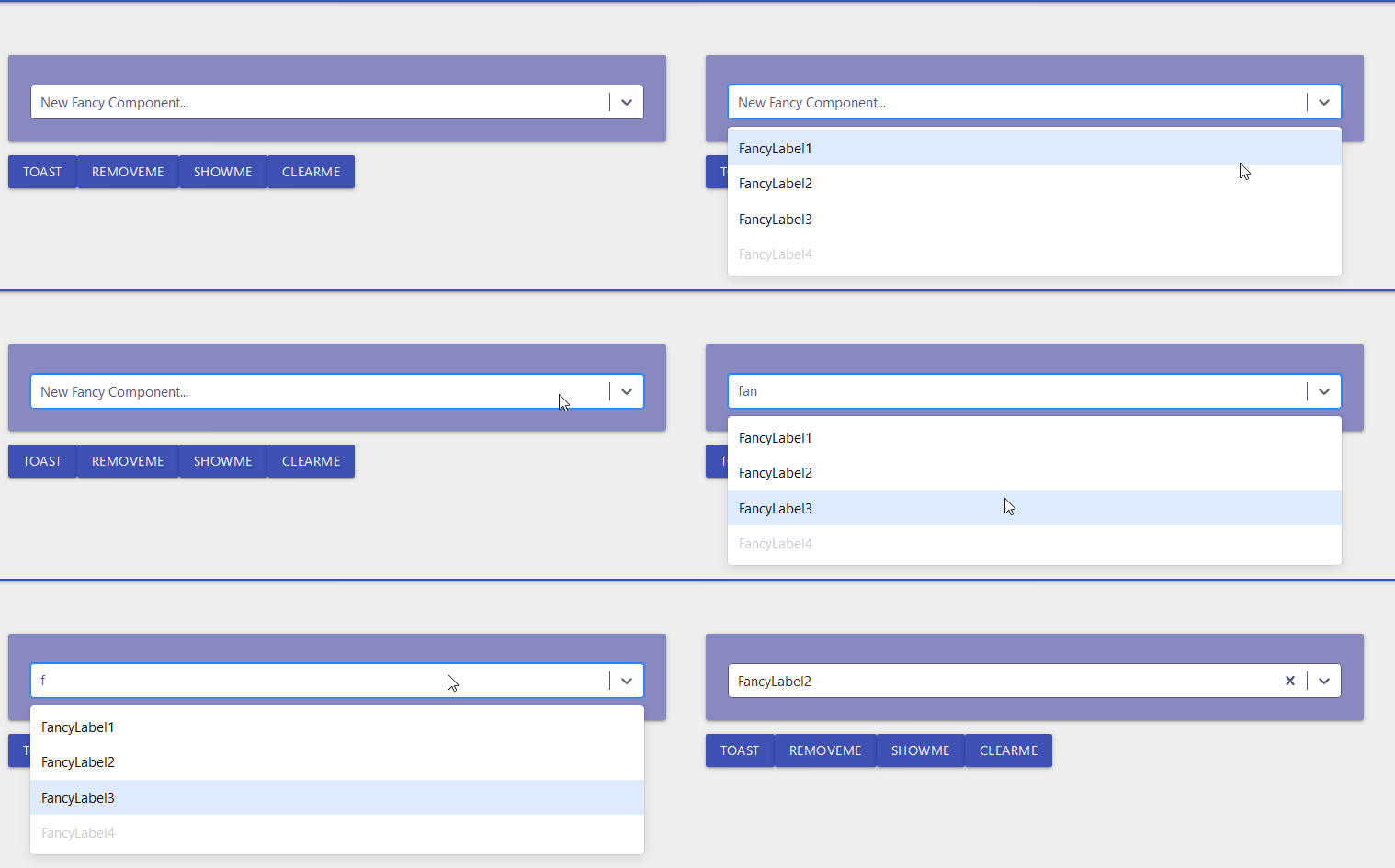
You now see then menu automatically closes after the selection has been made. I also added the clearable cross to clear the option, but this now looks good to go…so give me sometime to upload this to the powershell gallery now…Wahoo!Last Update
I just pushed version 1.0.2 to the powershell gallery which in-turn will sync to the marketplace, this includes the clearable option and automatically closes the select list upon selection of an item. As shown in the latest GIF i posted above. This should now tick all the boxes for a decent alternative for a single drop-down selection list that is also searchable, clearable and auto-closes
8d6cecfa48b200801205c6456cc0f88061d76d37.gif
Weird. Not seeing 1.0.2 in the PSGallery yet.
Hi @AnonymousUser you should see 1.0.2 on the marketplace:- https://marketplace.universaldashboard.io/Dashboard/UniversalDashboard.UDSingleSelector
or the powershellgallery:-
https://www.powershellgallery.com/packages/UniversalDashboard.UDSingleSelector/1.0.2
I def did this yesterday
Worked fine with v2.9.0. I was attempting to update UDSelector rather than UDSingleSelector. Thanks!
This is just what I was looking for as well! Thanks!
I love it! What a great component!
Great component, I love it already. Thanks @AnonymousUser!
Just out of curiosity, has anyone been able to set the current selected value of a pre-existing UDSingleSelector? Not being able to do that with New-UDSelect is one of my biggest hangups with that component. I imagine this would use something involving a call to Set-UDElement, and altering some attribute of the selector, but I’ve had no luck thus far.
Thanks @AnonymousUser for the appreciation…just had a quick butchers at:-
npm
and says…under the propsvalue - control the current value
So I may need to rebuild the component and add this in as an additional prop…aka parameter for the PS function side of things…crumbs…I just looked at the JSX and value is holding:-
value={selectedOption} and that selectedOption is const { selectedOption } = this.state have you tried setting the state of the component…let me try…Ok @AnonymousUser you owe me a and a pat on the as I developed this component I have now spent the last 30 minutes cooking up this lovely recipe:-
Import-Module UniversalDashboard.Community -RequiredVersion 2.8.1
Import-Module "C:\UD\UDSelector\SingleSelector\src\output\UniversalDashboard.UDSingleSelector\UniversalDashboard.UDSingleSelector.psd1"
function New-UDSelectorItem {
    [CmdletBinding(DefaultParameterSetName = "Default")]
    param(
        [Parameter(
            ValueFromPipeline = $true,
            Mandatory = $true,
            Position = 0
        )]
        [string]$Value,
        [Parameter(
            ValueFromPipeline = $true,
            Mandatory = $false,
            Position = 1
        )]
        [string]$Label,
        [Parameter(
            Mandatory = $false,
            ParameterSetName = "Disabled"
        )]
        [switch]$isDisabled
    )
    Begin {
        $out = @{ };
    }

    Process {
        if ($null -eq $Label) {
            $Label = $Value
        }

        $out.label = $Label
        $out.value = $Value


        if ($isDisabled.IsPresent) {
            $out.isDisabled = $true
        }
    }

    End {
        return $out
    }
}
$init = New-UDEndpointInitialization -Function @('New-UDSelectorItem') -Module @('New-UDSingleSelector')
Get-UDDashboard | Stop-UDDashboard
$theme = New-UDTheme -Name "Basic" -Definition @{
    '.css-1wa3eu0-placeholder'        = @{
        'color' = "#56587b !important"
    }
    '.css-1okebmr-indicatorSeparator' = @{
        'background-color' = "#56587b !important"
    }
    '.css-1hwfws3'                    = @{
        'height'      = "30px"
        'align-items' = "flex-start"
        'box-sizing'  = "initial !important"
        'flex-wrap'   = "initial !important"
    }
    '.css-1rhbuit-multiValue'         = @{
        'background-color' = "#323246 !important"

    }
    '.css-xb97g8'                     = @{
        'background-color' = "#56587b"
        'color'            = "#fffaf4"
    }
    '.css-12jo7m5'                    = @{
        'color' = "rgb(255, 255, 255) !important"
    }
    '.css-tlfecz-indicatorContainer'  = @{
        'color' = "#56587b !important"
    }
    '.css-yk16xz-control'             = @{
        'border-color' = "#56587b !important"
    }
    '.css-1g6gooi'                    = @{
        'padding-top' = "9px !important"
        'color'       = "#56587b !important"
    }
} -Parent "Default"
$dashboard = New-UDDashboard -Title "New Component" -Theme $theme -Content {
    New-UDRow -Columns {
        New-UDColumn -size 7 -Endpoint {
            New-UDCard -BackgroundColor "#8789c0" -Endpoint {

                New-UDSingleSelector -id  "stuff" -Options {
                    New-UDSelectorItem -value "SomeStuff1" -label "FancyLabel1"
                    New-UDSelectorItem -value "SomeStuff2" -label "FancyLabel2"
                    New-UDSelectorItem -value "SomeStuff3" -label "FancyLabel3"
                    New-UDSelectorItem -value "SomeStuff4" -label "FancyLabel4" -isDisabled
                } -PlaceHolder "New Fancy Component..."

            }

            New-UDButton -Text "Set Default" -OnClick {
                Set-UDElement -Id stuff -Attributes @{ selectedOption = @(@{value = "christmas"; label = "Christmas" }) }
            }

            New-UDButton -Text "Toast" -OnClick {
                $val = (Get-UDElement -id "stuff").Attributes.selectedOption | ConvertTo-Json -Depth 1 | ConvertFrom-Json | Select-Object -ExpandProperty SyncRoot
                $source = @(($val | Select-Object -ExpandProperty SyncRoot))
                $length = $source.length
                $i = 0
                Do {
                    if (($i % 2) -eq 0) {
                        $value += $source[$i] + ","
                    }
                    $i++
                }
                While ($i -le $length)
                $value = $value.TrimEnd(",")
                Show-UDToast -Message "Selected Values:- $value" -Position topLeft -Duration 4000

            }
            New-UDButton -Text "RemoveMe" -OnClick {
                Remove-UDElement -id "stuff"
            }
            New-UDButton -text "ShowME" -OnClick {
                Set-UDElement -id "stuff" -Attributes @{
                    hidden = $false
                }
            }
            New-UDButton -Text "ClearMe" -OnClick {
                Clear-UDElement -Id "stuff"
            }


        }
        New-UDColumn -size 2 -Endpoint {
            if ((Get-UDElement -Id stuff).Attributes.selectedOption -eq $null) {
                Set-UDElement -Id stuff -Attributes @{ selectedOption = @(@{value = "christmas"; label = "Christmas" }) }
            }

        } -AutoRefresh -refreshinterval 2

    }
} -EndpointInitialization $init

Start-UDDashboard -Dashboard $dashboard -Port 10005
So there is a random way of setting Christmas as the default selection, even though it’s not even in the selection list, in-case that was your next question and @Adam Driscoll does this mean my select component is better than yours? only joking jedi master
You’re the new jedi select master
Adam Driscoll
PowerShell Expert and Developer at Devolutions
@AnonymousUser@AnonymousUser
Maybe I found why it works on PS5 and not Pwsh. I made my toast UDButton return the raw json using this line:
New-UDButton -Text "Toast" -OnClick {
  $val = (Get-UDElement -id "stuff").Attributes.selectedOption | ConvertTo-Json -Depth 1
  Show-UDToast -Message "Selected Values:- $val" -Position topLeft -Duration 40000
}
On Pwsh, I get: Selected Values:- [ { "value": "2019 GameJam", "label": "2019 GameJam" }, { "value": "Arcade/Pinball", "label": "Arcade/Pinball" } ]
On Windows PowerShell 5.1, I get: Selected Values:- [ [ "2020 GameJam", "2020 GameJam" ], [ "Arcade/Pinball", "Arcade/Pinball" ] ]
As you can see, my Pwsh has a much better structure than 5.1. Interesting.
Sorry for the late reply, but thank you so much!! That’s exactly what I needed and it worked like a charm. Your the best!
d85e377edb60bdc7e6c669f83abd5fddb1489528.png
I love this component, it’s perfect for what I need. This is probably a question for @AnonymousUser - Do you know why the select box is focused on by default when a page is loaded with the selector? Here’s an example of one of my pages using it: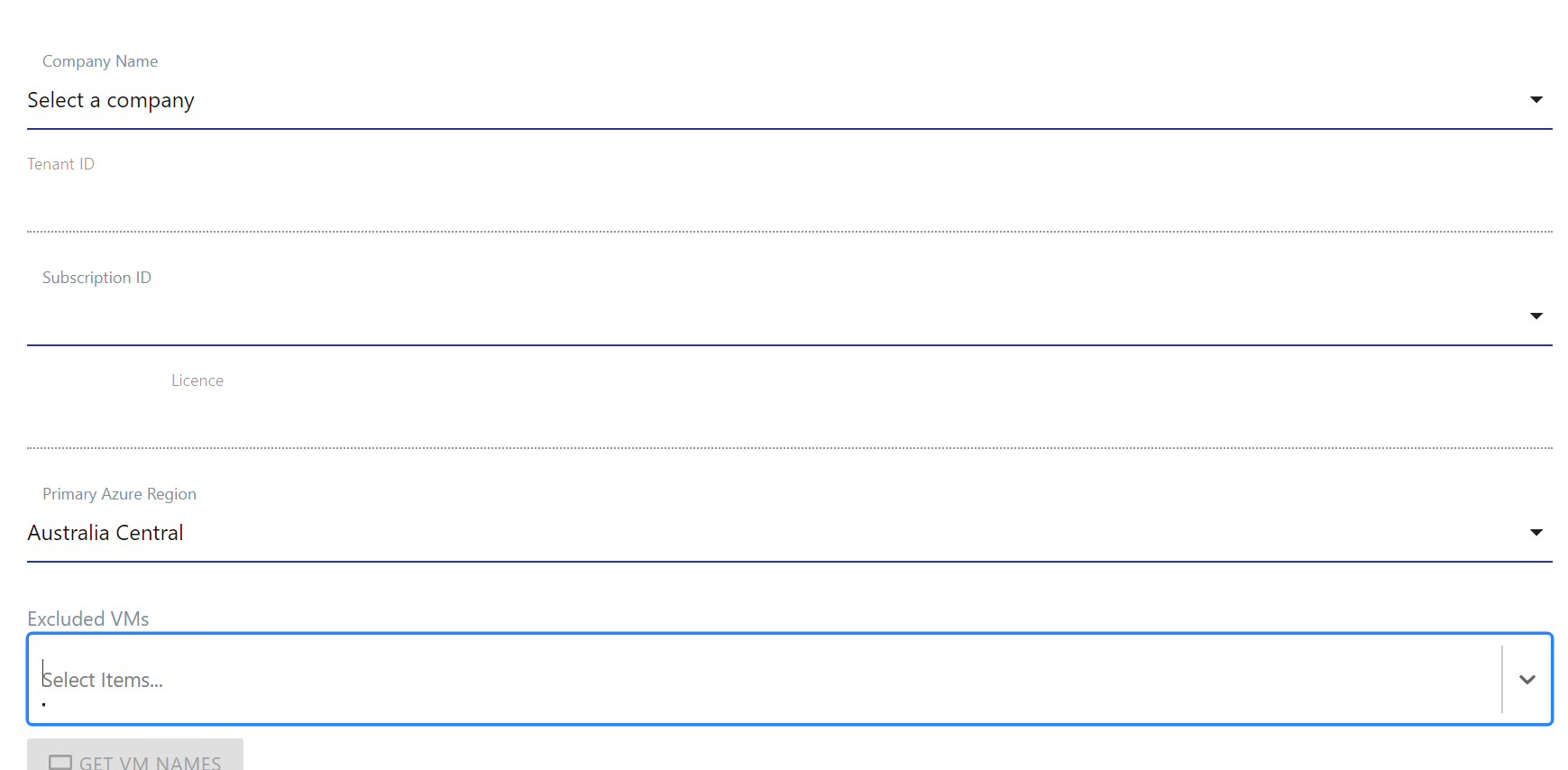
I tried forcing the focus to the company name dropdown using Select-UDElement but that doesn’t seem to work for select boxes so the focus stays on the selector.
2bcfef37840b918f3d28b360e43163b4b8d4f23e.png
Hey @AnonymousUser thanks for showing the appreciation for this component. In the forms that I am using this component in, I have made it the first component in the list, so not come across this problem…I am sure there is a solution to this problem…I will knock up some demo form and do my best to make this work. Peace
Excellent, thanks as always!
Hey @AnonymousUser I havent forgot about your issue, but not got round to building anything dashboard related in the past few weeks…however I have looked into this, and I believe this is happening as the JSX file which was used to create this component, I have included the autoFocus which is doing it’s job and auto focusing the component…so to fix this I will need to rebuild the component, then re-publish this back to the powershell gallery which in-turn will sync to the marketplace, I will update once I have done this. Thanks
Nice one! Thanks @AnonymousUser
Trust @AnonymousUser my life is never dull, with four young daughters to entertain and full time job etc. So put a bit of time to one-side today to rebuild both the multi selection and single selection selector components. I have not published these to the powershell gallery yet, but I have stuck them both on GITHUB here:- https://github.com/psDevUK/UD-Selector/tree/master/No_AutoFocus I have not tested yet, but literally removed the word autoFocus on both cases, and rebuilt it in the same fashion. Hopefully this should now tick all the boxes for you
Amazing thank you! I’ll give this a test today.
(4 daughters in lockdown, I feel for you! )
I got sidetracked with some other work but I can confirm that it now works as expected and it now doesn’t focus on the select box. I’ve already integrated it in multiple places in my app now and I’ll be using the single select too in place of the udselect so it’s nice and consistent. Thanks again @AnonymousUser
@AnonymousUser
Hi Adam!
Im having issues on this module. I want to populate the options from a Get-ADGroup query. I’ve tried different methods but those always trew me the " One or more errors occurred
You cannot call a method on a null-valued expression."New-UDRow -Columns {New-UDColumn -size 5 -Content {New-UDTypography -Text "ARG"$arrayArgDistrolist = @()$grupo = get-adobject -Filter 'ObjectClass -eq "group"' -SearchBase "OU=Argentina,OU=Distribution Groups,OU=company,DC=company,DC=local" | Select-Object Name,DistinguishedName foreach ($grupos in $grupo) { $grupoArgDN= $grupos.DistinguishedName $grupoArgName = $grupos.Name $arrayArgDistrolist += @{ value ="“$grupoArgDN"" label ="”$grupoArgName""} } New-UDSelector -id "selectorARG" -Options {$arrayArgDistrolist} -Placeholder "Select Arg Groups" } }
Hello @AnonymousUser thanks for taking the time to try out this module…Apologies on late reply just been super busy trying to decorate the house…and I’m better at coding than DIY for sure…I been laying flooring for about 10 hours, but I will cook you up something tomorrow, to show this working reading Active Directory
Ok 34 minutes later after laying flooring all day, and cutting boards, I needed something else to zone into so here is a complete working dashboard example
Import-Module UniversalDashboard
Import-Module ActiveDirectory
Import-Module UniversalDashboard.UDSelector
Get-UDDashboard | Stop-UDDashboard
$theme = New-UDTheme -Name "Basic" -Definition @{
    '.css-1wa3eu0-placeholder'        = @{
        'color' = "rgb(164, 174, 193) !important"
    }
    '.css-1okebmr-indicatorSeparator' = @{
        'background-color' = "rgb(164, 174, 193) !important"
    }
    '.css-1hwfws3'                    = @{
        'height'      = "30px"
        'align-items' = "flex-start"
        'box-sizing'  = "initial !important"
        'flex-wrap'   = "initial !important"
    }
    '.css-1rhbuit-multiValue'         = @{
        'background-color' = "rgb(183, 195, 219) !important"

    }
    '.css-xb97g8'                     = @{
        'background-color' = "rgb(164, 174, 193)"
        'color'            = "#fffaf4"
    }
    '.css-12jo7m5'                    = @{
        'color' = "rgb(255, 255, 255) !important"
    }
    '.css-tlfecz-indicatorContainer'  = @{
        'color' = "rgb(164, 174, 193) !important"
    }
    '.css-yk16xz-control'             = @{
        'border-color' = "rgb(164, 174, 193) !important"
    }
    '.css-1g6gooi'                    = @{
        'padding-top' = "9px !important"
        'color'       = "rgb(164, 174, 193) !important"
    }
} -Parent "Default"
$init = New-UDEndpointInitialization -Module @("ActiveDirectory")
$dashboard = New-UDDashboard -Title "Active Directory" -Theme $theme -Content {
    New-UDRow -Columns {
        New-UDColumn -size 8 -Content {
            New-UDCard -BackgroundColor "#8789c0" -Endpoint {
          $SecurityGroupMemembers = Get-ADGroupMember -Identity "YOUR_SECURITY_GROUP" | select Name,SamAccountName | export-csv "C:\adam\test.csv" -NoTypeInformation
          $Members = Import-Csv C:\adam\test.csv
                $hash = @()
    foreach($item in $Members) {
    $hash += @{
    value = $item.Name
    label = $item.SamAccountName
    }
    }
New-UDSelector -id "stuff" -Options {
$hash
} -PlaceHolder "Select Security Members..."
}
            }

            New-UDButton -Text "Toast" -OnClick {
                $val2 = (Get-UDElement -id "stuff").Attributes.selectedOption.Count | ConvertTo-Json | ConvertFrom-Json
                if ([int]$val2 -gt 1) {
                    $val = (Get-UDElement -id "stuff").Attributes.selectedOption | ConvertTo-Json -Depth 1 | ConvertFrom-Json | Select-Object -ExpandProperty SyncRoot
                    [array]$source = $val | Select-Object -ExpandProperty SyncRoot
                    $c = 0
                    $values = $source | ? { $c % 2 -eq 0; $c++ }
                    $length = $values.length
                    $i = 0
                    Do {
                        $value += "'$($values[$i])'" + ","
                        $i++
                    }
                    While ($i -le $length)
                    $Session:value2 = $value.Substring(0, $value.Length - 4)
                    Show-UDToast -Message "Selected Values:- $Session:value2" -Position topLeft -Duration 4000
                }
                elseif ([int]$val2 -eq 1) {
                    $single = (Get-UDElement -id "stuff").Attributes.selectedOption
                    $selection = $single | Select-Object Root | ConvertTo-Json -Depth 2 | ConvertFrom-Json
                    $finalvalue = $selection | Select-Object -ExpandProperty Root
                    $Session:value2 = $finalvalue | Select-Object -First 1
                    Show-UDToast -Message "You Selected $Session:value2"
                }
            }

        }
    } -EndpointInitialization $init

Start-UDDashboard -Dashboard $dashboard -Port 10009
Thats how I boshed it together in 34 minutes from typing my last post, one less thing for me to do tomorrow
I appreciate this is a super late reply but I had the same error and found it was a new param in the latest version “-Selected” that needs to be added to the command, even if it’s an empty script block. For example:
New-UDSelector -id “selector” -Options {$array} -Placeholder “Selector Name” -Selected {}
Damn should of made that a mandatory parameter…will try to update the module just still busy decorating…
I feel partially responsible for that param (Thanks again Adam for creating it for me )
Sorry if this has already been mentioned here, I tried searching but didn’t find anything. Is there a way to fix this when using the single selector component on UDv3 Dark theme?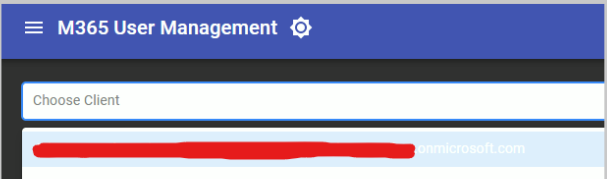
Using using the light theme, the dropdown text looks as it supposed to, but with the dark theme the text in the dropdown turns white so you can’t see the text in the dropdown (only one you can see is the currently highlighted one due to the background color changing slightly.)
5854f498f53746ac4b2f65e94f2f9d947a1fe5c9.png
Hello @AnonymousUser when I initially built this component Powershell Universal didn’t exist I believe, as I built this for UD…I have now got myself using Powershell Universal. This problem was mentioned before to me I believe but I was not using Powershell Universal at the time.
So now you jogged my memory I will have a butchers at fixing this theming issue. It will most likely require rebuilding this, so let me look into this and will update once I’ve had a proper butchers at this. Thanks
No, thank you @AnonymousUser. I too am migrating my dashboards to PSU from UD2.9. It would be nice if the New-UDAutoComplete and New-UDSelect were kinda merged together in PSU. I like using auto complete, but I need there to be a key value pair for each of the option, like select has.
FYI I was able to work around this for time being using the New-UDStyle cmdlet.
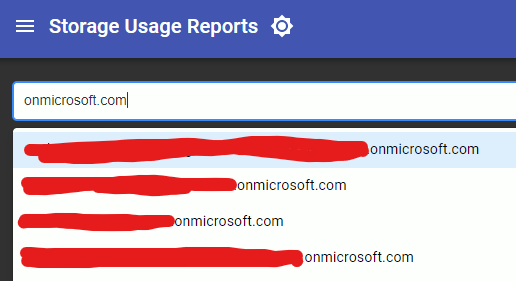
Since the background of the dropdown list is always white, black covers the light and dark them.
3d195817f76243c4dc0dfb9128632d842dec19ed.png
c125c67db985bbbe001637ad13ff40717abe6dc3.png
@AnonymousUser
Hi,
The component dosent work on 4.2.17
Can you please check and add code?
My time is more limited these days with 5 daughters. I believe Adam is phasing out the use of custom components. As mentioned in the initial thread this was built for powershell dashboard. If I get time I will look into updating. Thanks