
ruba
Create SQL login and User afterwards
Hi,
Is it possible to create a "SQL server login and user" after a user has been created without one?
Thanks
User delete logs
Hi,
We are currently reviewing our Remote Desktop Manager configuration.
When we add a user we use "integrated security Active directory" and "create SQL server login and user" Our DB runs on SQL 2012. We do not configure roles and deselect all options on the tab "privileges". We configure "Permissions" so the user can view the correct entry's but do not give him the rights to add, delete or edit an entry.
However, if that user opens SQL management studio it is possible for him to delete all the log entry's directly by using a SQL statement. We find this a bit of a security risk since a user can delete traces of him accessing a server. It is logical that a user can add an entry. But its not that he is also able to delete everything.
Just to be clear. The user does not have the right to "view shared logs".
Is it possible to prohibit the user from deleting the logs in the Database? Is this an option in the software?
Default user hide everything
Microsoft SQL server.
Default user hide everything
Hi,
We are controlling the access to RDM by using a script. The script checks if a user is member of a security group. If a user is member then RDM starts.
Now, if I add a user to the group. The user can see all entry's in RDM.
If I then set security rights the user is restricted to the entry's I have configured.
The problem is in the fact that a new user in the security group can see by default everything. Is there an option to restrict the default rights a user gets when he starts RDM? If I could configure that the user sees nothing as long as I do not have his rights configured, our problem would be solved.
Thanks,
Entry export with rdp port numbers
Hi,
I want to export all my RDP entry's to a csv (or other file extension) but I want to include the RDP port number configured for each entry. We want to audit the port numbers of our servers to see if a server still uses the default port.
I have tried to export the entry's but I am not able to export the port number data with it.
Is this possible?
Thanks,
RDM9 vmware thinapp
Great! It works just fine now :) Thanks for the help, keep up the good work.
RDM9 vmware thinapp
Hi all,
In our corporation we would like to distribute RDM9 as a virtualized package using vmware thinapp. We have successfully been using RDM8 as a vmware thinapp.
Our thinapp was built on a Windows 7 64bit machine.
On launch (only windows 7 or windows 8(.1), no problems on windows xp) we get following error message:
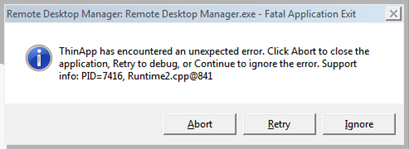
If I press Ignore the messagebox returns 2 more times but rdm9 launches without a problem. I’ve checked the rdm log but no errors are detected.
If I check sysinternals process explorer I can see that the error is caused by “Waitprogress.exe”. When I close rdm9, the waitprogress.exe process does not end. When I relaunch the thinapp everything is fine. When I close waitprogress.exe the error returns.
What is waitprogress.exe? Why does it not seem to run under windows xp? Any hint is welcome.
edited by ruba on 11/20/2013