RDM9 vmware thinapp

Hi all,
In our corporation we would like to distribute RDM9 as a virtualized package using vmware thinapp. We have successfully been using RDM8 as a vmware thinapp.
Our thinapp was built on a Windows 7 64bit machine.
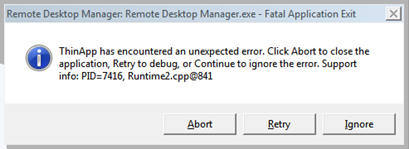
On launch (only windows 7 or windows 8(.1), no problems on windows xp) we get following error message:
If I press Ignore the messagebox returns 2 more times but rdm9 launches without a problem. I’ve checked the rdm log but no errors are detected.
If I check sysinternals process explorer I can see that the error is caused by “Waitprogress.exe”. When I close rdm9, the waitprogress.exe process does not end. When I relaunch the thinapp everything is fine. When I close waitprogress.exe the error returns.
What is waitprogress.exe? Why does it not seem to run under windows xp? Any hint is welcome.
edited by ruba on 11/20/2013
thinapperror.png
All Comments (2)
Hi,
The waitprogress is small application used to show a message when RDM is busy. You can disable it in the application options File->Options | User Interface -> Wait progress mode
Set it to None or Status bar
David Hervieux
Great! It works just fine now :) Thanks for the help, keep up the good work.