
ad8mustanggt
Crashing when hitting the gear icon
Got the attached crash when I clicked the gear icon to add my data-source... Happened right after opening the app but I haven't been able to reproduce the error.
Crash when quitting RDP and saying no
Check and check, thanks!!
Crash when quitting RDP and saying no
You guys rock!
Crash when quitting RDP and saying no
I haven't been able to make it crash since... I'll upload a new crash report with more details if I can make it happen again.
As far as the external monitor - would it be possible to set tabbed as the default? All of mine are currently set to external since that is what the default option is when creating a new entry.
Thanks!
Crash when quitting RDP and saying no
That issue seems to be fixed but I did get a crash almost immediately after connecting to a session after upgrading (attached).
Also - I'm getting "cannot find mstsc.exe" errors on some of my connections now. It appears to only be connections that are set-up with the default setting of "External" display. If I change it to Embedded (tabbed), they work fine.
Crash when quitting RDP and saying no
When I quit the RDM application but say no to the "are you sure you want to quit" dialog box the application crashes. Crash data attached.
Crash when connecting to RDP
Thanks for the update. So far so good...
Drag and Drop of sessions
It would be great if we could drag and drop sessions into folders to reorganize them instead of needing to edit them individually.
Crash when connecting to RDP
Looks good now, thanks!
I did have one random crash after upgrading to the latest version. It happened right after clicking the X next to a tabbed RDP session but i haven't been able to recreate it. I attached the new crash data.
Crash when connecting to RDP
Thanks, 0.9.1.0 took care of it.
The app takes about 15 seconds from click to showing the GUI on my late 2011 MBP w/8GB RAM and a SSD.
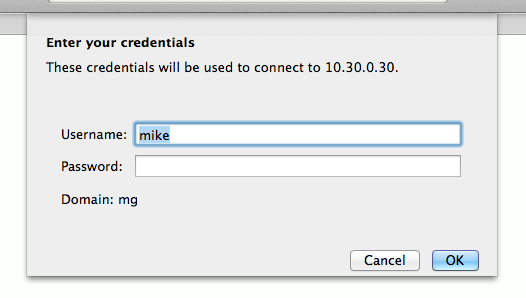
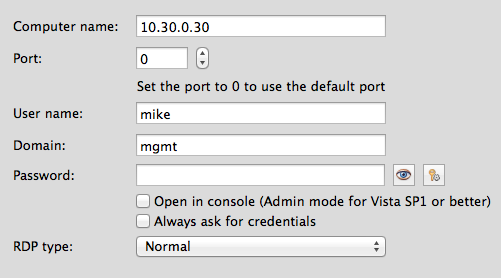
One other minor issue is the domain doesn't fully show when connecting to RDP. See below.
Crash when connecting to RDP
Here's what I did..
-Downloaded beta
-Unzipped
-Copied app to Applications folder
-Launched application
-Created new connection
-Entered IP address in 'Name' field which auto populates 'Computer name:' field
-Clicked Create
-Double clicked the IP under 'Sessions'
-App crashes
Crash txt attached, please let me know if there's anything else I can provide to help. I'm running OS X Mavericks.
I also notice that the app takes longer than any other app I have to launch. I have an SSD so most apps just bounce once in the dock then launch while RDM bounces multiple times before launching. Not sure if that's in any way related but thought you should know.