
RcGrnc
Tab Focus Following Logoff
Thank you Alexandre. I will try this.
-Rico
Tab Focus Following Logoff
RDM Enterprise 13.0.6.0 Windows
I had always been a Classic UI theme user until its depreciation and I am now growing accustomed to the Classic (Menu) theme. However there is one behavior that is driving me crazy.
If I have multiple open RDP sessions, and I log off one session and immediately begin working on another open RDP session, once the initial session disconnects, focus is removed from the active tab I am working on and goes to the left-most open tab. This is usually the Dashboard, but if I hide the Dashboard, focus goes to whatever is the left-most open tab regardless of session type. I've tried the 'Auto focus dashboard' setting which didn't help. Am I overlooking a setting to not lose focus on an active tab?
Thanks,
-Rico
Classic UI Theme depreciated in RDM 13.0?
That's a shame. I was afraid this would someday come, and I do appreciate you keeping the Classic UI for as long as you have. I am just not a fan of the DevExpress window decorations, especially the title bar which is several pixels taller than it needs to be and inexplicably grows another couple of pixels if you maximize the application. I just wish they offered something thinner for those of us who wish to conserve screen space.
Cheers, David. I appreciate your efforts.
-Rico
Classic UI Theme depreciated in RDM 13.0?
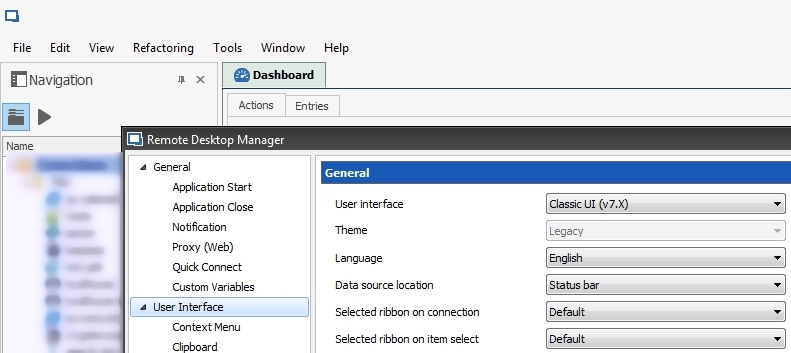
I've upgraded my machines to RDM Enterprise 13.0.1 from 12.8.0 and the Classic UI theme looks identical to the 'Default (Menu)' theme. Is this by design or a bug?
Bring Back VMRC
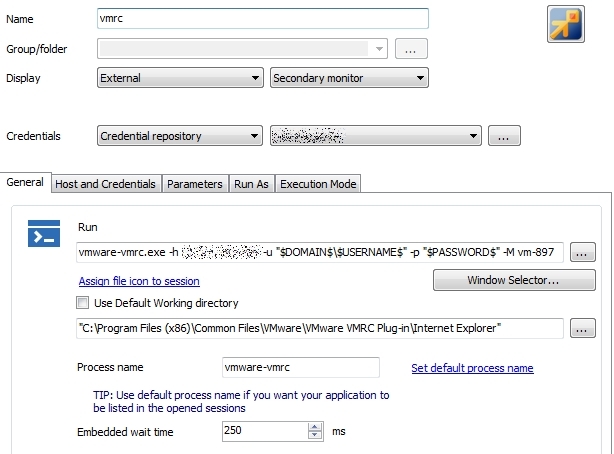
The old VMRC is easily accessed through a command-line session. I've just finished converting my ~1,000 entries so I am no longer in need of this support.
Thanks!
-Rico
Bring Back VMRC
Thank you Maurice.
-Rico
Bring Back VMRC
Why did you abandon the older VMRC connection type using the IE plugin completely in lieu of VMRC 8? I have thousands of connections configured to use the older type and VMRC 8 doesn't seem to work consistently if at all on older vSphere installations. Both types of VMRC can exist on a system in parallel. Why can't the user choose which VMRC to use? I am now stuck on RDM 11.1 indefinitely because of this.
Thanks.
Cisco AnyConnect Powershell Script Failure
Excellent. Thank you Hubert!
Cheers,
-Rico
Cisco AnyConnect Powershell Script Failure
Just in case anyone else should have this issue in the future, this is what I did to fix it. I know little about PowerShell, but I can Google.
In my embedded script, I added the following to the very start of the script:
If ($host.version -ne "2.0") {
$params = ($PSBoundParameters.GetEnumerator() | % {"-{0} {1}" -f $_.Key,$_.Value}) -join " "
Start-Process -File PowerShell.exe -Argument "-Version 2 -noprofile -noexit -file $($myinvocation.mycommand.definition) $params"
Break
}
This results in the script running without error, however the PowerShell console refused to exit once the connection was completed, so at the very end of the script I added:
stop-process -Id $PID
Now my embedded AnyConnect PowerShell scripts run exactly as they did before I upgraded PowerShell to v3.0.
Big thanks to David for suggesting PowerShell version as a possible culprit!
-Rico
Cisco AnyConnect Powershell Script Failure
Okay, pretty much confirmed as I can get my script to run via command line action by forcing powershell v2.0:
powershell.exe -version 2.0 "C:\Path\To\MyScript.ps1"
But that doesn't help with embedding the script in the datastore. I don't suppose you'll be implementing a "Force Powershell v2.0" feature in the embedded script action anytime soon, so I'll assume that I'm out of luck with this one. Off to workaroundland for me. :)
-Rico
Cisco AnyConnect Powershell Script Failure
Hi David,
Thanks for the response. Same error with command line action. Come to think of it, this might have very well started to occur after upgrading powershell on my PCs from v2.0 to v3.0. I will try to confirm this sometime next week and develop a workaround.
Cheers!
-Rico
Cisco AnyConnect Powershell Script Failure
Hi there. I hope you can help me.
First off, I cannot use the RDM Cisco AnyConnect plugin as the particular systems I connect to have additional custom prompts that need to be answered. Instead I have been launching the AnyConnect powershell script utilizing RDM's embedded script function for the past 2 years and it had worked great up until about a month ago. Now I get the following:
Cannot convert argument "hWnd", with value: "System.Object[]", for "SetForegroundWindow" to type "System.IntPtr": "Cannot convert the "System.Object[]" value of type "System.Object[]" to type "System.IntPtr"."
At C:\Users\myusername\AppData\Local\Temp\RDM\72c727ad-4540-4980-828d-7015efc73512.ps1:46 char:10
+ else{[void] [Win]::SetForegroundWindow($h)}
+ ~~~~~~~~~~~~~~~~~~~~~~~~~~~~~~~~~~~~~
+ CategoryInfo : NotSpecified: (:) [], MethodException
+ FullyQualifiedErrorId : MethodArgumentConversionInvalidCastArgument
The section of the script causing the issue (line 46 in bold):
{
Start-Process -FilePath $vpncliAbsolutePath -ArgumentList "connect $CiscoVPNHost"
$counter = 0; $h = 0;
while($counter++ -lt 1000 -and $h -eq 0)
{
sleep -m 10
$h = (Get-Process vpncli).MainWindowHandle
}
#if it takes more than 10 seconds then display message
if($h -eq 0){echo "Could not start VPNUI it takes too long."}
else{[void] [Win]::SetForegroundWindow($h)}
}
Running the script manually or running "C:\Users\myusername\AppData\Local\Temp\RDM\72c727ad-4540-4980-828d-7015efc73512.ps1" manually works without error, it is only when invoking via RDM's embedded script session where I see this error.
Any ideas to get this working again?
Thanks!
-Rico
"Open Sub Connection" from context menu
Thank you! :)
"Open Sub Connection" from context menu
Thanks David!
I am looking for something like:
Open Sub Connection [hover and display a list of sub connections to click]
No need for a full sub connection menu to choose multiple sub connections. Something similar to the edit and 'open with parameters' menus.
Make sense?
Thanks again,
Rico
"Open Sub Connection" from context menu
Hi all,
As the title suggests, I would love to see an "Open Sub Connection" option in the context menu of the connection, so sub connections can be opened from the context menu of an open or closed connection in tree view, or from the context menu of an open connection's tab.
That would make this guy happy. :)
Thanks!
-Rico
Embedded PuTTY vs. Classic UI
Sorry to bring this back up but I missed PuTTY so I did some testing. The issue is that when you have an embedded PuTTY session while using your Classic theme, if you switch to another tab, PuTTY views this as it's console window being resized to a much smaller size. PuTTY then crops the screen to fit this small size but it cannot undo this process when you switch back to your PuTTY session. The result is part of the PuTTY console being erased. As stated, this only occurs with the Classic theme, not the Default theme.
I was able to work around this issue by editing my PuTTY profiles, specifying a defined window size and changing the option "When window is resized" to something other than the default "Change the number of rows and columns" but this configuration only works for one specific screen resolution. If you can take a look at this some day (very low priority), this happy customer would be even happier.
Thanks again,
-Rico
Embedded PuTTY vs. Classic UI
Please don't waste any time on this. I have decided to migrate from putty to the rebex ssh shell which behaves nicely.
Thanks,
-Rico
Embedded PuTTY vs. Classic UI
That is correct.
Embedded PuTTY vs. Classic UI
Hello and happy New Year. This is an issue that makes me crazy, hopefully you can help me sort it out.
Using the Classic UI and embedded PuTTY SSH sessions, when I log into a server all is fine. If I switch to any other tab then back to my PuTTY session, there is a block of text missing. The size and position of this block is consistent, but position does change vertically dependent on how much data was displayed on the screen.
Remote Desktop Manager v.9.x.x.x - 32 and 64-bit.
Classic UI - issue does not present with the DevExpress skins.
PuTTY embedded - issue does not present when undocked or external, or if using rebex. Swithing to KiTTY made no change.
Tweaked every setting on PuTTY to no avail.
Multiple computers, all Windows 7 x64, Classic theme, all pretty stuff turned off.
Attached is a sample. Sure, there are a few ways to work around this issue but I'd rather not have to. I like my PuTTY and Classic UI. :) Any help here is greatly appreciated.
Thanks,
-Rico
edited by RcGrnc on 1/3/2014
edited by RcGrnc on 1/3/2014
Playlists
Fantastic! Thank you David!
Playlists
Well that's better! Very nice.
May I ask for a keyboard shortcut to the Playlist Manager here, or should I post that in feature requests? ;) For me, this feature is far too useful to be buried in the View menu, especially being I prefer to keep my top pane hidden for those extra vertical pixels.
Thanks David!
Playlists
My playlists do exist in AppData\Local.... but I still cannot figure out how to utilize them. I would prefer they reside in my data source if that is at all possible, but one thing at a time.
Playlists
Okay, now I'm feeling extra stupid! How do I invoke the Playlist Manager? I've never seen it and cannot find it in any menu.
Playlists
Just tried v9.0.1.0 - no change.
File menu from systray icon
Appreciated! :)