
Liquidmantis
Better Security Model
That's too bad. We're very happy with RDM but RDM Server is not something we need and therefore outside of what I can get budgeted.
Microsoft Hyper-V Support
@Liquidmantis
Could you try this version?
http://remotedesktopmanager.com/download/Devolutions.RemoteDesktopManager.Bin.7.0.2.0a.zip
Works like a champ!
Microsoft Hyper-V Support
It spams this:
[3/12/2012 12:41 PM]ERROR System.InvalidCastException: Unable to cast object of type 'System.String[]' to type 'System.String'.
at Devolutions.RemoteDesktopManager.Business.HyperVVirtualMachine.SetProperty(String name, Object value)
at Devolutions.RemoteDesktopManager.Business.HyperVVirtualMachine..ctor(ManagementObject managementObject)
at Devolutions.RemoteDesktopManager.Managers.HyperVManager.<GetTargetComputers>d__4.MoveNext()
at System.Collections.Generic.List`1..ctor(IEnumerable`1 collection)
at System.Linq.Enumerable.ToList[TSource](IEnumerable`1 source)
at Devolutions.RemoteDesktopManager.Managers.ThreadManager.<>c__DisplayClass5.<RefreshHyperVVirtualMachines>b__3()
at Devolutions.RemoteDesktopManager.Managers.ThreadManager.<>c__DisplayClass15.<Execute>b__14(Object param0)
Microsoft Hyper-V Support
In my environment Windows firewall is disabled. I can also use Hyper-V manager from my workstation.
Microsoft Hyper-V Support
I just poked around for a minute and see that I can recreate the same issue. My few remaining 2008 Hyper-V servers work but my 2008 R2 servers do not show anything, which I see is the same OS you're using too.
Microsoft Hyper-V Support
Edit the session and go to the Information tab. You need to set the checkbox to show it is a Hyper-V server.
Set Open URL as default behavior rather than View
Excellent! Found it now, thanks.
Set Open URL as default behavior rather than View
First, the embedded web browser is great! The behavior is non-intuitive though. I'd much rather have it open the URL by default rather than the session info. It's inconvenient for me but confusing for my users. I couldn't find a buried option to change the default so hopefully I'm not just overlooking a way to do this already.
Separate user rights for Edit Session types
I feel silly, I just tested this and you're right it does work. I swear this didn't use to be the case, before it greyed out both menu items for a user without the Edit Sessions permission. Maybe this changed with the Local Machine Specific addition?
Separate user rights for Edit Session types
(Ran out of characters in the subject.)
Right now I have to give users the Edit sessions permission to enable them to use the "Edit Session (User Specific Settings)" function. This has caused problems in the past by users accidentally editing the global settings instead of user specific. It would be great if we could give them rights to edit just the user specific settings but read only for the global.
Full screen mode (reposted for clarity)
I'm reposting this out of the "Auto-hide Sessions Pane" thread since it's a different request and I don't think I was very clear in describing it before. Hopefully now that 6.5 is out this can start being considered for the next major version. Here's my original post with screenshots of another program I have to use on my resolution-challenged laptop.
I would love if RDM would have a Full Screen Mode where it's practically the Shell, making the system (or a monitor in a multi-monitor setup) in essence a thin client with RDM maximized. The Windows taskbar would be hidden and the only wrapper elements would be the Tab Bar with the min/max/close buttons, it would be perfect if it had a similar menu bar drop down from a button as in my screenshot. The Session Pane would be its own tab as well. This allows access to RDM's controls without any session resizing which is slow on lower end systems or especially if running RDM over RDP on a remote computer.
On a high resolution monitor this might not seem very important (although I still use it the other program this way on a dedicated monitor and "pop out" some connections to other monitors as needed) but it's almost a necessity when connecting from a laptop.
Auto-Hide Session Panel
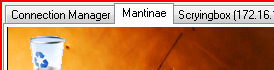
Thanks! So the new addition is the ability to hide the "top pane"? That's better, but I'd still like more. The program I use for myself will go on top of the taskbar and has no title bar. When maximized it's just a set of tabs, one tab is the equivalent of RDM's Sessions Pane and Dashboard, and on the right with the usual Minimize, Restore, Close buttons is a button that pulls down the usual menus, what RDM calls the Top Pane. Next to that is a SmartSize button that scales the connection to the window size if needed.
Tabs:
Buttons:
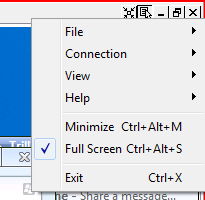
Thanks for adding one more piece of UI that we can turn off, but it would be great if RDM would get out of the way even more. Other than those tabs and the buttons on the same bar, when set to full-screen mode my current RDP front end adds no UI elements other than that 1 px wide red border to show you you're in an remote connection since you can't see the host machine's taskbar. I wish I could turn it off but the program doesn't seem to respect the toggle that is supposed to disable it.
edited by Liquidmantis on 7/11/2011
edited by Liquidmantis on 7/11/2011
Auto-Hide Session Panel
That's great news. Any chance of getting ahold of a beta build with it added? This will allow me to switch from my no longer supported product to RDM for my own use. Currently the UI hit is too much for my laptop screen.
Multiple Data Source view
Thanks!
Multiple Data Source view
We're running the Enterprise version with an MS-SQL database for the group. I'm adding some personal machines that don't belong in that database so I created a local data source, but it's annoying to switch data sources. It'd be great if there were an option to have the Sessions Pane tree display the data source as a root level folder.
Example:
Shared
|-->Computer Group
|-----> Machine 1
|-----> Machine 2
Private
|-->My computers
|-----> Machine 1
|-->Test systems
|-----> Machine 2
Better Security Model
Thanks. My current workaround has been to only allow a very few people to have more than just basic view rights. I realized another way to work within the current system would be to have multiple duplicate sessions with different security group membership but that seems a kludge and adds a lot of excess sessions for admins and members of multiple groups.
I'd also really like a way to allow a user to have access to Edit Session (User-Specific) but not the global Edit Session.
Anyway, I started rolling RDM out to my users on Friday and it looks like they're loving the app. We all spend all day in multiple RDP sessions and I've been looking for a centrally managed solution for a long time. vRD was way out of budget but the pricing on RDM is phenomenal. Thanks for the great product and support.
Better Security Model
First let me explain what we'd like to achieve. We'd like to give some people the ability to manage sessions in certain organizational groups and read-only (with Edit Session (User-Specific) still working) access in other groups. Ideally security groups would have permissions and not be just containers, and session organizational groups would have the ability to be assigned to security groups.
For example lets say I have the following tree:
Sessions
->Primary
--->AppServer1
--->AppServer2
->Testing
--->TestServer1
--->TestServer2
->Software
--->DevServer1
Given this scenario, what I'd like to implement is for my Testing Admins to be able to manage sessions in Testing and read sessions in Primary. Software Admins would be able to manage sessions in Software and Testing but only read sessions in Primary. Again both user groups would have access to Edit Session (User-Specific) so that they could adjust display settings. There would also be a lower access group of Testing Users that can only read in Testing as well as Primary.
If I understand the current model correctly, for my Testing guys to be able to manage Testing sessions and still use Primary sessions their RDM user-rights will allow them to manage any RDM security groups of which they are members. Likewise the Software users.
This is an oversimplified example. In reality we're setting up about a dozen organizational groups and have need of 6 or so user-level groups with three or four admin-level groups with control of specific organizational groups.
Hopefully this makes sense. The entry window is small so it's hard to visualize what I've typed and I'm juggling a lot today.
[Edit] As I move forward in setting this up for us I'm realizing how much of a pain it's going to be to make changes. If I create a new security group I'm going to need to slowly edit all the users that need to belong to it. It would be much easier to edit the group and add members. I guess what I'm really looking for is something replicating Windows user management. The ability to use Windows security groups in RDM would reduce a lot of duplicate management too.
edited by Liquidmantis on 10/22/2010
Auto-Hide Session Panel
Great, thanks for the quick response! I've upgraded now and this is much better. What would make it even better is if this behavior could be set as default, perhaps in the UI Options. And while it's nit-picking, resizing the window to bring out the Session Pane is slower than desired. Personally, I think the perfect implementation of this is in Visual Studio, like the Toolbox window. It's an overlay when you bring it out but when you pin it open the overlaid window resizes to accommodate it.
Auto-Hide Session Panel
I was actually coming here to make a similar request. Until discovering RDM I was using a different program which has the equivalent "Session Pane" as a tab itself rather than a fixed UI element, just like the Dashboard is in RDM. All embedded connections start a new tab at the Window resolution. If I'm using this .4 RDM build correctly the only way for the collapsing Session Pane to increase the connection size is to use the scaling function rather than sizing natively to the full window minus session pane. My preference would be for a setting that has the connection expecting the Session Pane to be collapsed and sizes the connection accordingly.
Another feature of the other program is that when maximized it does away with the standard titlebar and has the option to hide the menu bar. The interface can be pared down to the point that the only thing you see is the tab bar and the tab for the "Session Pane" (called the Connection Manager in this app) gives you quick access to all your connections.