
lorenmatt35
problem setting up a VPN connection using forticlient
I would like to include my VPN access as a connection in RDM.
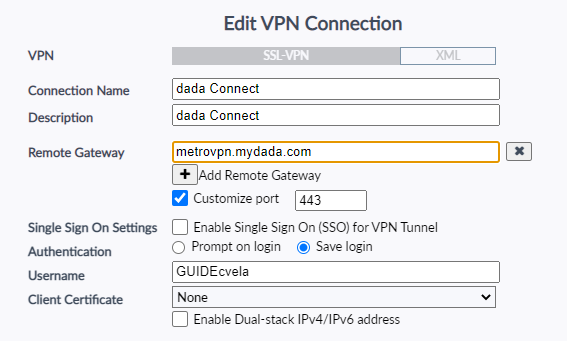
we currently use the following connection setup:
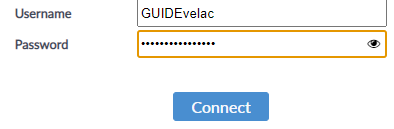
When we run it from our desktops, we do this:
We then receive a token in an email, and the screen above gets a box where to enter the token sent.
This works very well for us.
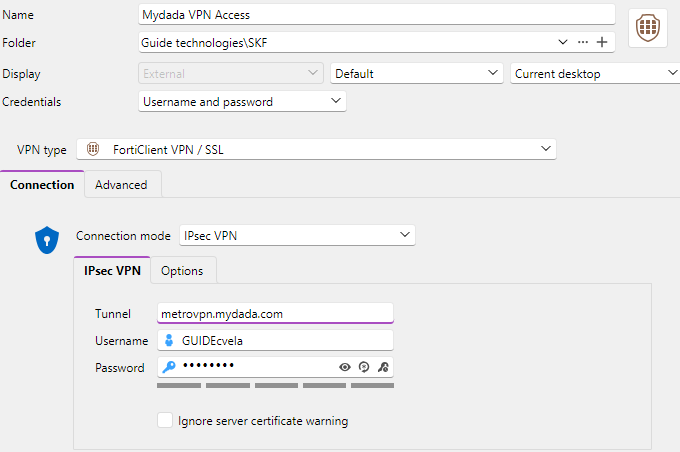
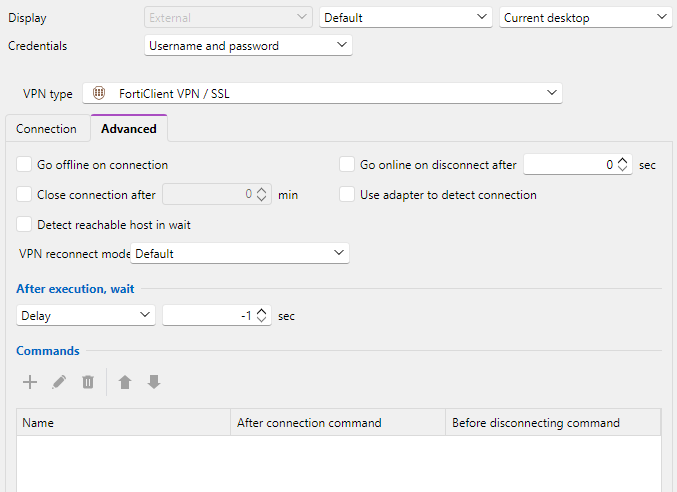
I have tried to set up a similar confguration in RDM which looks like this:
Geometry Dash Full when i save and submit the request, it spins for 15 seconds and then drops - what am i missing?

@cvelaThe explanation is clear and helpful, especially the suggestion to try the SSL VPN connection mode. Great support and useful information for anyone troubleshooting FortiClient integration with Remote Desktop Manager!
problem setting up a VPN connection using forticlient
I would like to include my VPN access as a connection in RDM.
we currently use the following connection setup:
When we run it from our desktops, we do this:
We then receive a token in an email, and the screen above gets a box where to enter the token sent.
This works very well for us.
I have tried to set up a similar confguration in RDM which looks like this:
when i save and submit the request, it spins for 15 seconds and then drops - what am i missing?
@cvelaI suggest trying the SSL VPN (deprecated) connection mode in RDM, as recommended by the support team. Also, make sure the email-based OTP authentication is properly supported. If this works, consider finding an alternative before the deprecated mode is removed in a future release.