latkinw
Entry properties, Description tab: description box no longer fills the window height (regression of 39870)
Hi,
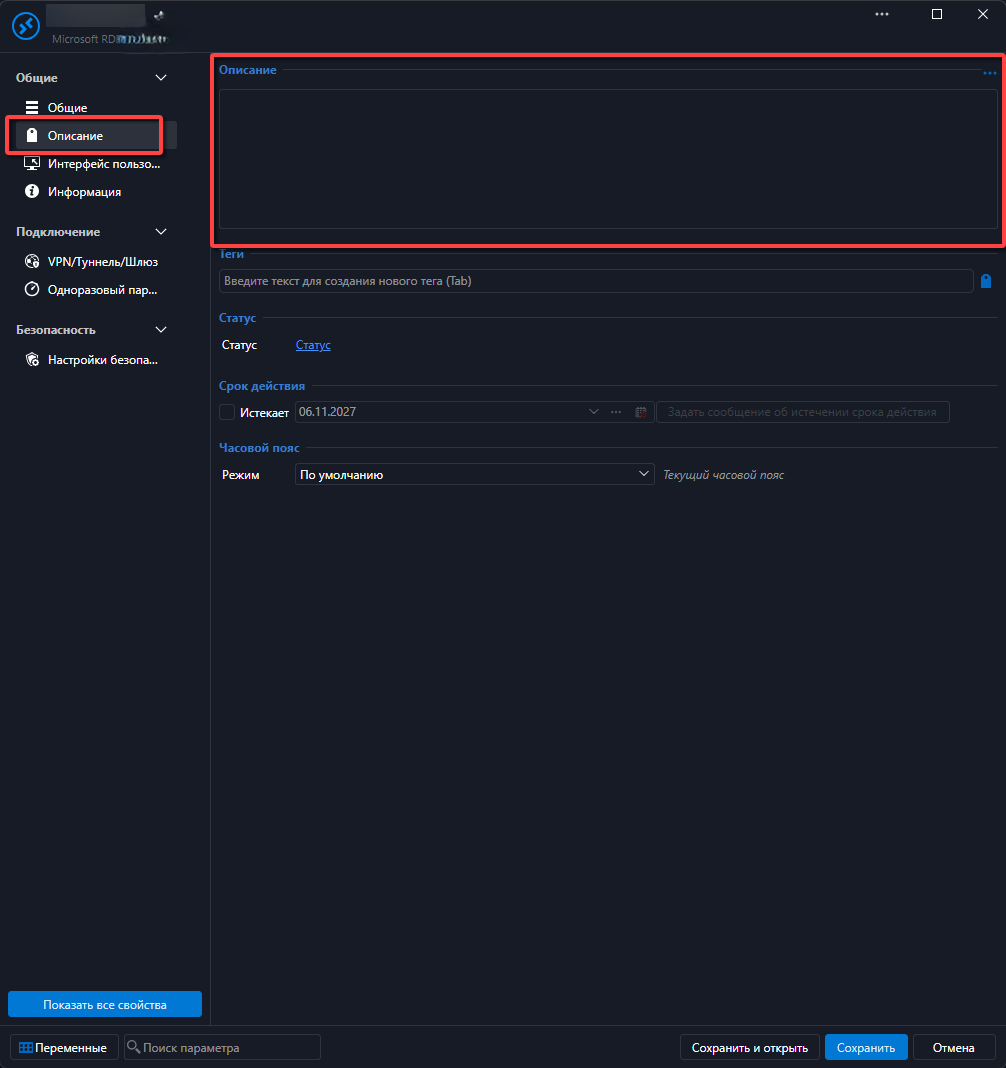
The free-text description box on the Description tab of an entry's properties is back to a fixed height of about four lines, whatever the size of the properties window. It cannot be resized at all — there is no drag handle — and the rest of the tab stays empty, so longer notes are read and edited through a small scroll area.
This is a regression of topic 39870 ("Extend the HEIGHT of the Description text box in the Description Section of any object"). That request was completed for 2023.3.3, where the box became resizable by dragging, and in later builds it also grew with the properties window. In 2026.3.17.0 both are gone: fixed height, no handle.
Environment
Remote Desktop Manager 2026.3.17.0 (64-bit)
Windows 11, build 26300
Data source: local workspace
Steps to reproduce
Open Properties of any entry.
Open the Description tab (the one with Time zone, Expiration, Status, Tags and the description box).
Try to resize the box or maximize the properties window.
Actual: the description box stays about four lines high, cannot be resized, and the tab keeps a large empty area below it.
Expected: as in 2023.3.3 and later builds — the box can be resized and fills the remaining height of the tab.
Proposal (either variant would work)
Restore the drag handle and the auto-expanding height of the description box.
Or move the description box below the Time zone / Expiration / Status / Tags fields so it can use the full remaining height of the window.
Possible cause, in case it helps locate the regression: the properties windows were remade in the new Avalonia UI (release notes 2025.3.15.0 "Remade multiple views in Avalonia", 2026.2.5.0 non-modal connection properties), and 2026.3.8.0 mentions "Fixed fields stretching across the full width in the RDP entry properties".
Screenshot attached.
Thanks!